FontVibe
InicioCrearEstilosGaleríaFuentesPlanesBlog
Español▾
FontVibe
✦FontVibe
FontVibe

Generador de fuentes IA gratis: describe lo que necesitas o elige un estilo y obtén la pieza de texto terminada. 134+ estilos, descarga PNG/JPG al instante.

Producto

CrearEstilosGaleríaPlanes

Escenas populares

Diseños de HalloweenDiseños de CanalFuente de Halloween

Recursos

BlogBiblioteca de fuentes de IACreador de Fondos TransparentesGenerador de Arte ASCIIHerramientas de fuentes

Legal

Términos del servicioPolítica de privacidadAviso legalContacto
© 2026 FontVibe. Todos los derechos reservados.
Política de privacidad|Términos y condiciones|Aviso legal|特定商取引法に基づく表記
FontVibe

Generador de fuentes IA gratis: describe lo que necesitas o elige un estilo y obtén la pieza de texto terminada. 134+ estilos, descarga PNG/JPG al instante.

Producto
CrearEstilosGaleríaPlanes
Escenas populares
Diseños de HalloweenDiseños de CanalFuente de Halloween
Recursos
BlogBiblioteca de fuentes de IACreador de Fondos TransparentesGenerador de Arte ASCIIHerramientas de fuentes
Legal
TérminosPrivacidadLegalContacto
© 2026 FontVibe. Todos los derechos reservados.
Privacy|Terms|Legal|特商法
Inicio››Clean Paper Guide (DIY)›How to Draw a Candy Cane 1 2 3 4
How to Draw a Candy Cane
1
2
3
4 - Clean Paper Guide (DIY) text effect - create a clean, beginner-friendly, landscape 16:9 step-by-st
Dibujo

How to Draw a Candy Cane 1 2 3 4 - Clean Paper Guide Text Effect

Creado el hace 23 horas
F
@FontVibe
9660 diseños públicos
›
Estilo
Clean Paper Guide (DIY)
Fuente de IA
Rounded Hand Letter
Composición
Four-Step Strip
Tamaño de imagen
1824 × 1024
✦ Rehaz este diseño con tu texto

Usa OpenAI GPT-Image-2.5 Sunburst, el modelo de esta obra · 15 créditos

32/500
Efecto transparente
✦ Efecto transparente
Genera un PNG sin fondo — solo quedan el texto y sus efectos visuales. La IA elige automáticamente el color de fondo óptimo para una limpieza precisa según tu estilo.
La salida siempre es PNG para una transparencia sin pérdida.
Sobre esta obra

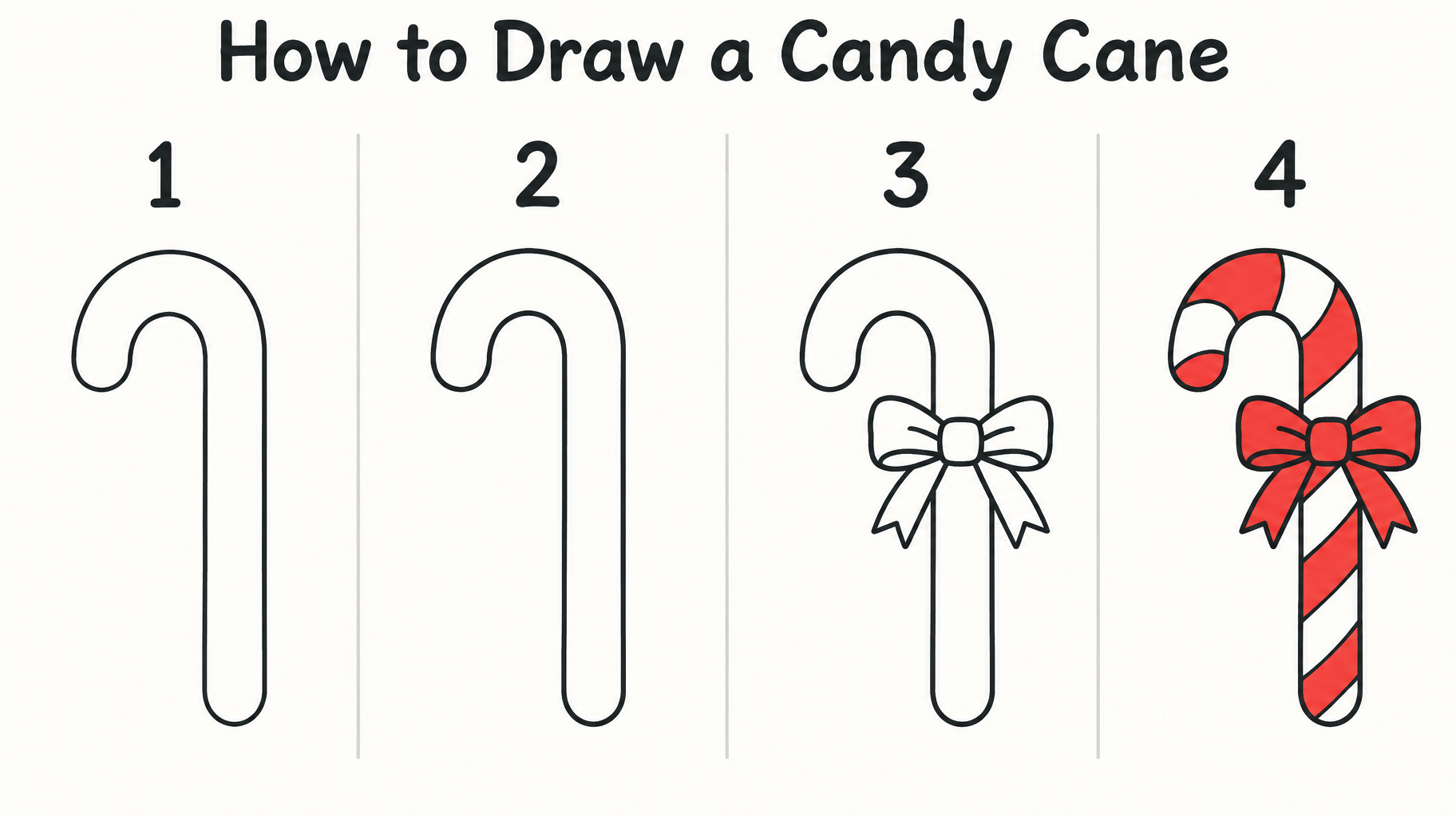
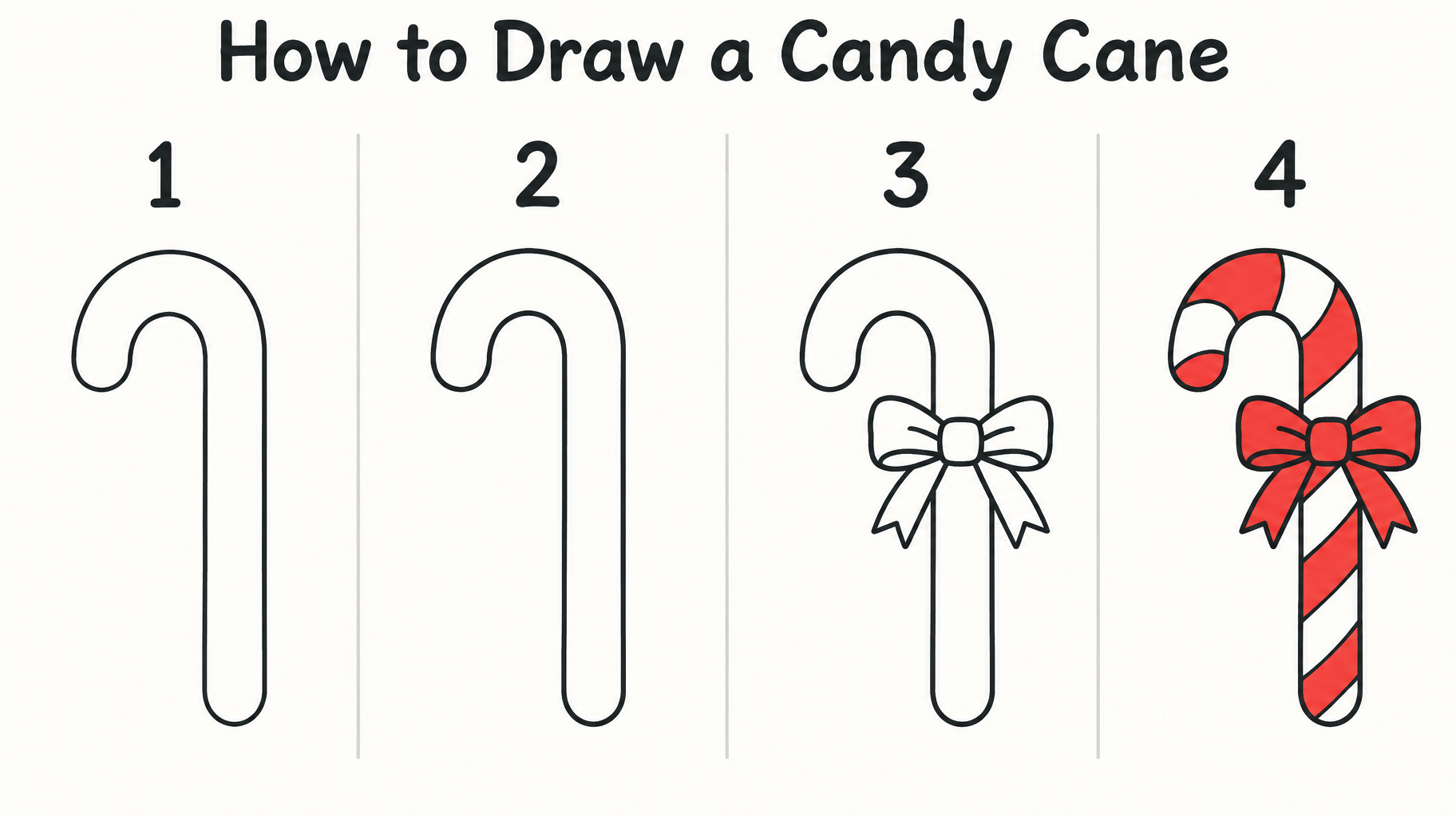
"How to Draw a Candy Cane" es una guía de dibujo en cuatro pasos con un estilo limpio de líneas de dibujo animado. Los paneles numerados del 1 al 4 aparecen bajo un título oscuro en sans redondeada y muestran el contorno del bastón, un lazo añadido y luego rayas rojas que rellenan el bastón y el lazo. Puedes recrearla con tu propio título, números de paso y motivo, cambiando el titular y los pasos del dibujo.

Prompt creativo

Create a clean, beginner-friendly, landscape 16:9 step-by-step drawing guide on a plain warm-white paper background. Across the upper margin, render the exact title “How to Draw a Candy Cane” in large, dark-ink, friendly rounded hand-lettering, easy to read at phone size. Below it, show exactly four evenly spaced drawing stages in a clear left-to-right sequence, each marked only with its large numeral: “1”, “2”, “3”, “4”. No other words, captions, labels, logos, or watermark. Keep all text and drawings within generous safe margins. Use thin, crisp, slightly hand-drawn dark charcoal outlines with simple geometry and no heavy shading. Keep the same upright candy cane angle, size, and placement in every stage so the changes are easy to follow. Stage 1: a single smooth line forming the cane’s hooked top and long straight stem. Stage 2: add the parallel contour to turn that guide into a simple hollow candy-cane silhouette with rounded ends. Stage 3: add a small, easy-to-copy tied bow at the neck just below the hook, with two loops and two short tails. Stage 4: show the complete same cane and bow, with bold red diagonal bands alternating with clean white bands along the cane; color the bow red, leaving the outline clear. The final stage is the only fully colored one; keep earlier stages as simple dark outlines. Make each stage visibly build on the last with only a few added lines at a time. Separate the four drawing areas with subtle, fine vertical rules and otherwise leave the background uncluttered. Flat, clear instructional illustration, no perspective, no texture behind the drawings, no extra Christmas motifs.

Etiquetas

Uso
FormatoDibujo
Estética
EstiloCartoon›AmbienteAlegre›EfectoPlano›LetraSans serif›Forma de letraRedondeado›ComposiciónUna línea›ElementosBastón de caramelo›Lazo›Rayas›ParaNiños›IdiomaInglés›

Generada el 19 de octubre de 2026 · 1824 × 1024 · PNG · OpenAI GPT-Image-2.5 Sunburst · Diseño: Four-Step Strip · Compartida por el creador · Uso comercial gratuito (CC BY 4.0)

✦ Explora estilos de efectos de texto IA

Explora estilos de efectos de texto IA

Ver todos los estilos →
Vikingo
Vikingo923
Cine y Películas
Cine y Películas8.7K
Cyberpunk
Cyberpunk776
Netflix y Streaming
Netflix y Streaming1.8K
Resplandor Neón
Resplandor Neón1.6K
3D Negrita
3D Negrita1.4K
Inicio››Clean Paper Guide (DIY)›How to Draw a Candy Cane 1 2 3 4
How to Draw a Candy Cane
1
2
3
4 - Clean Paper Guide (DIY) text effect - create a clean, beginner-friendly, landscape 16:9 step-by-st
Descargar PNG
Dibujo

How to Draw a Candy Cane 1 2 3 4 - Clean Paper Guide Text Effect

Creado el hace 23 horas
F
@FontVibe
9660 diseños públicos · Ver todos sus diseños →
Estilo
Clean Paper Guide (DIY)
Fuente de IA
Rounded Hand Letter
Composición
Four-Step Strip
Tamaño de imagen
1824 × 1024
✦ Rehaz este diseño con tu texto

Usa OpenAI GPT-Image-2.5 Sunburst, el modelo de esta obra · 15 créditos

32/500
Efecto transparente
✦ Efecto transparente
Genera un PNG sin fondo — solo quedan el texto y sus efectos visuales. La IA elige automáticamente el color de fondo óptimo para una limpieza precisa según tu estilo.
La salida siempre es PNG para una transparencia sin pérdida.
Sobre esta obra

"How to Draw a Candy Cane" es una guía de dibujo en cuatro pasos con un estilo limpio de líneas de dibujo animado. Los paneles numerados del 1 al 4 aparecen bajo un título oscuro en sans redondeada y muestran el contorno del bastón, un lazo añadido y luego rayas rojas que rellenan el bastón y el lazo. Puedes recrearla con tu propio título, números de paso y motivo, cambiando el titular y los pasos del dibujo.

Prompt creativo

Create a clean, beginner-friendly, landscape 16:9 step-by-step drawing guide on a plain warm-white paper background. Across the upper margin, render the exact title “How to Draw a Candy Cane” in large, dark-ink, friendly rounded hand-lettering, easy to read at phone size. Below it, show exactly four evenly spaced drawing stages in a clear left-to-right sequence, each marked only with its large numeral: “1”, “2”, “3”, “4”. No other words, captions, labels, logos, or watermark. Keep all text and drawings within generous safe margins. Use thin, crisp, slightly hand-drawn dark charcoal outlines with simple geometry and no heavy shading. Keep the same upright candy cane angle, size, and placement in every stage so the changes are easy to follow. Stage 1: a single smooth line forming the cane’s hooked top and long straight stem. Stage 2: add the parallel contour to turn that guide into a simple hollow candy-cane silhouette with rounded ends. Stage 3: add a small, easy-to-copy tied bow at the neck just below the hook, with two loops and two short tails. Stage 4: show the complete same cane and bow, with bold red diagonal bands alternating with clean white bands along the cane; color the bow red, leaving the outline clear. The final stage is the only fully colored one; keep earlier stages as simple dark outlines. Make each stage visibly build on the last with only a few added lines at a time. Separate the four drawing areas with subtle, fine vertical rules and otherwise leave the background uncluttered. Flat, clear instructional illustration, no perspective, no texture behind the drawings, no extra Christmas motifs.

Etiquetas

Uso
FormatoDibujo
Estética
EstiloCartoon›AmbienteAlegre›EfectoPlano›LetraSans serif›Forma de letraRedondeado›ComposiciónUna línea›ElementosBastón de caramelo›Lazo›Rayas›ParaNiños›IdiomaInglés›

Generada el 19 de octubre de 2026 · 1824 × 1024 · PNG · OpenAI GPT-Image-2.5 Sunburst · Diseño: Four-Step Strip · Compartida por el creador · Uso comercial gratuito (CC BY 4.0)

✦ Explora estilos de efectos de texto IA

Explora estilos de efectos de texto IA

Ver todos los estilos →
Vikingo
Explorar estilo →
Vikingo923 imágenes
MetallicCarvedAggressiveRugged
Cine y Películas
Explorar estilo →
Cine y Películas8.7K imágenes
EpicDramaticCinematicGold
Cyberpunk
Explorar estilo →
Cyberpunk776 imágenes
NeonCyberpunkDarkGlitch
Netflix y Streaming
Explorar estilo →
Netflix y Streaming1.8K imágenes
ModernDarkCinematicGlow
Resplandor Neón
Explorar estilo →
Resplandor Neón1.6K imágenes
GlowDreamyNeonTubular
3D Negrita
Explorar estilo →
3D Negrita1.4K imágenes
3DStrikingHeavyChunky

¿Quieres más estilos de texto? Explora nuestros generadores de fuentes gratis — elegante, cursiva, gótica y más.

Búsquedas populares:
AI text effect generatortext effect generatorAI typography generatortext art makerfancy font generator
Notificaciones
Aún no hay notificaciones