Agent Fast Lane

Full guide for AI agents, with shortcut URLs and parameters for each task on this site (make a text graphic in a chosen style or AI font, describe a design and get concepts, a free text tool (fancy fonts, translators, ASCII art, signature), search and filter community creations, browse all text effect styles). Content of 2026-11-27; WebForAgents' latest check results are in the guide: https://webforagents.org/site/fontvibe.ai/agent-fast-lane.md

This page's shortcut: /blog/{slug} A blog article.

FontVibe is an AI design tool that designs and generates images, especially images built around a text effect (logos, posters, cards, thumbnails, social graphics), and can edit an image the user brings. Describe what you need and pick a proposed concept, or choose a style or AI font and type your words. Results are PNG or JPG images, not font files. Creating images and using the text tools needs a real browser (results are rendered in the page); no public REST API; an MCP server is described on the developers page.

  • Free text tools run in the page and need no account.
  • Generating or editing an image spends credits; guests get a small daily allowance. Signing in and paying are left to the user.
  • agent=1 in a URL hides credit pop-ups, the language banner and ads for the tab session; the generate page then reports "Done: image ready" or "Failed: image not generated" in its title and data-state on <html>.

Most used:

  • Make a text graphic in a chosen style or AI font: /generate?style={style}&fontId={fontId}&text={text}&ratio={ratio}&resolution={resolution}&format={format}
  • Describe a design and get concepts: /generate?mode=vibe_design&text={text}
  • A free text tool (fancy fonts, translators, ASCII art, signature): /tools/{slug}?text={text}
  • Search and filter community creations: /gallery?q={q}&style={style}&sort={sort}&tag={tag}
  • Browse all text effect styles: /styles

Notes by the FontVibe team.

FontVibe
首页创作AI 字体作品集工具套餐博客
登录
FontVibe
登录
FontVibe
FontVibe

免费 AI 字体生成器 —— 说清需求或直接选风格,拿到做完的文字作品。142+ 种风格,PNG/JPG 即刻下载。

产品

创作风格作品集套餐

热门场景

万圣节设计频道设计万圣节艺术字

资源

博客AI 字体库透明背景生成器字符画生成器字体工具

法律

服务条款隐私政策法律声明联系我们
© 2026 Funovate Technology LLC. 保留所有权利。
For AI agents
FontVibe

免费 AI 字体生成器 —— 说清需求或直接选风格,拿到做完的文字作品。142+ 种风格,PNG/JPG 即刻下载。

产品
AI 生成风格作品集套餐
热门场景
万圣节设计频道设计万圣节艺术字
资源
博客AI 字体库透明背景生成器字符画生成器字体工具
法律
使用条款隐私政策法律声明联系我们
© 2026 Funovate Technology LLC. 保留所有权利。
For AI agents
FontVibe
通知
暂无通知
首页›博客›复制粘贴文字›Kaomoji: The Complete Copy & Paste Guide (Cute, Cat, Bio & More)
复制粘贴文字›颜文字›个人简介›
复制粘贴文字›颜文字›个人简介›

Kaomoji: The Complete Copy & Paste Guide (Cute, Cat, Bio & More)

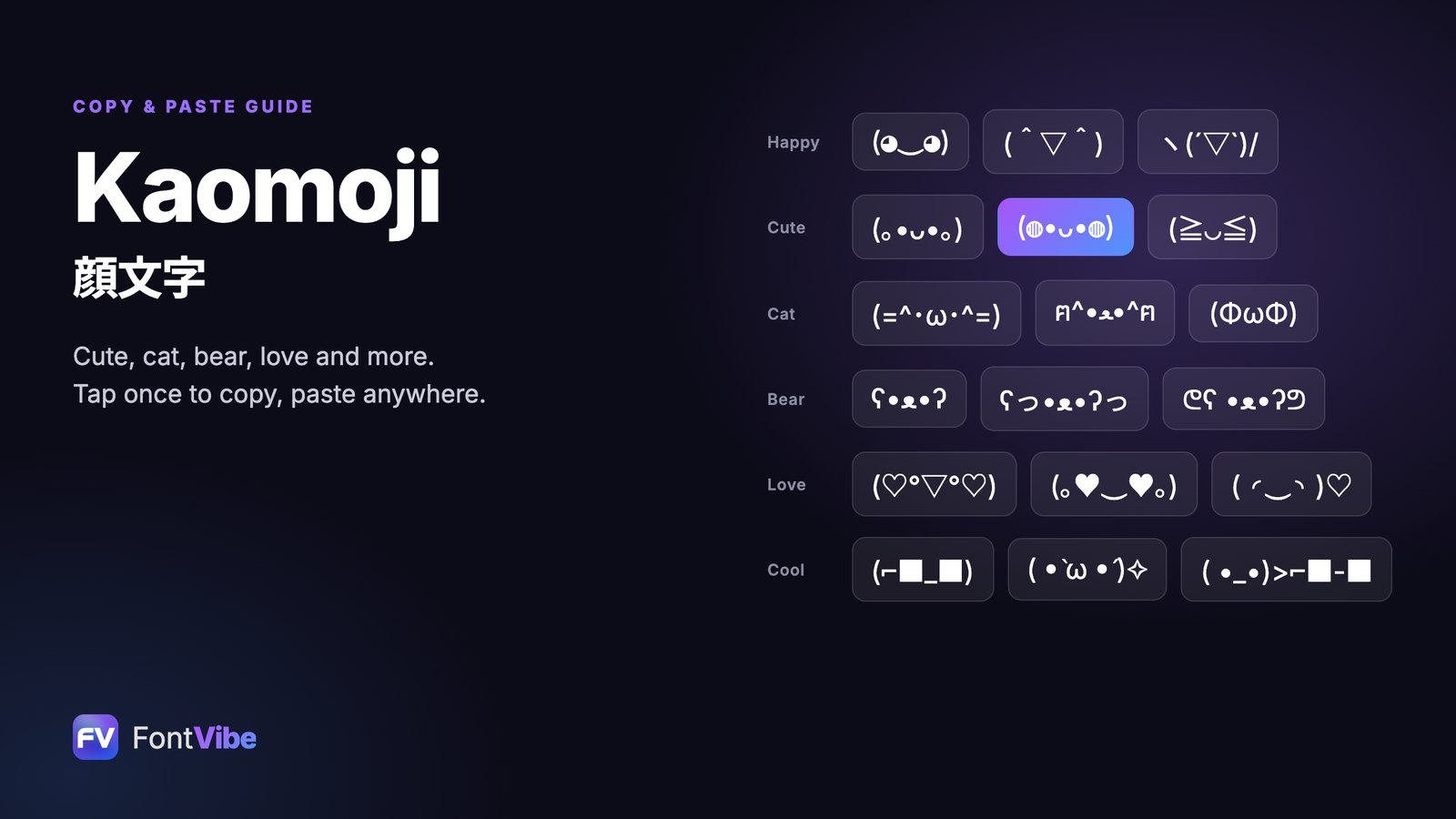
A categorized kaomoji list you can copy and paste right now — happy, cute, cat, bear, love, cool and table-flip Japanese emoticons — plus how to paste them on iPhone and Android, the cutest kaomoji for your bio, and how kaomoji differ from emoji.
F
FontVibe Team
2026年8月24日·3 分钟阅读
Kaomoji: The Complete Copy & Paste Guide (Cute, Cat, Bio & More)

Kaomoji (´• ω •`) are Japanese emoticons built entirely from text characters — no images, no fonts to install. Unlike Western smileys like :-) that you read sideways, kaomoji are read upright, so a whole little face fits into a single line of any bio, caption or chat.

This is the complete copy-and-paste guide: a categorized list you can grab from right now, how to paste them on iPhone and Android, the cutest ones for your bio, and how kaomoji differ from emoji and emoticons. For the full library — hundreds of faces sorted by mood, one tap to copy — use the Kaomoji copy & paste tool.


Kaomoji to Copy and Paste (by Category)

Tap any face below to copy it. Here is a quick set from each mood — these are just samples; open the Kaomoji generator for the full list in every category.

Happy kaomoji

Cute kaomoji

Cat kaomoji

Bear kaomoji

Love kaomoji

Cool kaomoji

Sparkle kaomoji

Table flip kaomoji

Shrug kaomoji

→ Browse all kaomoji, sorted by mood — free, no sign-up


What Is Kaomoji?

Kaomoji (顔文字, literally “face characters”) started on Japanese message boards in the 1980s and 90s. Because Japanese text input already offered a huge range of symbols, users could build far more expressive faces than the West’s :) — complete with blushing cheeks (⁄ ⁄•⁄ω⁄•⁄ ⁄), sparkling eyes (★‿★), or an entire cat (=^・ω・^=).

The key difference: kaomoji are horizontal. You do not tilt your head to read them. That’s also why they work so well in profiles and usernames, where a sideways smiley would look out of place. If you specifically want decorated names, the nickname fonts tool pairs nicely with a kaomoji.


How to Copy and Paste Kaomoji on Your Phone

It works the same on iPhone and Android, and needs no app:

  1. Open the kaomoji list and pick a face.
  2. Tap it once — it is copied to your clipboard instantly.
  3. Long-press the text field where you want it (Instagram bio, TikTok caption, a chat), and choose Paste.

Because kaomoji are plain Unicode text, they survive copy-paste anywhere that accepts text — Instagram, TikTok, Discord, X, YouTube, WhatsApp, even your display name. No screenshots, no image uploads.


Cute Kaomoji for Your Bio

A short kaomoji at the end of a bio line adds personality without taking much space. Aesthetic combos work best for Instagram and TikTok profiles:

Keep it to one per line so it reads as a flourish, not clutter. Grab these and more from the Cute and Sparkle categories, and if you want a matching heart or star glyph, the heart symbols page has those.


Kaomoji vs Emoji vs Emoticons

  • Emoticons — the original Western smileys typed sideways, like :), ;-) or :D.
  • Emoji — the colorful picture characters (😀🐱✨) that render as small images. They are a fixed set defined by the Unicode standard.
  • Kaomoji — Japanese text faces read upright, assembled from many characters, like (^▽^) or ʕ•ᴥ•ʔ. They are open-ended: people keep inventing new ones, which is why a good kaomoji list keeps growing.

All three are just text, so they mix freely. A kaomoji plus one emoji is a common bio combo — for example (。•ᴗ•。) ✿.


Ready to grab yours? The Kaomoji copy & paste tool has the full library — happy, cute, cat, bear, love, cool, sparkle, table flip and more — with one-tap copy, free and with no sign-up.

✦

准备好亲自试试了吗?

将这些技巧付诸实践 — 无需注册即可开始。

去试试这个工具 →
这篇文章有帮助吗?
1,177 次阅读

在 Google 中将 FontVibe 设为首选来源

准备好亲自试试了吗?

将这些技巧付诸实践 — 无需注册即可开始。

开始创作

相关文章

度数符号 ° 怎么打,别打成 º
复制粘贴文字

度数符号 ° 怎么打,别打成 º

2026年11月24日 · 19 分钟阅读 · 11 次阅读
爱心符号 ♥ 怎么打:各种键盘都适用
复制粘贴文字

爱心符号 ♥ 怎么打:各种键盘都适用

2026年10月31日 · 6 分钟阅读 · 111 次阅读
爱心表情含义:每种颜色的爱心代表什么
复制粘贴文字

爱心表情含义:每种颜色的爱心代表什么

2026年10月31日 · 8 分钟阅读 · 63 次阅读

评论

加载中...
← 返回博客
目录
  1. Kaomoji to Copy and Paste (by Category)
  2. Happy kaomoji
  3. Cute kaomoji
  4. Cat kaomoji
  5. Bear kaomoji
  6. Love kaomoji
  7. Cool kaomoji
  8. Sparkle kaomoji
  9. Table flip kaomoji
  10. Shrug kaomoji
  11. What Is Kaomoji?
  12. How to Copy and Paste Kaomoji on Your Phone
  13. Cute Kaomoji for Your Bio
  14. Kaomoji vs Emoji vs Emoticons
准备好亲自试试了吗?

将这些技巧付诸实践 — 无需注册即可开始。

开始创作
相关文章
度数符号 ° 怎么打,别打成 º
度数符号 ° 怎么打,别打成 º
2026年11月24日
爱心符号 ♥ 怎么打:各种键盘都适用
爱心符号 ♥ 怎么打:各种键盘都适用
2026年10月31日
爱心表情含义:每种颜色的爱心代表什么
爱心表情含义:每种颜色的爱心代表什么
2026年10月31日