FontVibe
首页创作风格作品集字体套餐博客
中文▾
FontVibe
✦FontVibe
FontVibe

免费 AI 字体生成器 —— 说清需求或直接选风格,拿到做完的文字作品。126+ 种风格,PNG/JPG 即刻下载。

产品

创作风格作品集套餐

热门场景

万圣节设计频道设计万圣节艺术字

资源

博客AI 字体库透明背景生成器字符画生成器字体工具

法律

服务条款隐私政策法律声明联系我们
© 2026 FontVibe. 保留所有权利。
隐私政策|服务条款|法律声明|特定商取引法に基づく表記
FontVibe

免费 AI 字体生成器 —— 说清需求或直接选风格,拿到做完的文字作品。126+ 种风格,PNG/JPG 即刻下载。

产品
AI 生成风格作品集套餐
热门场景
万圣节设计频道设计万圣节艺术字
资源
博客AI 字体库透明背景生成器字符画生成器字体工具
法律
使用条款隐私政策法律联系我们
© 2026 FontVibe. 保留所有权利。
Privacy|Terms|Legal|特商法
✦FontVibe
通知
暂无通知
首页››Cyan Stream Interface (DIY)›CodeWithKai Starting Soon
CodeWithKai
Starting Soon - Cyan Stream Interface (DIY) text effect - create a finished full-screen stream overlay for obs or stre
频道›直播叠层›

CodeWithKai Starting Soon - Cyan Stream Interface Text Effect

前天生成
F
@FontVibe
公开作品 9072 件
›
风格
Cyan Stream Interface (DIY)
AI 字体
Kai Display Sans
排版
Text Left Webcam Right
图片尺寸
1824 × 1024
适用场景
直播画面
→
✦ 换上你的文字,复刻这件作品

用原作的模型 OpenAI GPT-Image-2.5 Sunburst · 15 积分

25/250
透明效果
✦ 透明效果
生成去除背景的 PNG——只保留文字及其视觉效果。AI 会自动选择最合适的背景色,确保抠图干净清晰。
输出始终为 PNG 以保证无损透明。
关于这件作品

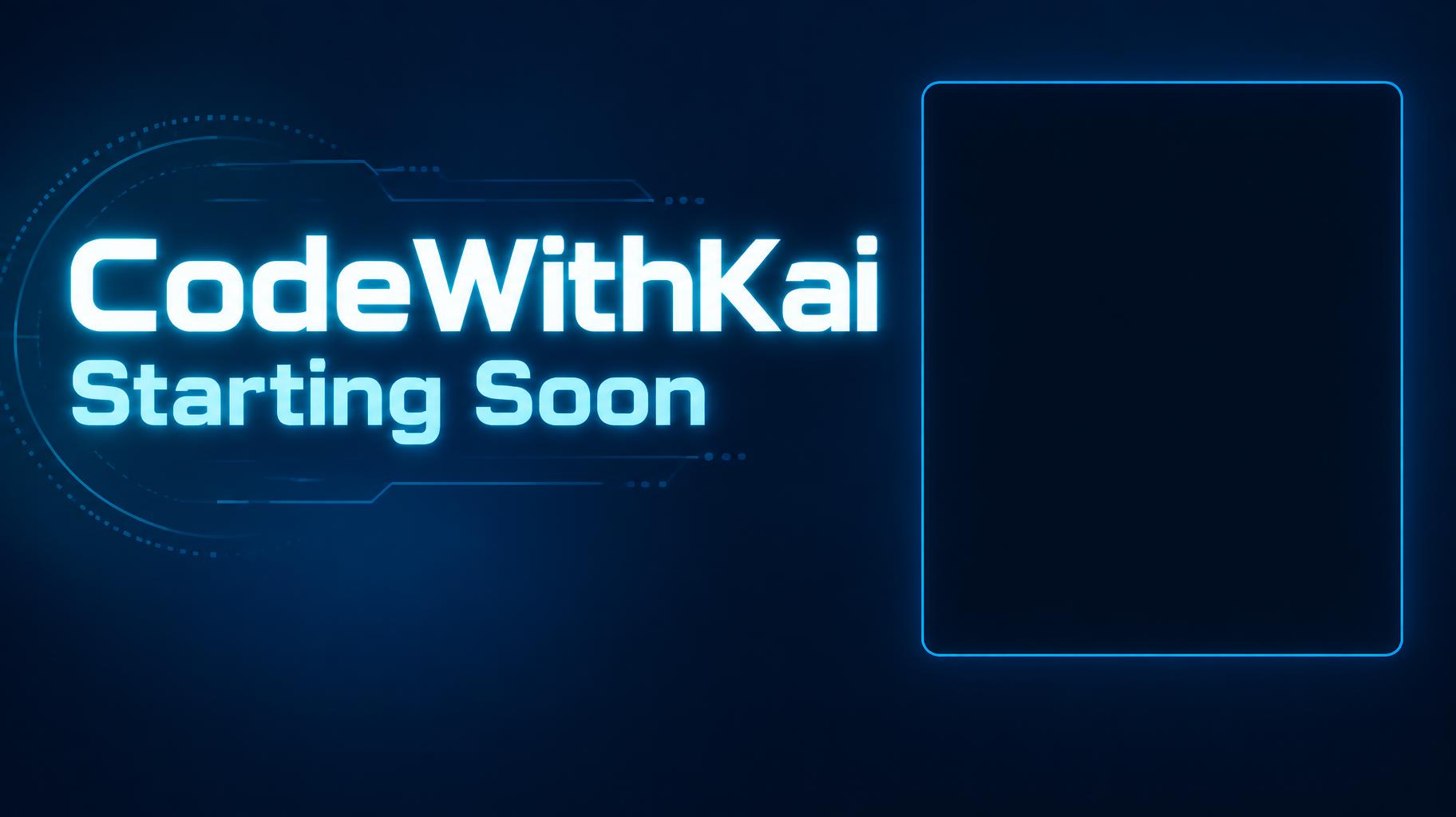
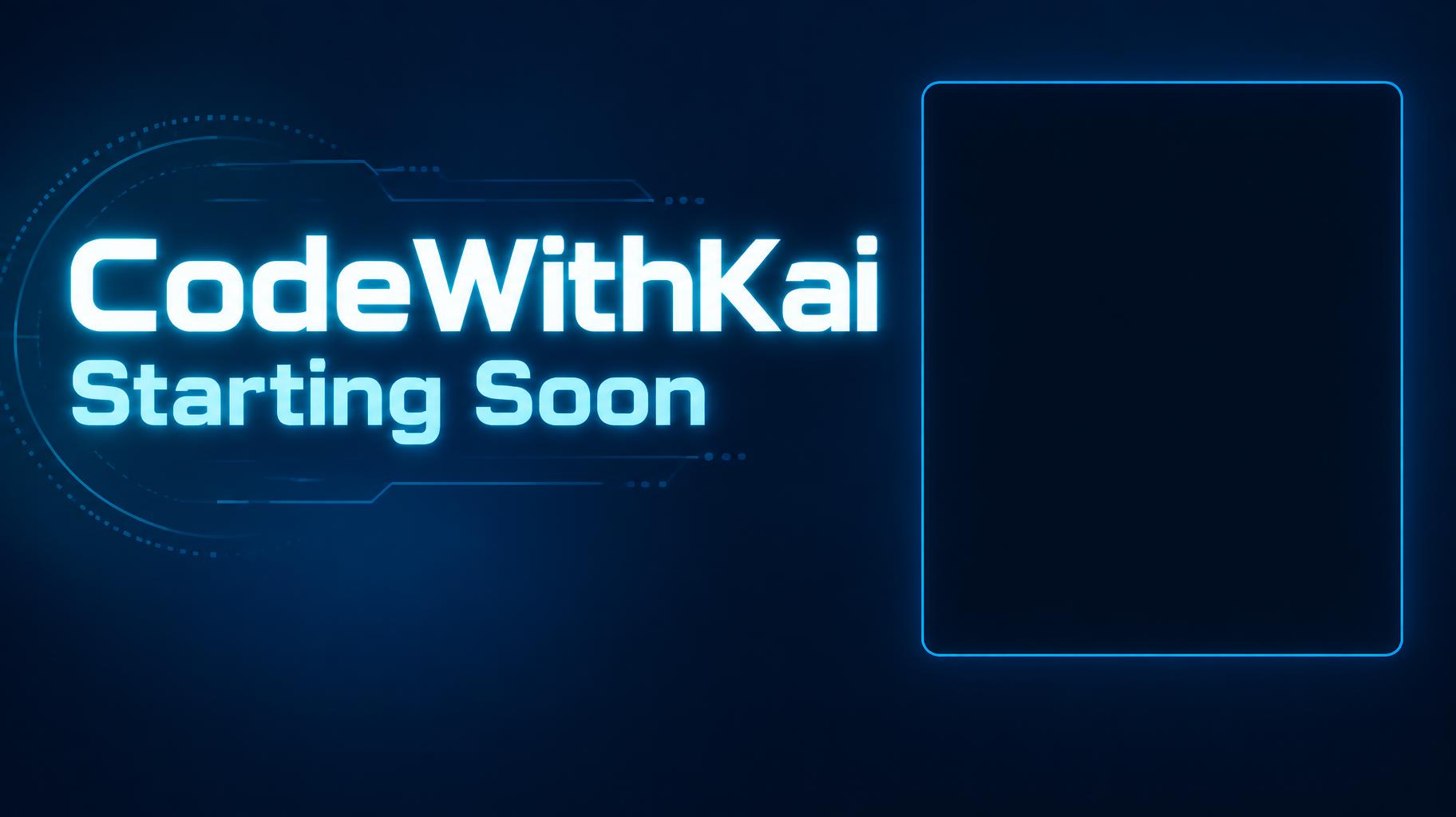
"CodeWithKai — Starting Soon" 是一张编程直播用的直播画面,采用干净的霓虹科技风格。频道名和状态的发光青色字放在深蓝屏幕左边,右边是一个青色描边的空圆角框,用来放摄像头。可以换成你自己的名字和状态。

创作提示词

Create a finished full-screen stream overlay for OBS or Streamlabs, 1824 × 1024 px, 16:9. Render exactly these two text strings, with no other text: “CodeWithKai” and “Starting Soon”. Make “CodeWithKai” the dominant channel wordmark, set large and bold in the upper-left area; place the equally phone-legible status line “Starting Soon” directly below it. Use custom geometric sans-serif lettering: extra-bold, broad, cleanly cut terminals, open counters, close but distinct spacing, bright neon cyan letter faces with a narrow white-cyan luminous core and a controlled cyan halo. Keep every letter crisp and highly legible at thumbnail size. Use a deep blue-to-navy background with restrained blue light falloff and a few faint, low-contrast technical line details confined to the left text area. On the right, reserve a large empty, plain dark rectangle for the webcam, approximately 34% of canvas width and 60% of canvas height, with only a fine subdued cyan perimeter rule; leave its interior completely clear and dark. Maintain a clear gap between text and webcam area. Keep all key elements within generous safe margins. No chat, timer, interface elements, extra copy, busy imagery, or details along the edges. High-contrast digital broadcast graphic, precise vector-like edges, subtle emissive glow, clean composition.

作品标签

用途
场景频道›交付物直播叠层›场合知识教学频道›
画面
风格感未来感›极简›情绪暗黑›效果霓虹›发光›字形无衬线体›排版多行堆叠›颜色蓝色›青绿色›黑色›画面元素摄像头画框›文字类型标题加信息›文字语言英语›

生成于 2026年10月6日 · 1824 × 1024 · JPEG · OpenAI GPT-Image-2.5 Sunburst · 版式:Text Left Webcam Right · 公开作品 · 可免费商用(CC BY 4.0)
这件作品适用的场景

频道设计→
直播画面直播画面39 件作品 · 1824 × 1024 像素,16:9频道
✦ 探索 AI 文字效果风格

浏览 AI 文字效果风格

查看全部风格 →
维京
探索风格 →
维京872 件作品
MetallicCarvedAggressiveRugged
电影大片
探索风格 →
电影大片8.3K 件作品
EpicDramaticCinematicGold
赛博朋克 Cyberpunk
探索风格 →
赛博朋克 Cyberpunk750 件作品
NeonCyberpunkDarkGlitch
Netflix 与流媒体
探索风格 →
Netflix 与流媒体1.7K 件作品
ModernDarkCinematicGlow
霓虹光效
探索风格 →
霓虹光效1.5K 件作品
GlowDreamyNeonTubular
3D 立体粗体
探索风格 →
3D 立体粗体1.3K 件作品
3DStrikingHeavyChunky
首页›››CodeWithKai Starting Soon
CodeWithKai
Starting Soon - Cyan Stream Interface (DIY) text effect - create a finished full-screen stream overlay for obs or stre
下载 JPEG
频道›直播叠层›

CodeWithKai Starting Soon - Cyan Stream Interface Text Effect

前天生成
F
@FontVibe
公开作品 9072 件 · 查看 TA 的全部作品 →
风格
Cyan Stream Interface (DIY)
AI 字体
Kai Display Sans
排版
Text Left Webcam Right
图片尺寸
1824 × 1024
适用场景
直播画面
→
✦ 换上你的文字,复刻这件作品

用原作的模型 OpenAI GPT-Image-2.5 Sunburst · 15 积分

25/250
透明效果
✦ 透明效果
生成去除背景的 PNG——只保留文字及其视觉效果。AI 会自动选择最合适的背景色,确保抠图干净清晰。
输出始终为 PNG 以保证无损透明。
关于这件作品

"CodeWithKai — Starting Soon" 是一张编程直播用的直播画面,采用干净的霓虹科技风格。频道名和状态的发光青色字放在深蓝屏幕左边,右边是一个青色描边的空圆角框,用来放摄像头。可以换成你自己的名字和状态。

创作提示词

Create a finished full-screen stream overlay for OBS or Streamlabs, 1824 × 1024 px, 16:9. Render exactly these two text strings, with no other text: “CodeWithKai” and “Starting Soon”. Make “CodeWithKai” the dominant channel wordmark, set large and bold in the upper-left area; place the equally phone-legible status line “Starting Soon” directly below it. Use custom geometric sans-serif lettering: extra-bold, broad, cleanly cut terminals, open counters, close but distinct spacing, bright neon cyan letter faces with a narrow white-cyan luminous core and a controlled cyan halo. Keep every letter crisp and highly legible at thumbnail size. Use a deep blue-to-navy background with restrained blue light falloff and a few faint, low-contrast technical line details confined to the left text area. On the right, reserve a large empty, plain dark rectangle for the webcam, approximately 34% of canvas width and 60% of canvas height, with only a fine subdued cyan perimeter rule; leave its interior completely clear and dark. Maintain a clear gap between text and webcam area. Keep all key elements within generous safe margins. No chat, timer, interface elements, extra copy, busy imagery, or details along the edges. High-contrast digital broadcast graphic, precise vector-like edges, subtle emissive glow, clean composition.

作品标签

用途
场景频道›交付物直播叠层›场合知识教学频道›
画面
风格感未来感›极简›情绪暗黑›效果霓虹›发光›字形无衬线体›排版多行堆叠›颜色蓝色›青绿色›黑色›画面元素摄像头画框›文字类型标题加信息›文字语言英语›

生成于 2026年10月6日 · 1824 × 1024 · JPEG · OpenAI GPT-Image-2.5 Sunburst · 版式:Text Left Webcam Right · 公开作品 · 可免费商用(CC BY 4.0)

这件作品适用的场景

频道设计→
直播画面直播画面39 件作品 · 1824 × 1024 像素,16:9频道
✦ 探索 AI 文字效果风格

浏览 AI 文字效果风格

查看全部风格 →
维京
探索风格 →
维京872 件作品
MetallicCarvedAggressiveRugged
电影大片
探索风格 →
电影大片8.3K 件作品
EpicDramaticCinematicGold
赛博朋克 Cyberpunk
探索风格 →
赛博朋克 Cyberpunk750 件作品
NeonCyberpunkDarkGlitch
Netflix 与流媒体
探索风格 →
Netflix 与流媒体1.7K 件作品
ModernDarkCinematicGlow
霓虹光效
探索风格 →
霓虹光效1.5K 件作品
GlowDreamyNeonTubular
3D 立体粗体
探索风格 →
3D 立体粗体1.3K 件作品
3DStrikingHeavyChunky

想要更多文字样式?看看我们的 免费字体生成器 —— 花体、手写、哥特等更多样式。

热门搜索:
AI text effect generatortext effect generatorAI typography generatortext art makerfancy font generator