FontVibe
StartErstellenStileGalerieSchriftartenPreiseBlog
Deutsch▾
FontVibe
✦FontVibe
FontVibe

Kostenloser KI-Schriftgenerator — beschreib, was du brauchst, oder wähl einen Stil, und bekomm fertige Textgrafik. 134+ Stile, PNG/JPG sofort herunterladen.

Produkt

ErstellenStileGaleriePreise

Beliebte Szenen

Halloween-DesignsKanal-DesignsHalloween-Schriftart

Ressourcen

BlogKI-SchriftbibliothekTransparenter-Hintergrund-MacherASCII-Art-GeneratorSchrift-Tools

Rechtliches

NutzungsbedingungenDatenschutzImpressumKontakt
© 2026 FontVibe. Alle Rechte vorbehalten.
Datenschutz|Allgemeine Geschäftsbedingungen|Impressum|特定商取引法に基づく表記
FontVibe

Kostenloser KI-Schriftgenerator — beschreib, was du brauchst, oder wähl einen Stil, und bekomm fertige Textgrafik. 134+ Stile, PNG/JPG sofort herunterladen.

Produkt
ErstellenStileGaleriePreise
Beliebte Szenen
Halloween-DesignsKanal-DesignsHalloween-Schriftart
Ressourcen
BlogKI-SchriftbibliothekTransparenter-Hintergrund-MacherASCII-Art-GeneratorSchrift-Tools
Rechtliches
AGBDatenschutzRechtlichesKontakt
© 2026 FontVibe. Alle Rechte vorbehalten.
Privacy|Terms|Legal|特商法
Start››Clean Paper Guide (DIY)›How to Draw a Candy Cane 1 2 3 4
How to Draw a Candy Cane
1
2
3
4 - Clean Paper Guide (DIY) text effect - create a clean, beginner-friendly, landscape 16:9 step-by-st
Zeichnung

How to Draw a Candy Cane 1 2 3 4 - Clean Paper Guide Text Effect

Erstellt am vor 23 Stunden
F
@FontVibe
9660 öffentliche Designs
›
Stil
Clean Paper Guide (DIY)
KI-Schriftart
Rounded Hand Letter
Layout
Four-Step Strip
Bildgröße
1824 × 1024
✦ Dieses Design mit deinem Text neu erstellen

Nutzt OpenAI GPT-Image-2.5 Sunburst, das Modell dieses Werks · 15 Credits

32/500
Transparent-Effekt
✦ Transparent-Effekt
Generiert ein PNG mit entferntem Hintergrund — nur der Text und seine visuellen Effekte bleiben übrig. Die KI wählt automatisch die optimale Hintergrundfarbe für eine saubere Entfernung passend zu deinem Stil.
Die Ausgabe ist immer PNG für verlustfreie Transparenz.
Über dieses Werk

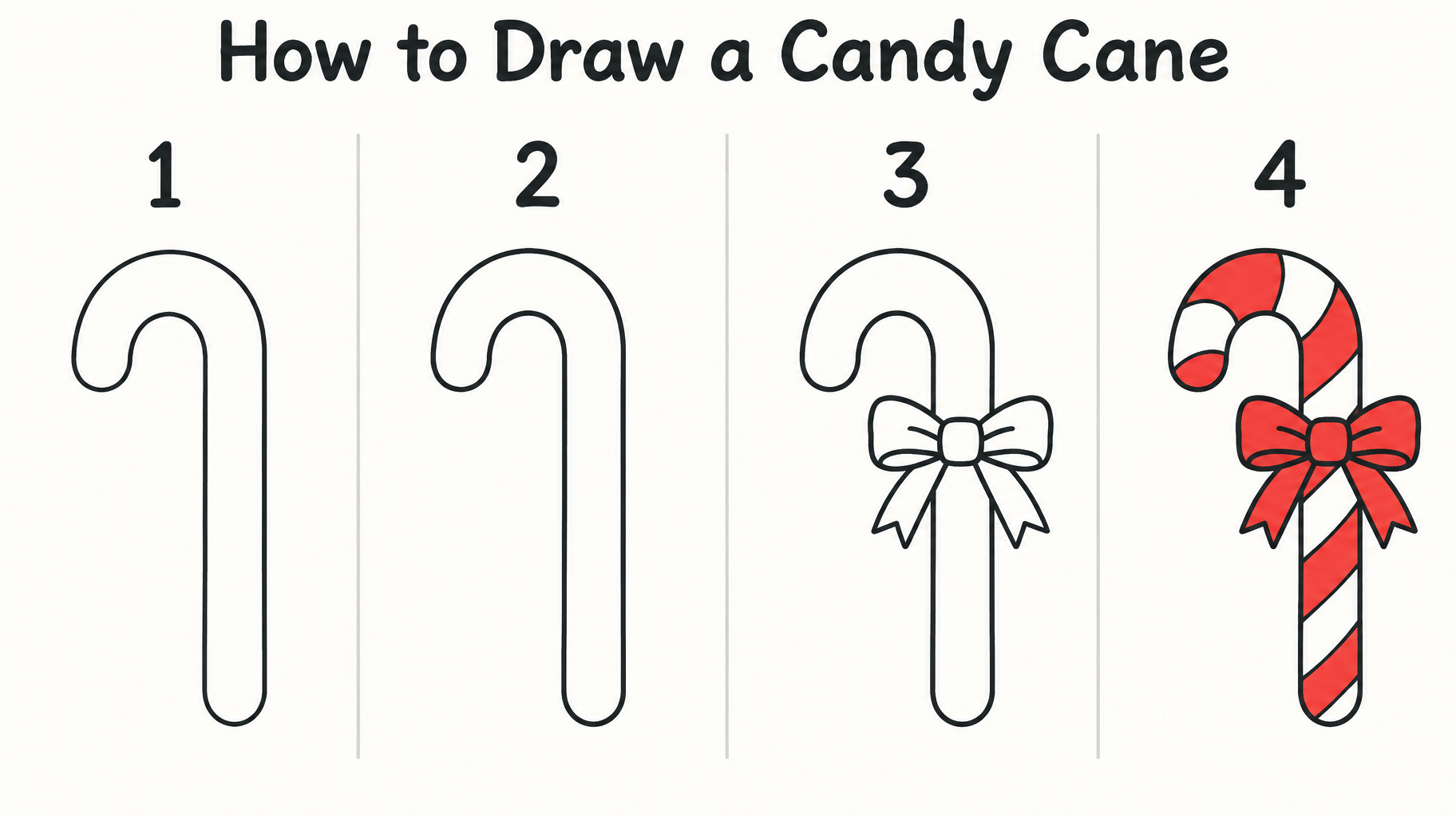
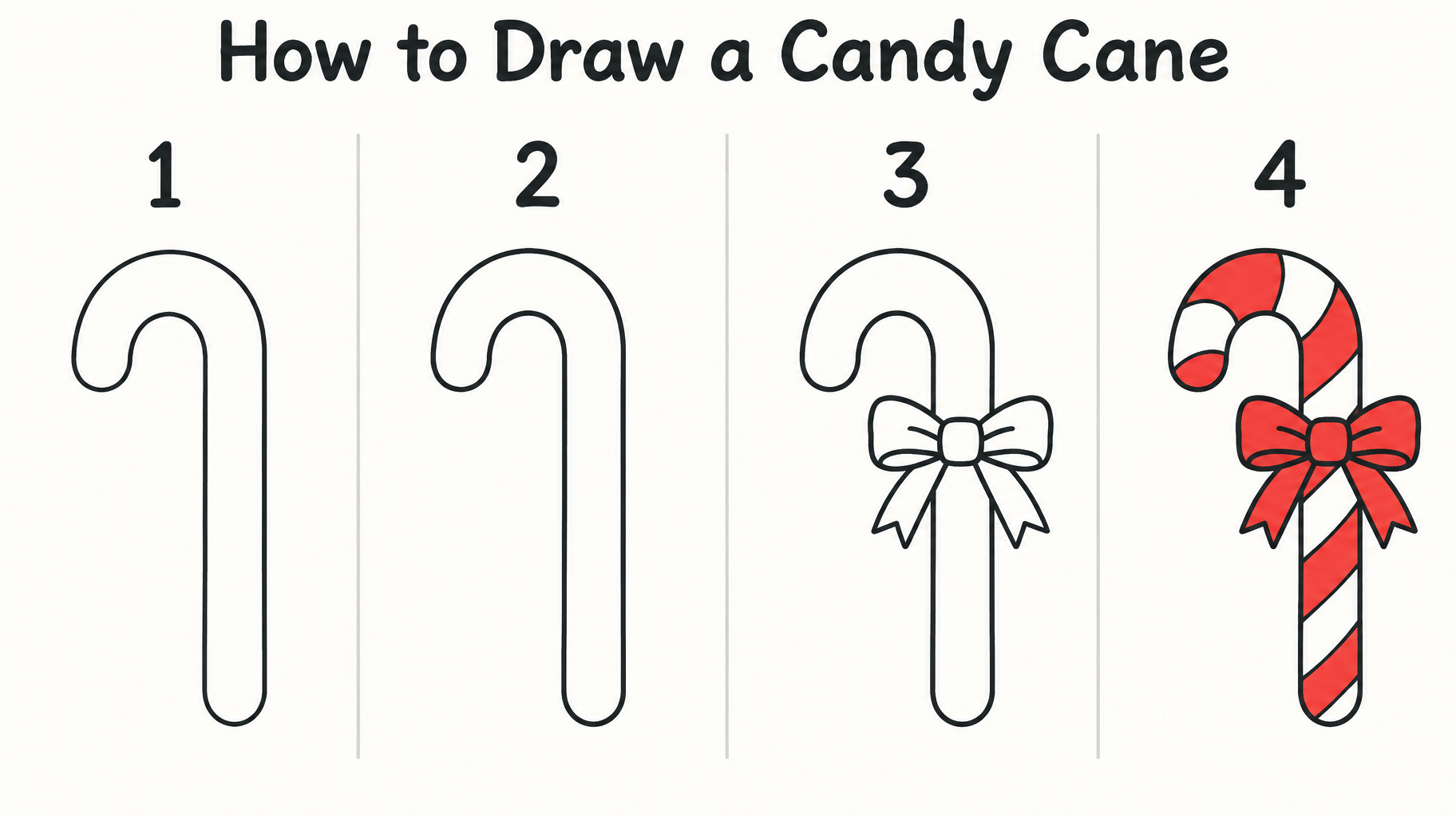
"How to Draw a Candy Cane" ist eine Zeichenanleitung in vier Schritten im klaren Cartoon-Linienstil. Nummerierte Felder von 1 bis 4 stehen unter einem dunklen, runden Sans-Titel und zeigen die Zuckerstangen-Kontur, eine hinzugefügte Schleife und dann rote Streifen, die Stange und Schleife füllen. Du kannst sie mit eigenem Titel, Schrittnummern und Motiv nachbauen, indem du Überschrift und Zeichenschritte austauschst.

Kreativ-Prompt

Create a clean, beginner-friendly, landscape 16:9 step-by-step drawing guide on a plain warm-white paper background. Across the upper margin, render the exact title “How to Draw a Candy Cane” in large, dark-ink, friendly rounded hand-lettering, easy to read at phone size. Below it, show exactly four evenly spaced drawing stages in a clear left-to-right sequence, each marked only with its large numeral: “1”, “2”, “3”, “4”. No other words, captions, labels, logos, or watermark. Keep all text and drawings within generous safe margins. Use thin, crisp, slightly hand-drawn dark charcoal outlines with simple geometry and no heavy shading. Keep the same upright candy cane angle, size, and placement in every stage so the changes are easy to follow. Stage 1: a single smooth line forming the cane’s hooked top and long straight stem. Stage 2: add the parallel contour to turn that guide into a simple hollow candy-cane silhouette with rounded ends. Stage 3: add a small, easy-to-copy tied bow at the neck just below the hook, with two loops and two short tails. Stage 4: show the complete same cane and bow, with bold red diagonal bands alternating with clean white bands along the cane; color the bow red, leaving the outline clear. The final stage is the only fully colored one; keep earlier stages as simple dark outlines. Make each stage visibly build on the last with only a few added lines at a time. Separate the four drawing areas with subtle, fine vertical rules and otherwise leave the background uncluttered. Flat, clear instructional illustration, no perspective, no texture behind the drawings, no extra Christmas motifs.

Tags

Einsatz
Gemacht alsZeichnung
Optik
StilCartoon›StimmungFröhlich›EffektFlach›SchriftSerifenlos›BuchstabenformAbgerundet›LayoutEinzeilig›MotiveSchleife›Streifen›Zuckerstange›FürKinder›SpracheEnglisch›

Generiert am 19. Oktober 2026 · 1824 × 1024 · PNG · OpenAI GPT-Image-2.5 Sunburst · Layout: Four-Step Strip · Von der erstellenden Person geteilt · Kostenlos kommerziell nutzbar (CC BY 4.0)

✦ KI-Texteffekt-Stile entdecken

KI-Texteffekt-Stile durchstöbern

Alle Stile ansehen →
Wikinger
Wikinger923
Film & Kino
Film & Kino8.7K
Cyberpunk
Cyberpunk776
Netflix & Streaming
Netflix & Streaming1.8K
Neon-Leuchtschrift
Neon-Leuchtschrift1.6K
3D Fett
3D Fett1.4K
Start››Clean Paper Guide (DIY)›How to Draw a Candy Cane 1 2 3 4
How to Draw a Candy Cane
1
2
3
4 - Clean Paper Guide (DIY) text effect - create a clean, beginner-friendly, landscape 16:9 step-by-st
PNG herunterladen
Zeichnung

How to Draw a Candy Cane 1 2 3 4 - Clean Paper Guide Text Effect

Erstellt am vor 23 Stunden
F
@FontVibe
9660 öffentliche Designs · Alle Designs dieser Person →
Stil
Clean Paper Guide (DIY)
KI-Schriftart
Rounded Hand Letter
Layout
Four-Step Strip
Bildgröße
1824 × 1024
✦ Dieses Design mit deinem Text neu erstellen

Nutzt OpenAI GPT-Image-2.5 Sunburst, das Modell dieses Werks · 15 Credits

32/500
Transparent-Effekt
✦ Transparent-Effekt
Generiert ein PNG mit entferntem Hintergrund — nur der Text und seine visuellen Effekte bleiben übrig. Die KI wählt automatisch die optimale Hintergrundfarbe für eine saubere Entfernung passend zu deinem Stil.
Die Ausgabe ist immer PNG für verlustfreie Transparenz.
Über dieses Werk

"How to Draw a Candy Cane" ist eine Zeichenanleitung in vier Schritten im klaren Cartoon-Linienstil. Nummerierte Felder von 1 bis 4 stehen unter einem dunklen, runden Sans-Titel und zeigen die Zuckerstangen-Kontur, eine hinzugefügte Schleife und dann rote Streifen, die Stange und Schleife füllen. Du kannst sie mit eigenem Titel, Schrittnummern und Motiv nachbauen, indem du Überschrift und Zeichenschritte austauschst.

Kreativ-Prompt

Create a clean, beginner-friendly, landscape 16:9 step-by-step drawing guide on a plain warm-white paper background. Across the upper margin, render the exact title “How to Draw a Candy Cane” in large, dark-ink, friendly rounded hand-lettering, easy to read at phone size. Below it, show exactly four evenly spaced drawing stages in a clear left-to-right sequence, each marked only with its large numeral: “1”, “2”, “3”, “4”. No other words, captions, labels, logos, or watermark. Keep all text and drawings within generous safe margins. Use thin, crisp, slightly hand-drawn dark charcoal outlines with simple geometry and no heavy shading. Keep the same upright candy cane angle, size, and placement in every stage so the changes are easy to follow. Stage 1: a single smooth line forming the cane’s hooked top and long straight stem. Stage 2: add the parallel contour to turn that guide into a simple hollow candy-cane silhouette with rounded ends. Stage 3: add a small, easy-to-copy tied bow at the neck just below the hook, with two loops and two short tails. Stage 4: show the complete same cane and bow, with bold red diagonal bands alternating with clean white bands along the cane; color the bow red, leaving the outline clear. The final stage is the only fully colored one; keep earlier stages as simple dark outlines. Make each stage visibly build on the last with only a few added lines at a time. Separate the four drawing areas with subtle, fine vertical rules and otherwise leave the background uncluttered. Flat, clear instructional illustration, no perspective, no texture behind the drawings, no extra Christmas motifs.

Tags

Einsatz
Gemacht alsZeichnung
Optik
StilCartoon›StimmungFröhlich›EffektFlach›SchriftSerifenlos›BuchstabenformAbgerundet›LayoutEinzeilig›MotiveSchleife›Streifen›Zuckerstange›FürKinder›SpracheEnglisch›

Generiert am 19. Oktober 2026 · 1824 × 1024 · PNG · OpenAI GPT-Image-2.5 Sunburst · Layout: Four-Step Strip · Von der erstellenden Person geteilt · Kostenlos kommerziell nutzbar (CC BY 4.0)

✦ KI-Texteffekt-Stile entdecken

KI-Texteffekt-Stile durchstöbern

Alle Stile ansehen →
Wikinger
Stil entdecken →
Wikinger923 Bilder
MetallicCarvedAggressiveRugged
Film & Kino
Stil entdecken →
Film & Kino8.7K Bilder
EpicDramaticCinematicGold
Cyberpunk
Stil entdecken →
Cyberpunk776 Bilder
NeonCyberpunkDarkGlitch
Netflix & Streaming
Stil entdecken →
Netflix & Streaming1.8K Bilder
ModernDarkCinematicGlow
Neon-Leuchtschrift
Stil entdecken →
Neon-Leuchtschrift1.6K Bilder
GlowDreamyNeonTubular
3D Fett
Stil entdecken →
3D Fett1.4K Bilder
3DStrikingHeavyChunky

Mehr Textstile gefällig? Stöber durch unsere kostenlosen Schriftgeneratoren — cool, Schreibschrift, Gothic und mehr.

Beliebte Suchen:
AI text effect generatortext effect generatorAI typography generatortext art makerfancy font generator
Benachrichtigungen
Noch keine Benachrichtigungen