FontVibe
StartErstellenStileGalerieSchriftartenPreiseBlog
Deutsch▾
FontVibe
✦FontVibe
FontVibe

Kostenloser KI-Schriftgenerator — beschreib, was du brauchst, oder wähl einen Stil, und bekomm fertige Textgrafik. 126+ Stile, PNG/JPG sofort herunterladen.

Produkt

ErstellenStileGaleriePreise

Beliebte Szenen

Halloween-DesignsKanal-DesignsHalloween-Schriftart

Ressourcen

BlogKI-SchriftbibliothekTransparenter-Hintergrund-MacherASCII-Art-GeneratorSchrift-Tools

Rechtliches

NutzungsbedingungenDatenschutzImpressumKontakt
© 2026 FontVibe. Alle Rechte vorbehalten.
Datenschutz|Allgemeine Geschäftsbedingungen|Impressum|特定商取引法に基づく表記
FontVibe

Kostenloser KI-Schriftgenerator — beschreib, was du brauchst, oder wähl einen Stil, und bekomm fertige Textgrafik. 126+ Stile, PNG/JPG sofort herunterladen.

Produkt
ErstellenStileGaleriePreise
Beliebte Szenen
Halloween-DesignsKanal-DesignsHalloween-Schriftart
Ressourcen
BlogKI-SchriftbibliothekTransparenter-Hintergrund-MacherASCII-Art-GeneratorSchrift-Tools
Rechtliches
AGBDatenschutzRechtlichesKontakt
© 2026 FontVibe. Alle Rechte vorbehalten.
Privacy|Terms|Legal|特商法
✦FontVibe
Benachrichtigungen
Noch keine Benachrichtigungen
Start›››PRESS START RETRO GAMING ARCADE • 8-BIT • 16-BIT INSERT COIN
PRESS START
RETRO GAMING
ARCADE • 8-BIT • 16-BIT
INSERT COIN - Pixel Art (DIY) text effect - create a finished 16:9 youtube thumbnail for the retro gamin
Effekte

PRESS START RETRO GAMING ARCADE • 8-BIT • 16-BIT INSERT COIN - Pixel Art Text Effect

Erstellt am 30. Sept.
?
FontVibe-Nutzer
Stil
Pixel Art (DIY)
KI-Schriftart
Pixel Retro
Bildgröße
1824 × 1024
✦ Dieses Design mit deinem Text neu erstellen

Nutzt OpenAI GPT-Image-2.5 Sunburst, das Modell dieses Werks · 15 Credits
60/250
Transparent-Effekt
✦ Transparent-Effekt
Generiert ein PNG mit entferntem Hintergrund — nur der Text und seine visuellen Effekte bleiben übrig. Die KI wählt automatisch die optimale Hintergrundfarbe für eine saubere Entfernung passend zu deinem Stil.
Die Ausgabe ist immer PNG für verlustfreie Transparenz.
✦ Pixel Art (DIY)
Alle Pixel Art (DIY) ansehen →
"Faz um touro
" — Pixel Art text effect
"PIXEL" — Pixel Art text effect
"NEON
NIGHTS" — Pixel Art text effect
"LEVEL UP" — Pixel Art text effect
"CRAFT" — Pixel Art text effect
"DREAM BIG" — Pixel Art text effect
"CYJ" — Pixel Art text effect
"MOSSBYTE GAMES PRESENTS
SLIME KINGDOM
QUEST
PRESS START
© 2026 MOSSBYTE GAMES" — Pixel Art text effect
"NEON
NIGHTS" — Pixel Art text effect
"NEON
NIGHTS" — Pixel Art text effect
"CRAFT" — Pixel Art text effect
"LEVEL UP" — Pixel Art text effect
"Dream" — Pixel Art text effect
"PRESS START" — Pixel Art text effect
"LEO SIL" — Pixel Art text effect
"LEVEL UP" — Pixel Art text effect
"CRAFT" — Pixel Art text effect
"LEVEL UP" — Pixel Art text effect
"GAME OVER" — Pixel Art text effect
"PRESS START" — Pixel Art text effect
Über dieses Werk

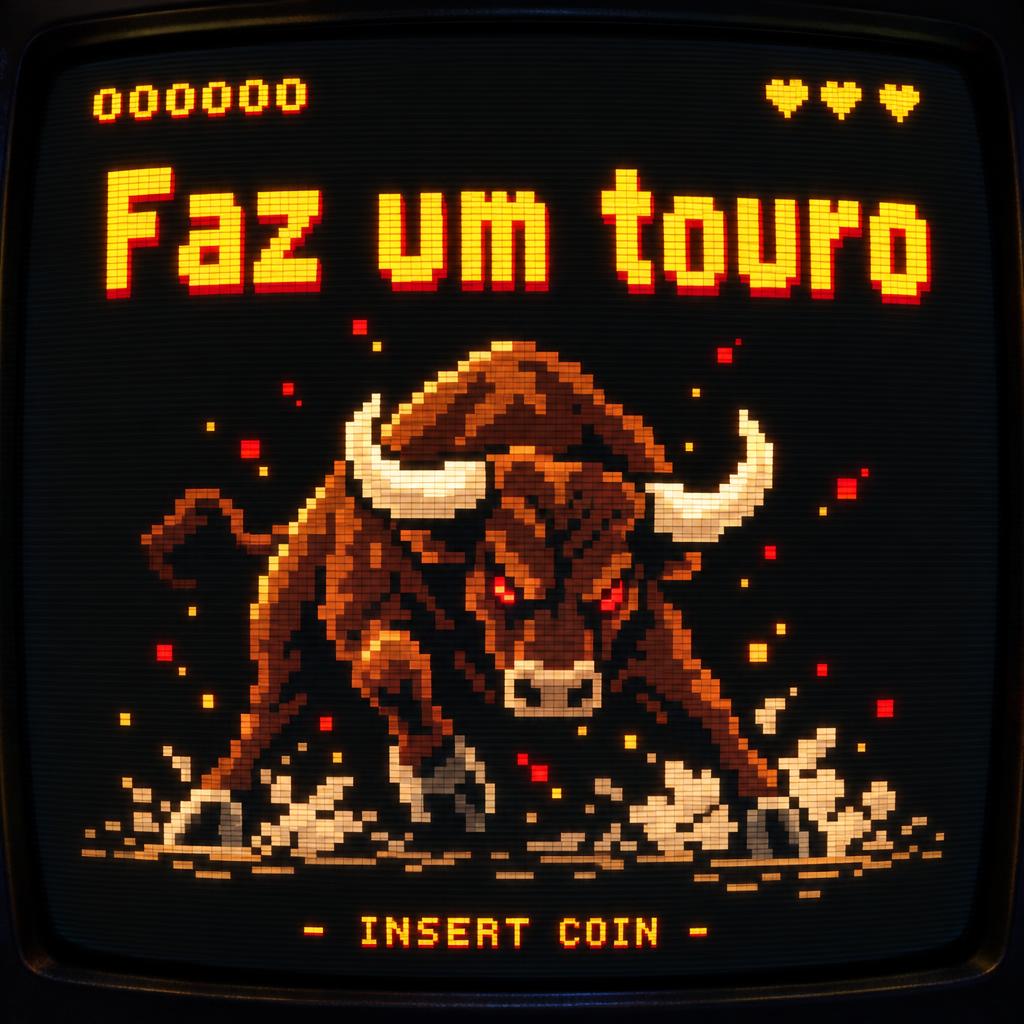
“PRESS START RETRO GAMING ARCADE • 8-BIT • 16-BIT INSERT COIN” is a Pixel Art text effect Texteffekt erstellt mit FontVibe KI. Blockige 8-Bit-Pixelversalien, die bernsteinorange auf einem gewölbten CRT-Arcade-Bildschirm leuchten, mit Scanlines, Phosphorschein und einer kleinen INSERT-COIN-Zeile.

Kreativ-Prompt

Create a finished 16:9 YouTube thumbnail for the retro gaming channel Press Start. Show the complete artwork on a curved black CRT arcade monitor filling the frame; the monitor screen is the only light source, with the surrounding edges falling into darkness. Render all typography, UI, and imagery on one consistent coarse pixel grid, with square cells, hard color boundaries, authentic stepped diagonals, and absolutely no anti-aliasing. Text, exactly as written and in this hierarchy: dominant headline “PRESS START”; secondary line “RETRO GAMING”; compact detail line “ARCADE • 8-BIT • 16-BIT”; small bottom-center arcade UI “INSERT COIN”. Keep each line crisp and correctly spelled. Build “PRESS START” in wide, bold display lettering from uniform square pixel blocks approximately 8–10 screen pixels per cell, with a visible one-pixel gap between adjacent blocks, two-pixel stroke weight, angular pixel curves, and generous display proportions. Use bright amber phosphor pixels for the headline with a tight amber bloom halo. Set the secondary line and detail in clean cyan and warm yellow pixel UI lettering. Composition: “PRESS START” dominates the upper-middle screen, centered and highly legible at thumbnail size. Place “RETRO GAMING” directly below it. In the lower-middle, feature a large, unmistakable pixel-art arcade joystick with a red ball-top stick, a cyan button, and two small game cartridges; keep this hero illustration clearly separated from the text. Set “ARCADE • 8-BIT • 16-BIT” beneath the illustration and “INSERT COIN” at the bottom center. Use a jet-black screen field, accurate horizontal 240p scanlines across the full image, phosphor bloom around bright pixels, and a curved barrel-distortion vignette darkening the corners. Rich arcade phosphor colors, high contrast, sharp grid alignment, no extra words, no extra logos, no smooth gradients, no photographic props.

Generiert am 30. September 2026 · 1824 × 1024 · JPEG · OpenAI GPT-Image-2.5 Sunburst · Layout: Poster · Von der erstellenden Person geteilt · Kostenlos kommerziell nutzbar (CC BY 4.0)

✦ KI-Texteffekt-Stile entdecken

KI-Texteffekt-Stile durchstöbern

Alle Stile ansehen →
Wikinger
Stil entdecken →
Wikinger872 Bilder
MetallicCarvedAggressiveRugged
Film & Kino
Stil entdecken →
Film & Kino8.3K Bilder
EpicDramaticCinematicGold
Cyberpunk
Stil entdecken →
Cyberpunk750 Bilder
NeonCyberpunkDarkGlitch
Netflix & Streaming
Stil entdecken →
Netflix & Streaming1.7K Bilder
ModernDarkCinematicGlow
Neon-Leuchtschrift
Stil entdecken →
Neon-Leuchtschrift1.5K Bilder
GlowDreamyNeonTubular
3D Fett
Stil entdecken →
3D Fett1.3K Bilder
3DStrikingHeavyChunky
Start›››PRESS START RETRO GAMING ARCADE • 8-BIT • 16-BIT INSERT COIN
PRESS START
RETRO GAMING
ARCADE • 8-BIT • 16-BIT
INSERT COIN - Pixel Art (DIY) text effect - create a finished 16:9 youtube thumbnail for the retro gamin
JPEG herunterladen
Effekte

PRESS START RETRO GAMING ARCADE • 8-BIT • 16-BIT INSERT COIN - Pixel Art Text Effect

Erstellt am 30. Sept.
?
FontVibe-Nutzer
Stil
Pixel Art (DIY)
KI-Schriftart
Pixel Retro
Bildgröße
1824 × 1024
✦ Dieses Design mit deinem Text neu erstellen

Nutzt OpenAI GPT-Image-2.5 Sunburst, das Modell dieses Werks · 15 Credits

60/250
Transparent-Effekt
✦ Transparent-Effekt
Generiert ein PNG mit entferntem Hintergrund — nur der Text und seine visuellen Effekte bleiben übrig. Die KI wählt automatisch die optimale Hintergrundfarbe für eine saubere Entfernung passend zu deinem Stil.
Die Ausgabe ist immer PNG für verlustfreie Transparenz.
✦ Pixel Art (DIY)
Alle Pixel Art (DIY) ansehen →

Mehr Pixel Art (DIY) Texteffekte

"Faz um touro
" — Pixel Art | AI Text Effect Generator
“Faz um touro ”
Pixel Art
"PIXEL" — Pixel Art | AI Text Effect Generator
“PIXEL”
Pixel Art
"NEON
NIGHTS" — Pixel Art | AI Text Effect Generator
“NEON NIGHTS”
Pixel Art
"LEVEL UP" — Pixel Art | AI Text Effect Generator
“LEVEL UP”
Pixel Art
"CRAFT" — Pixel Art | AI Text Effect Generator
“CRAFT”
Pixel Art
"DREAM BIG" — Pixel Art | AI Text Effect Generator
“DREAM BIG”
Pixel Art
"CYJ" — Pixel Art | AI Text Effect Generator
“CYJ”
Pixel Art
"MOSSBYTE GAMES PRESENTS
SLIME KINGDOM
QUEST
PRESS START
© 2026 MOSSBYTE GAMES" — Pixel Art | AI Text Effect Generator
“MOSSBYTE GAMES PRESENTS SLIME KINGDOM QUEST PRESS START © 2026 MOSSBYTE GAMES”
Pixel Art (DIY)
"NEON
NIGHTS" — Pixel Art | AI Text Effect Generator
“NEON NIGHTS”
Pixel Art
"NEON
NIGHTS" — Pixel Art | AI Text Effect Generator
“NEON NIGHTS”
Pixel Art
"CRAFT" — Pixel Art | AI Text Effect Generator
“CRAFT”
Pixel Art
"LEVEL UP" — Pixel Art | AI Text Effect Generator
“LEVEL UP”
Pixel Art
"Dream" — Pixel Art | AI Text Effect Generator
“Dream”
Pixel Art
"PRESS START" — Pixel Art | AI Text Effect Generator
“PRESS START”
Pixel Art
"LEO SIL" — Pixel Art | AI Text Effect Generator
“LEO SIL”
Pixel Art
"LEVEL UP" — Pixel Art | AI Text Effect Generator
“LEVEL UP”
Pixel Art
"CRAFT" — Pixel Art | AI Text Effect Generator
“CRAFT”
Pixel Art
"LEVEL UP" — Pixel Art | AI Text Effect Generator
“LEVEL UP”
Pixel Art
"GAME OVER" — Pixel Art | AI Text Effect Generator
“GAME OVER”
Pixel Art
"PRESS START" — Pixel Art | AI Text Effect Generator
“PRESS START”
Pixel Art (DIY)
Über dieses Werk

“PRESS START RETRO GAMING ARCADE • 8-BIT • 16-BIT INSERT COIN” is a Pixel Art text effect Texteffekt erstellt mit FontVibe KI. Blockige 8-Bit-Pixelversalien, die bernsteinorange auf einem gewölbten CRT-Arcade-Bildschirm leuchten, mit Scanlines, Phosphorschein und einer kleinen INSERT-COIN-Zeile.

Kreativ-Prompt

Create a finished 16:9 YouTube thumbnail for the retro gaming channel Press Start. Show the complete artwork on a curved black CRT arcade monitor filling the frame; the monitor screen is the only light source, with the surrounding edges falling into darkness. Render all typography, UI, and imagery on one consistent coarse pixel grid, with square cells, hard color boundaries, authentic stepped diagonals, and absolutely no anti-aliasing. Text, exactly as written and in this hierarchy: dominant headline “PRESS START”; secondary line “RETRO GAMING”; compact detail line “ARCADE • 8-BIT • 16-BIT”; small bottom-center arcade UI “INSERT COIN”. Keep each line crisp and correctly spelled. Build “PRESS START” in wide, bold display lettering from uniform square pixel blocks approximately 8–10 screen pixels per cell, with a visible one-pixel gap between adjacent blocks, two-pixel stroke weight, angular pixel curves, and generous display proportions. Use bright amber phosphor pixels for the headline with a tight amber bloom halo. Set the secondary line and detail in clean cyan and warm yellow pixel UI lettering. Composition: “PRESS START” dominates the upper-middle screen, centered and highly legible at thumbnail size. Place “RETRO GAMING” directly below it. In the lower-middle, feature a large, unmistakable pixel-art arcade joystick with a red ball-top stick, a cyan button, and two small game cartridges; keep this hero illustration clearly separated from the text. Set “ARCADE • 8-BIT • 16-BIT” beneath the illustration and “INSERT COIN” at the bottom center. Use a jet-black screen field, accurate horizontal 240p scanlines across the full image, phosphor bloom around bright pixels, and a curved barrel-distortion vignette darkening the corners. Rich arcade phosphor colors, high contrast, sharp grid alignment, no extra words, no extra logos, no smooth gradients, no photographic props.

Generiert am 30. September 2026 · 1824 × 1024 · JPEG · OpenAI GPT-Image-2.5 Sunburst · Layout: Poster · Von der erstellenden Person geteilt · Kostenlos kommerziell nutzbar (CC BY 4.0)

✦ KI-Texteffekt-Stile entdecken

KI-Texteffekt-Stile durchstöbern

Alle Stile ansehen →
Wikinger
Stil entdecken →
Wikinger872 Bilder
MetallicCarvedAggressiveRugged
Film & Kino
Stil entdecken →
Film & Kino8.3K Bilder
EpicDramaticCinematicGold
Cyberpunk
Stil entdecken →
Cyberpunk750 Bilder
NeonCyberpunkDarkGlitch
Netflix & Streaming
Stil entdecken →
Netflix & Streaming1.7K Bilder
ModernDarkCinematicGlow
Neon-Leuchtschrift
Stil entdecken →
Neon-Leuchtschrift1.5K Bilder
GlowDreamyNeonTubular
3D Fett
Stil entdecken →
3D Fett1.3K Bilder
3DStrikingHeavyChunky
Learn more about Pixel Art text effect →

Mehr Textstile gefällig? Stöber durch unsere kostenlosen Schriftgeneratoren — cool, Schreibschrift, Gothic und mehr.

Beliebte Suchen:
AI text effect generatortext effect generatorAI typography generatortext art makerfancy font generator