Best AI Image Generator for Text: 7 Models Tested
Four models made 119 error-free images out of 120; Qwen Image 3.0 Pro had errors in 11 of 30. Update: GPT Image 2.6 tied with the four.
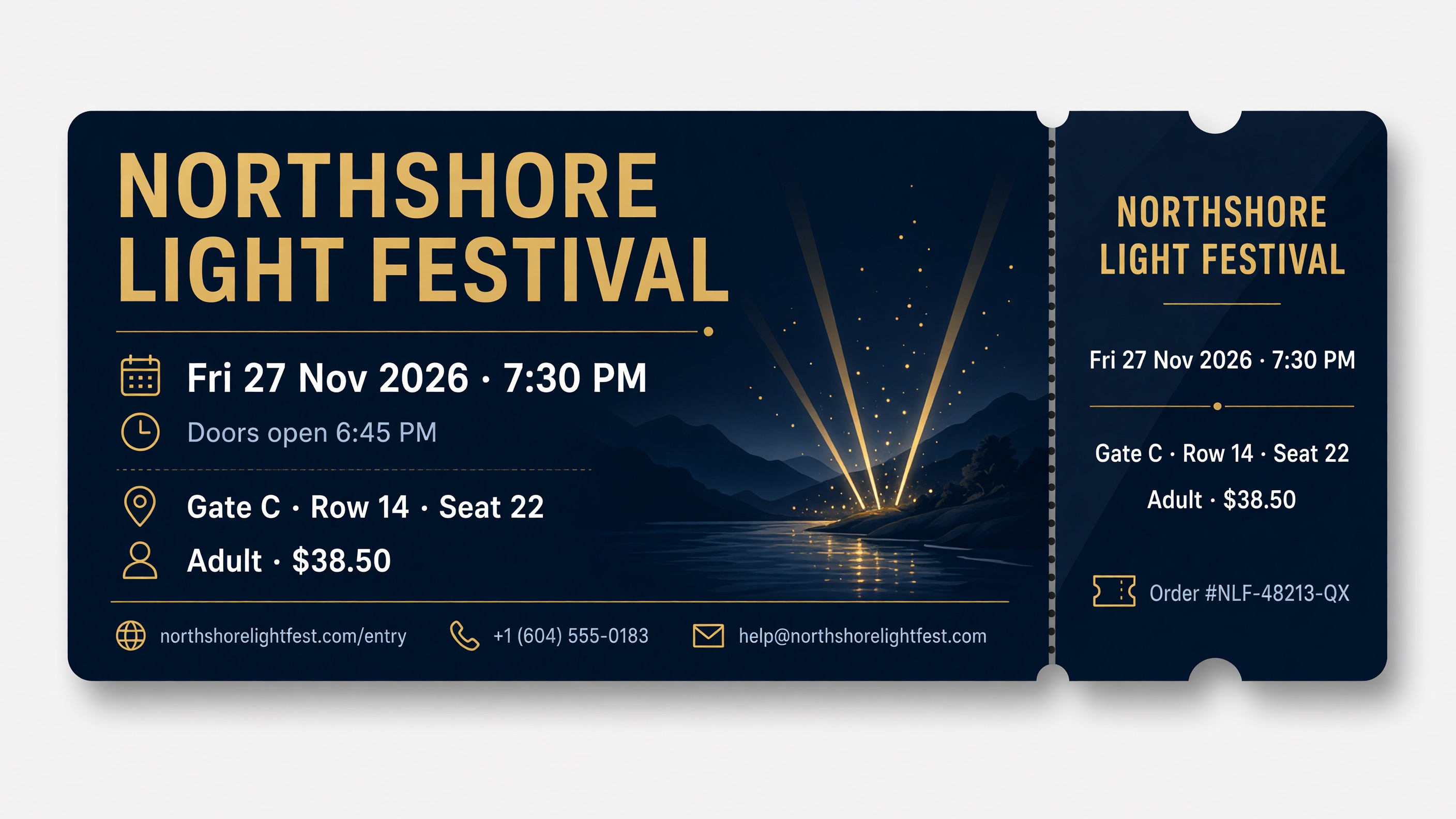
The best AI image generator for text is not one model. In our test of 150 images, four of the five models wrote text with almost no errors, and we could not tell them apart: GPT Image 2.5 Sunburst, Grok Imagine 2.0, Seedream 5.0 Pro and Nano Banana 2.1. Together they made 119 error-free images out of 120, on prompts up to a 189-word letter. The fifth model, Qwen Image 3.0 Pro, was error-free on the 26- and 34-word jobs, made errors in 1 of 3 images at 72 words and in every image at 117 words and above, and made errors in 11 of its 30 images in all, 4 of them on short jobs (the ticket and the bakery sign).
Because the four are tied on accuracy, choose among them by design and price. On design, Grok Imagine 2.0, GPT Image 2.5 Sunburst and Nano Banana 2.1 scored within noise of each other, and Nano Banana 2.1 is the cheapest of the five on FontVibe. Seedream 5.0 Pro scored lower on design than Grok Imagine 2.0 and GPT Image 2.5 Sunburst and was tied with Nano Banana 2.1, and it added a line of its own to every gig poster.
Each model got the same 10 prompts, ran 3 times per prompt, and we kept every image. We checked every required character in all 150 images. The full list, with a link to each image, is in the appendix.
Update, November 10, 2026: we added OpenAI's GPT Image 2.6, which comes as two models, GPT Image 2.6 Sunburst and GPT Image 2.6 Flare, on the same 10 prompts at the same setting as GPT Image 2.5 Sunburst: 60 more images. Neither was measurably more accurate than GPT Image 2.5 Sunburst. See GPT Image 2.6 Sunburst and Flare vs GPT Image 2.5 Sunburst. The results for the five models above are unchanged.
The results
| Model (setting) | Error-free images | Required lines correct | Characters wrong | Longest job with all 3 images error-free | Design score (out of 10) | FontVibe credits per image |
|---|---|---|---|---|---|---|
| GPT Image 2.5 Sunburst (Medium, one step below the default High) | 29 / 30 | 233 / 234 | 16 of 7,410 (0.2%) | 189 words, the longest tested | 7.91 | 32 |
| Grok Imagine 2.0 (Medium, its higher of two settings) | 30 / 30 | 234 / 234 | 0 | 189 words, the longest tested | 8.01 | 40 |
| Seedream 5.0 Pro | 30 / 30 | 234 / 234 | 0 | 189 words, the longest tested | 7.25 | 40 |
| Nano Banana 2.1 | 30 / 30 | 234 / 234 | 0 | 189 words, the longest tested | 7.69 | 25 |
| Qwen Image 3.0 Pro | 19 / 30 | 211 / 234 | 255 of 7,410 (3.4%) | 34 words (at 72 words, 2 of 3 error-free) | 5.82 | 40 |
| GPT Image 2.6 Sunburst (Medium, one step below the default High; added November 10) | 29 / 30 | 233 / 234 | 16 of 7,410 (0.2%) | 189 words, the longest tested | Tied with GPT Image 2.5 Sunburst, scored in a separate round | Preview: FontVibe test accounts only (November 10) |
| GPT Image 2.6 Flare (Medium, one step below the default High; added November 10) | 30 / 30 | 234 / 234 | 0 | 189 words, the longest tested | Tied with GPT Image 2.5 Sunburst, scored in a separate round | Preview: FontVibe test accounts only (November 10) |
The two GPT Image 2.6 rows were added after the main test. Their accuracy columns use the same prompts and the same checks; their design scores come from a separate review round, explained in GPT Image 2.6 Sunburst and Flare vs GPT Image 2.5 Sunburst.
An image counts as error-free when every required line is spelled exactly as written. "Characters wrong" is out of the 7,410 required characters in each model's 30 images: letters, digits, accents and the symbols & # @ % / $ £ +, not counting spaces or punctuation. All 16 of GPT Image 2.5 Sunburst's are one missing line, the order number on a ticket. The "longest job" column uses the length ladder, jobs 1 to 5. Capital letters, punctuation swaps (a "·" printed as "-") and line breaks are not counted as errors. All images are 2K. Credits are the price of one image at these settings on FontVibe.
What "could not tell them apart" means. Each model made 3 images per prompt, 30 in all. One of GPT Image 2.5 Sunburst's 30 images had an error (a missing order-number line, 16 characters), and the other three had no errors. At this sample size, chance alone can easily produce a difference of one image in 30: when we compared the four models prompt by prompt and resampled the results 10,000 times, the gap between any two of them always included zero. So we report them as tied, not ranked. All four were clearly more accurate than Qwen Image 3.0 Pro by the same test.
A clean 30 out of 30 does not prove a model never makes a mistake. It means mistakes at these text lengths are rare enough that 30 tries did not produce one.
GPT Image 2.5 Sunburst was tested at Medium, not at High, FontVibe's default for this model. Its one image with an error and its design score describe Medium. High or above may be more accurate.
GPT Image 2.6 Sunburst and Flare vs GPT Image 2.5 Sunburst: is the new version more accurate?
OpenAI released GPT Image 2.6 on November 4, 2026, as two models. Its image generation guide describes GPT Image 2.6 Sunburst as for detailed visual work and GPT Image 2.6 Flare as for fast iteration. Sunburst and Flare are OpenAI's own names (in its API, gpt-image-2.6-sunburst and gpt-image-2.6-flare), and GPT Image 2.5 came in the same two variants, GPT Image 2.5 Sunburst and GPT Image 2.5 Flare. Flare is the faster one: in this test, a 2K Medium image took about 12 seconds with GPT Image 2.6 Flare and about 29 seconds with GPT Image 2.6 Sunburst, the average over each variant's 30 images, timed from request to finished image (including time spent queued and polling for the result). GPT Image 2.6 reached FontVibe on November 10, the day after the main test, which is why the main test used GPT Image 2.5 Sunburst. The main test did not include GPT Image 2.5 Flare, so both GPT Image 2.6 variants, Flare included, are compared here with GPT Image 2.5 Sunburst.
We ran both GPT Image 2.6 variants on the same 10 prompts, 3 images per prompt, at 2K and Medium quality, the setting GPT Image 2.5 Sunburst used in the main test, and checked every required character the same way. As with GPT Image 2.5 Sunburst, FontVibe's default for both GPT Image 2.6 variants is High, one step above the setting we tested.
| Model (2K, Medium) | Error-free images | Required lines correct | Characters wrong | 3 of 3 error-free up to |
|---|---|---|---|---|
| GPT Image 2.5 Sunburst (main test) | 29 / 30 | 233 / 234 | 16 of 7,410 (0.2%) | 189 words |
| GPT Image 2.6 Sunburst | 29 / 30 | 233 / 234 | 16 of 7,410 (0.2%) | 189 words |
| GPT Image 2.6 Flare | 30 / 30 | 234 / 234 | 0 | 189 words |
Not measurably more accurate. GPT Image 2.6 Sunburst made the same single mistake as GPT Image 2.5 Sunburst: on 1 of its 3 tickets, the line "Order #NLF-48213-QX" is missing entirely. Every other required line in its 30 images is correct. GPT Image 2.6 Flare made no errors in 30 images, including the 189-word letter, the price list and the Chinese and Japanese card. When we compared each GPT Image 2.6 variant with GPT Image 2.5 Sunburst prompt by prompt, using the same 10,000 resamples as above, the 95% range of the difference included zero for error-free images and for wrong characters. So GPT Image 2.6 Sunburst, GPT Image 2.6 Flare and GPT Image 2.5 Sunburst are tied. Both GPT Image 2.6 variants are also tied with Grok Imagine 2.0, Seedream 5.0 Pro and Nano Banana 2.1: GPT Image 2.6 Sunburst's results are the same as GPT Image 2.5 Sunburst's prompt for prompt, and GPT Image 2.6 Flare, like those three, had no errors in 30 images. Both GPT Image 2.6 variants were more accurate than Qwen Image 3.0 Pro by the same test. Neither GPT Image 2.6 variant added text the prompts did not ask for.
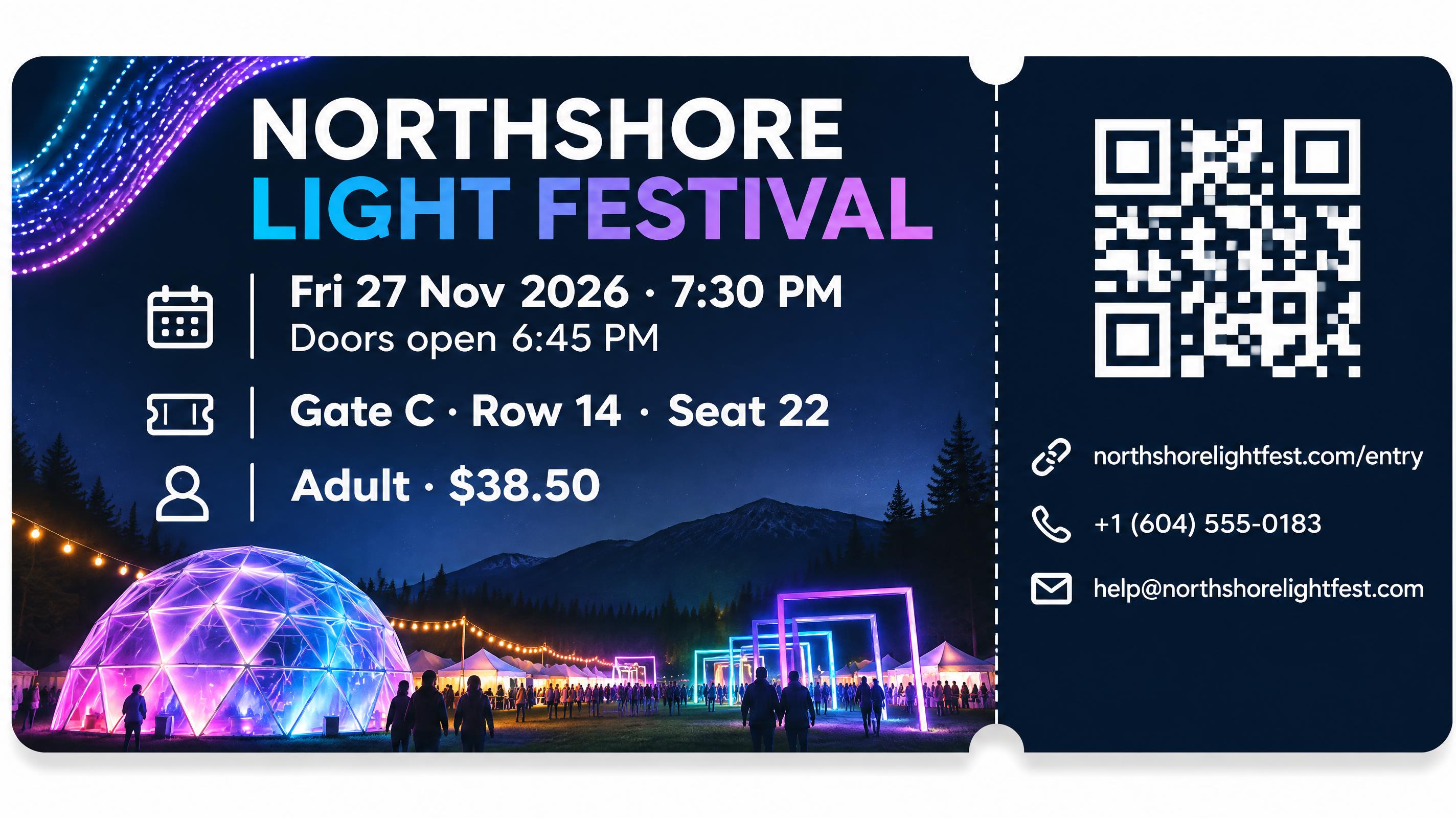
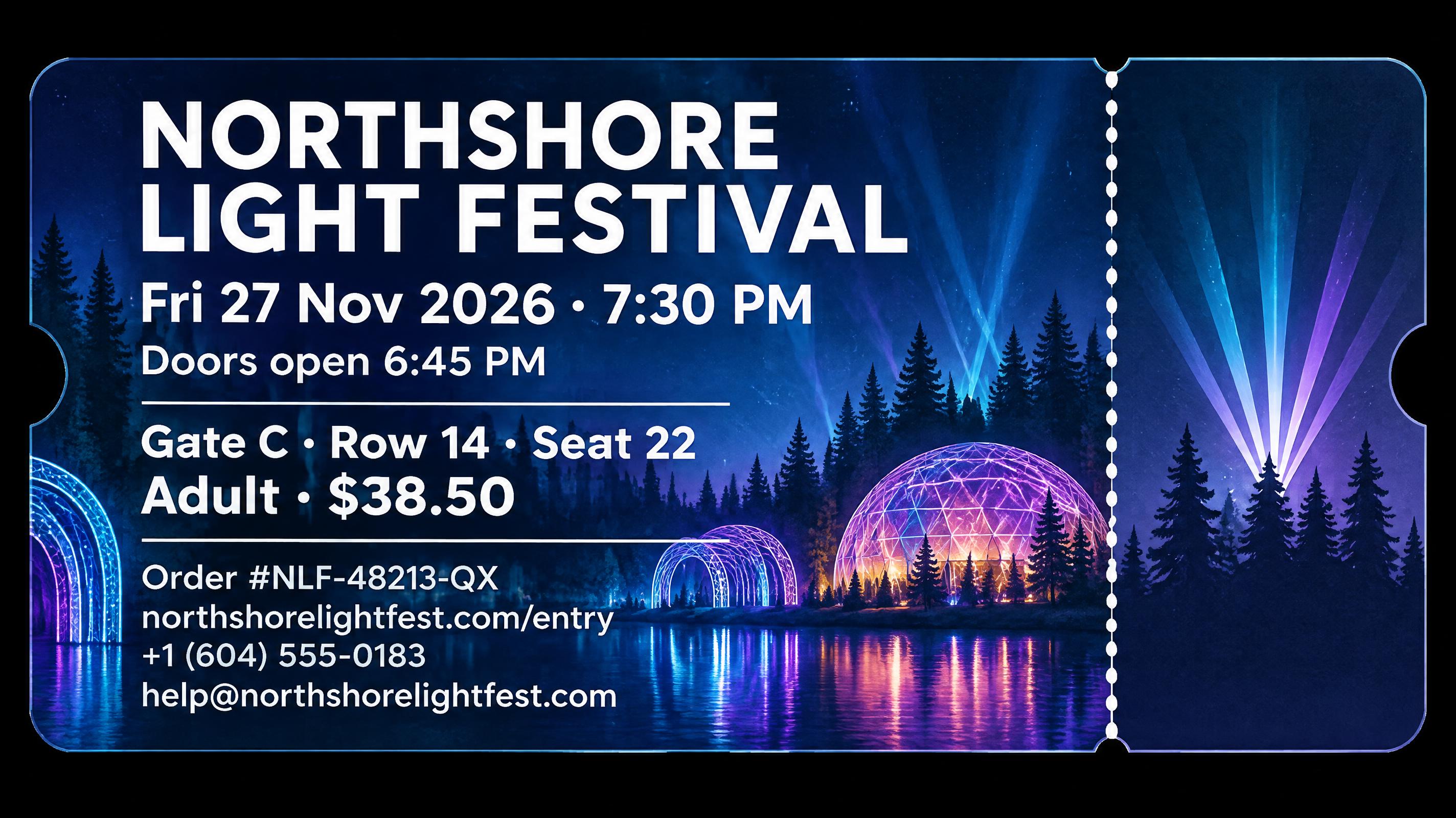
More output tokens at Medium, same accuracy. OpenAI's API returns a usage count with each image, including the output image tokens it used. In our measurements when we added GPT Image 2.6 to FontVibe, each 2K Medium image uses 1,690 output tokens with GPT Image 2.6 (Sunburst and Flare alike) and 512 with GPT Image 2.5 Sunburst, about 3.3 times as many; the count was the same for every image at that setting. At High and the settings above it, GPT Image 2.6 and GPT Image 2.5 Sunburst use the same number of output tokens (about 2,125 for a 2K High image). On these prompts the extra tokens did not change accuracy: GPT Image 2.5 Sunburst at Medium already had only one error in 30 images, so this test has little room to show an improvement. A test with longer or denser text than 189 words might separate GPT Image 2.6 from GPT Image 2.5 Sunburst.
Design. The GPT Image 2.6 images were scored by the same AI reviewer with the same rubric, again with the model names hidden, but in a separate round, so the main round's scores stay as published. To check the reviewer's scale, each round also included the same 30 GPT Image 2.5 Sunburst images. In that round, GPT Image 2.6 Sunburst averaged 8.03, GPT Image 2.6 Flare 7.58 and GPT Image 2.5 Sunburst 7.63. Compared with GPT Image 2.5 Sunburst prompt by prompt, both GPT Image 2.6 differences include zero (Sunburst +0.40, 95% range −0.10 to +0.91; Flare −0.05, range −0.54 to +0.43), so both GPT Image 2.6 variants are tied with GPT Image 2.5 Sunburst on design. The same 30 GPT Image 2.5 Sunburst images scored 7.91 in the main round and 7.63 in this one, so numbers from the two rounds should not be compared directly. That is why the results table says "tied" instead of giving a score.
Availability. As of November 10, 2026, GPT Image 2.6 is in preview on FontVibe: only FontVibe's own test accounts can select it, and it is not in the model menu for any other user yet. The images above are public and can be opened like any other; until GPT Image 2.6 opens, their Recreate button uses GPT Image 2 instead, an earlier OpenAI model that was not part of this test. We will update this post when it is available to everyone.
How much text before it breaks
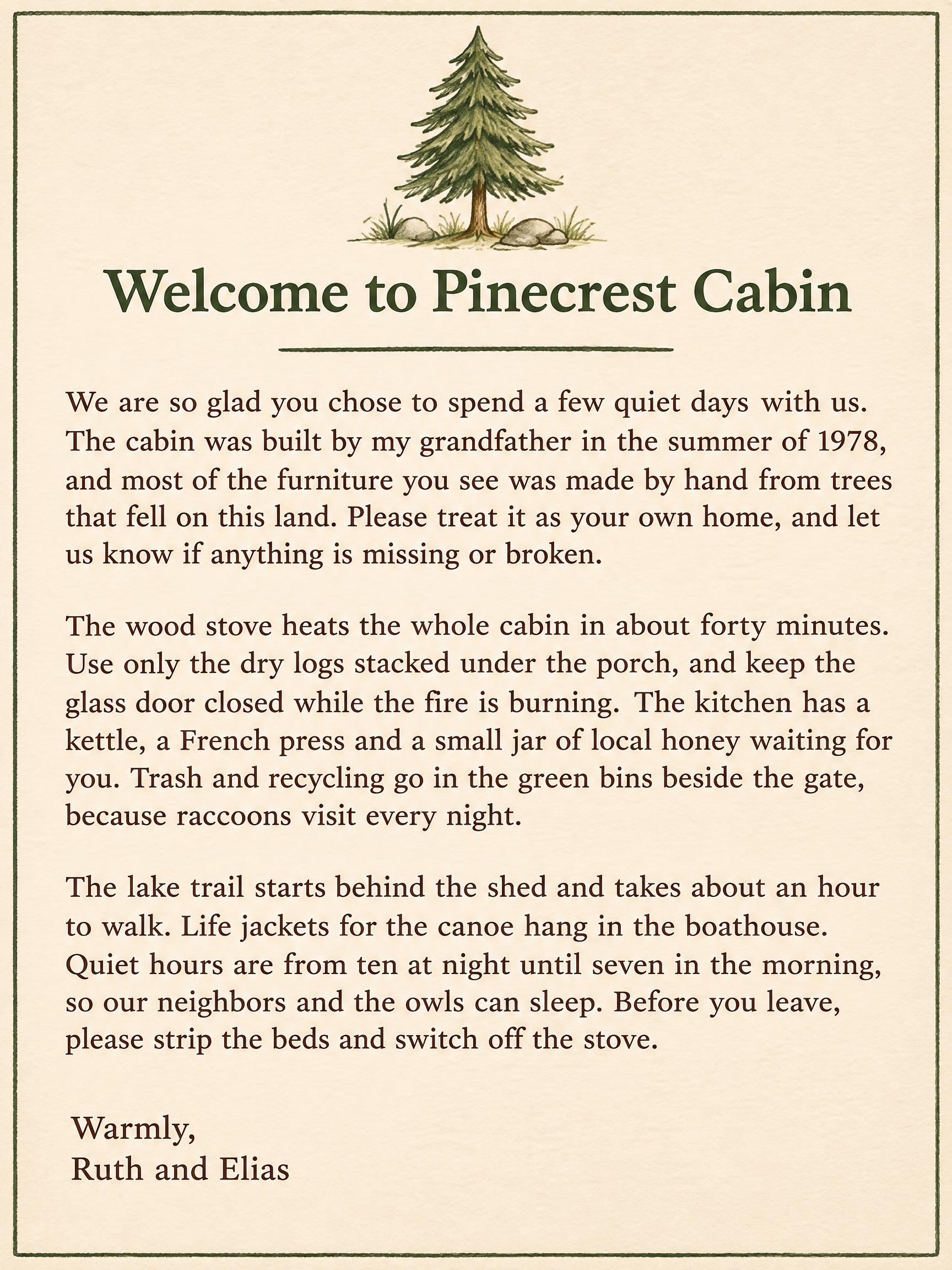
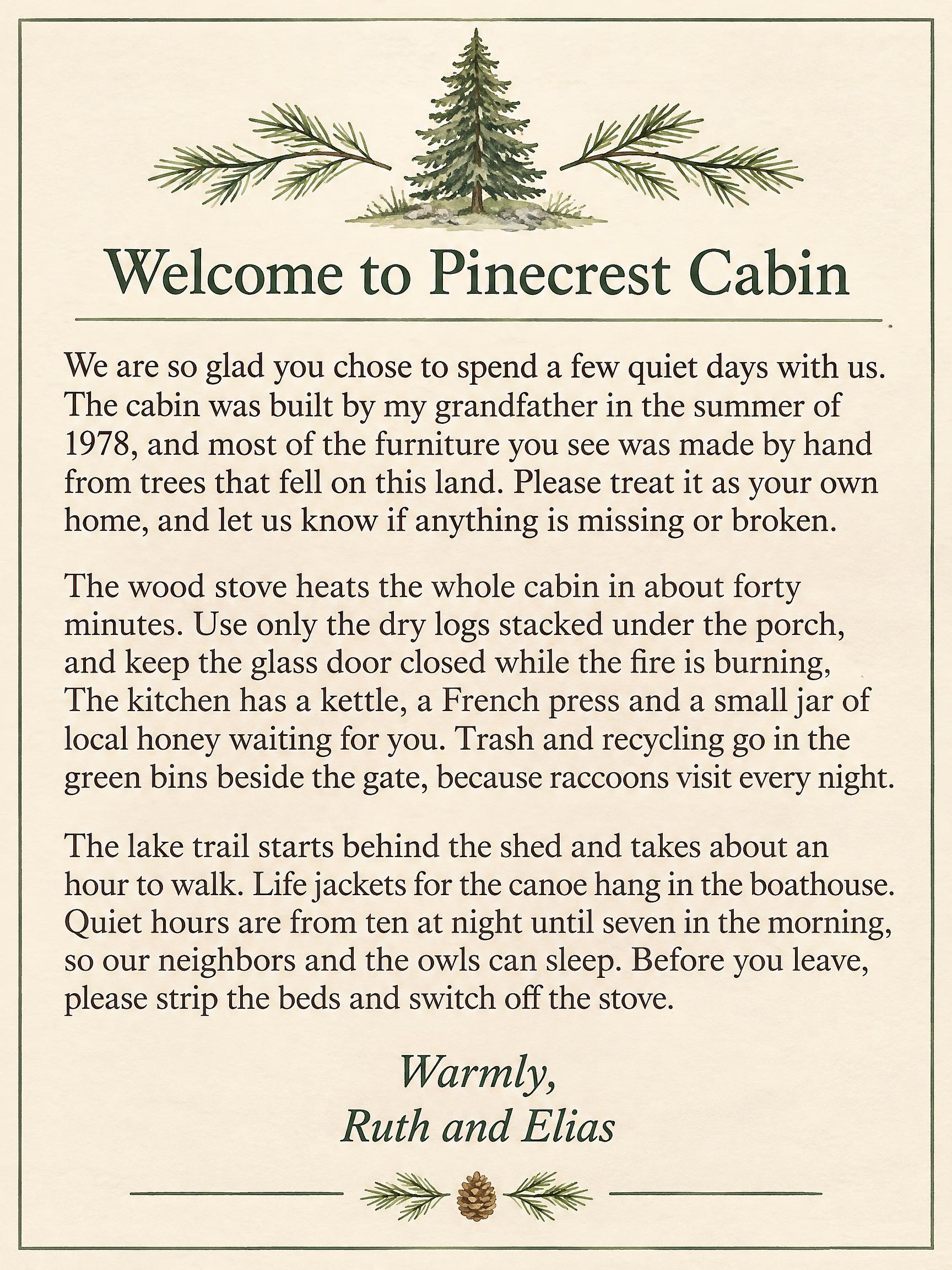
Jobs 1 to 5 are a ladder: five copy-the-text jobs in different formats, each with more text than the last, from a 26-word gig poster to a 189-word welcome letter. This part of the test asks one question: at what length does a model start getting words wrong?
| Words of required text | Job | GPT Image 2.5 Sunburst | Grok Imagine 2.0 | Seedream 5.0 Pro | Nano Banana 2.1 | Qwen Image 3.0 Pro |
|---|---|---|---|---|---|---|
| 26 | Gig poster | 3 / 3 | 3 / 3 | 3 / 3 | 3 / 3 | 3 / 3 |
| 34 | Café menu | 3 / 3 | 3 / 3 | 3 / 3 | 3 / 3 | 3 / 3 |
| 72 | Garden notice | 3 / 3 | 3 / 3 | 3 / 3 | 3 / 3 | 2 / 3 |
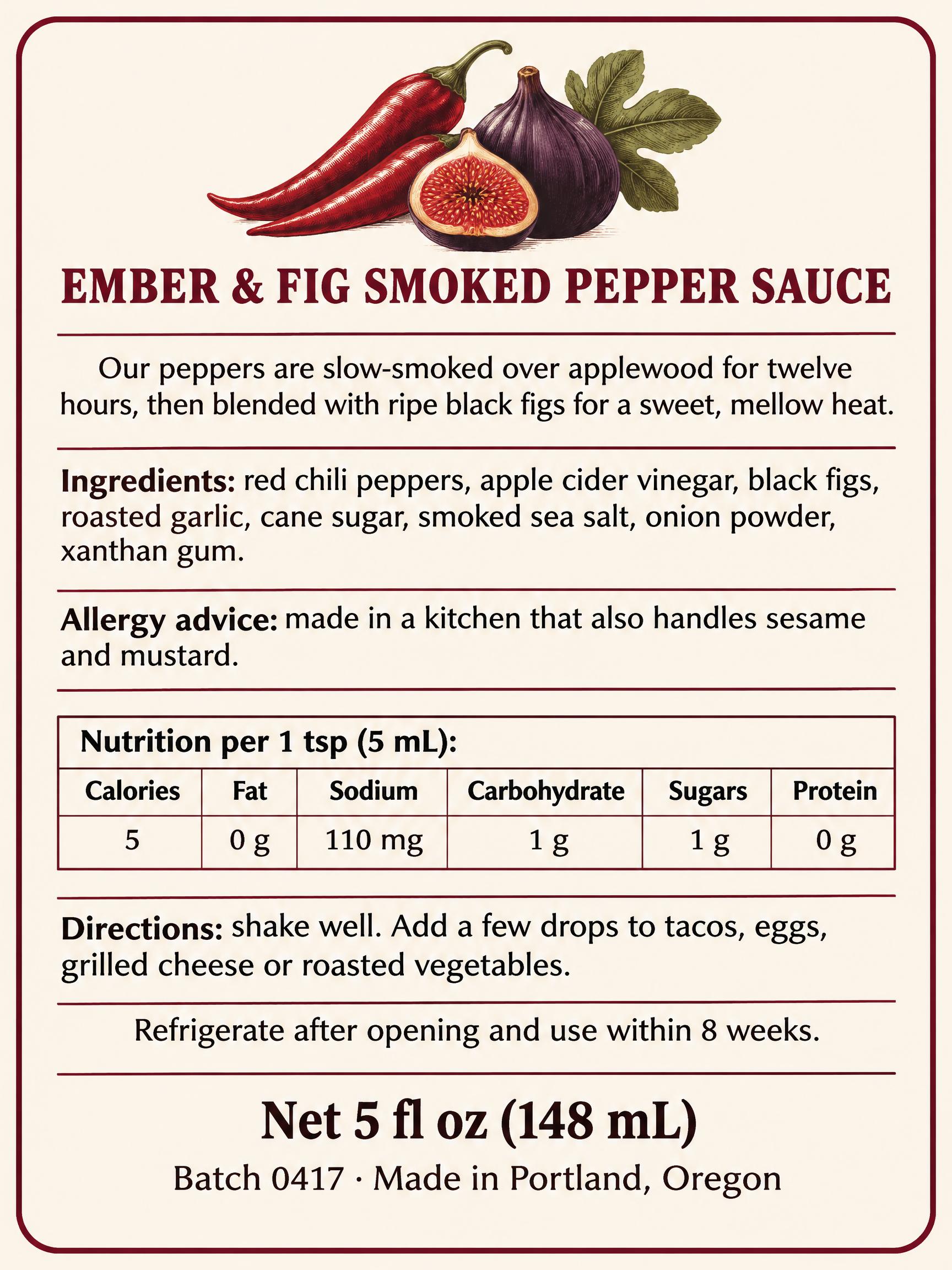
| 117 | Hot sauce back label | 3 / 3 | 3 / 3 | 3 / 3 | 3 / 3 | 0 / 3 |
| 189 | Cabin welcome letter | 3 / 3 | 3 / 3 | 3 / 3 | 3 / 3 | 0 / 3 |
Each cell is error-free images out of 3.
Four models held all the way up. GPT Image 2.5 Sunburst, Grok Imagine 2.0, Seedream 5.0 Pro and Nano Banana 2.1 wrote the 189-word letter, three paragraphs and 11 sentences, without a single wrong character in all 12 of their images. Their limit is somewhere above 189 words. We did not test longer text in this round, so we cannot say where it is.
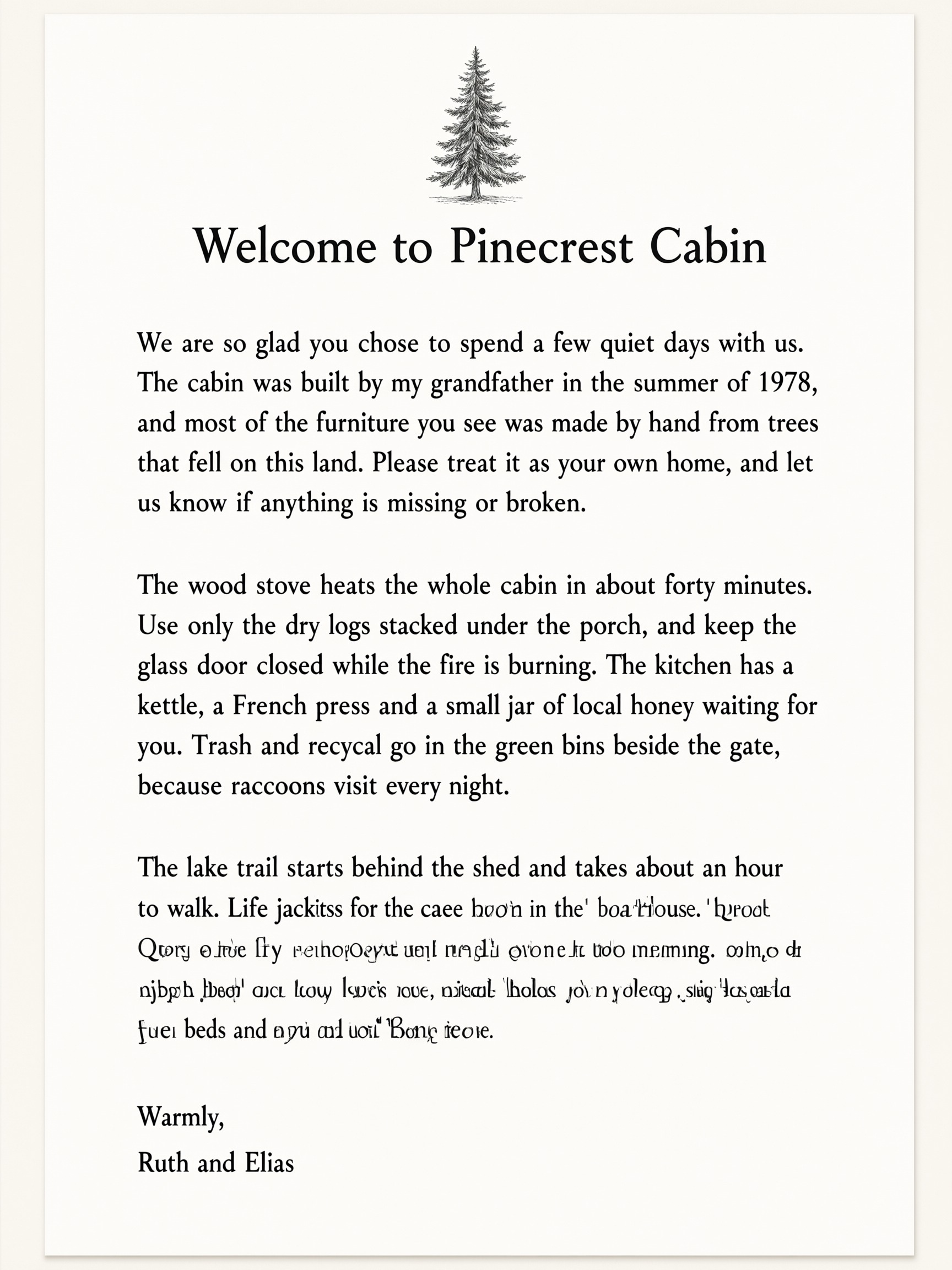
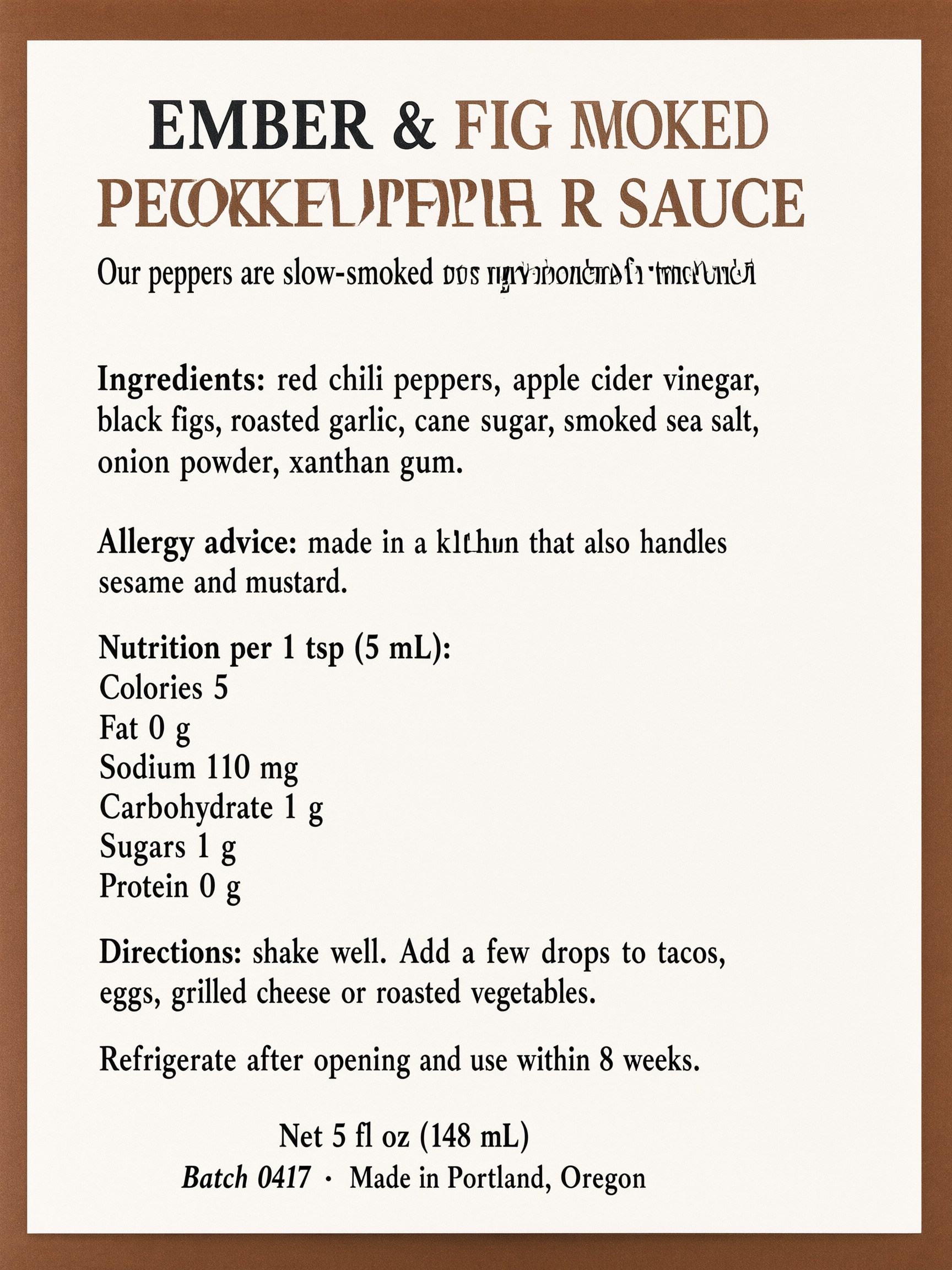
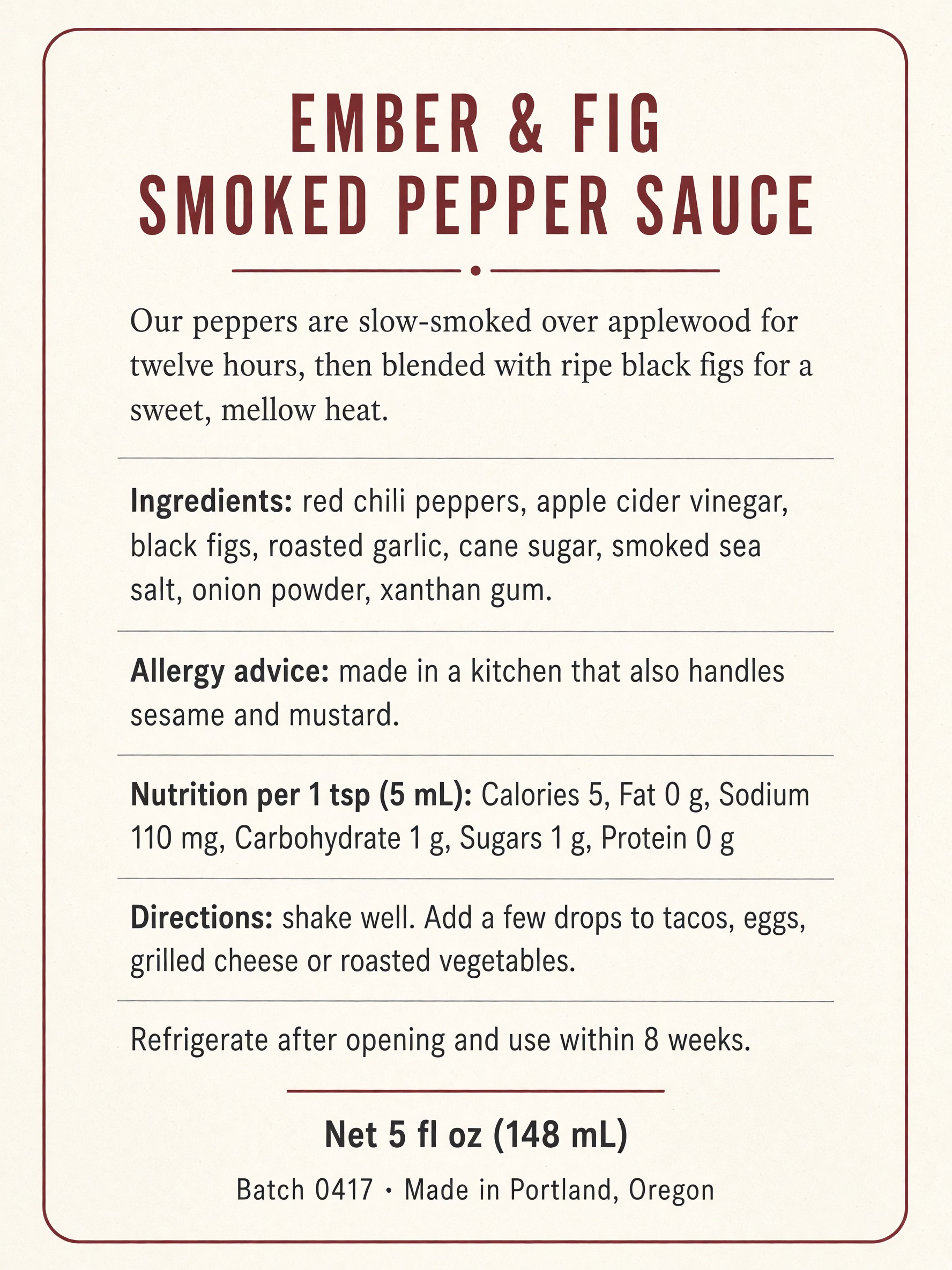
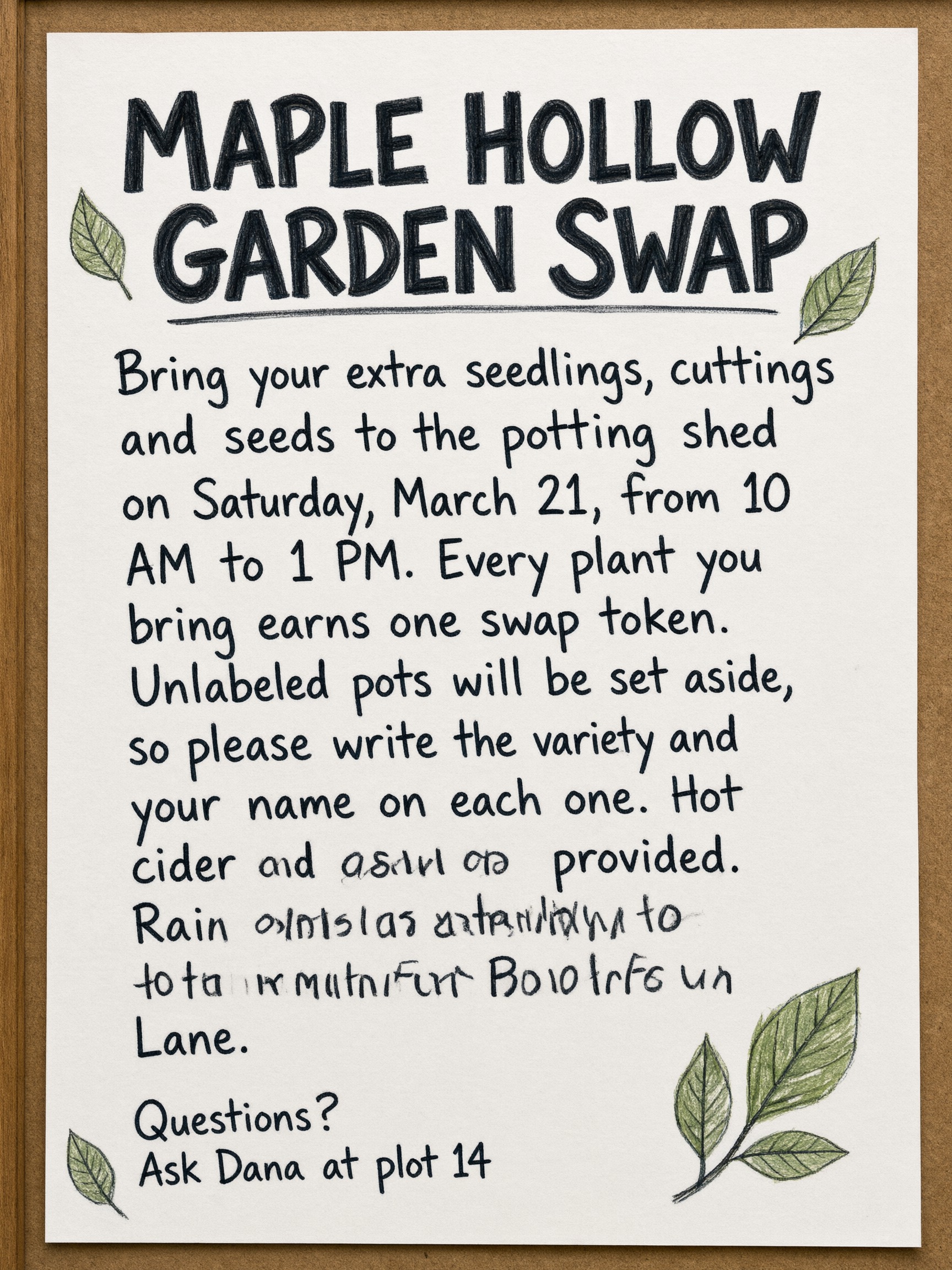
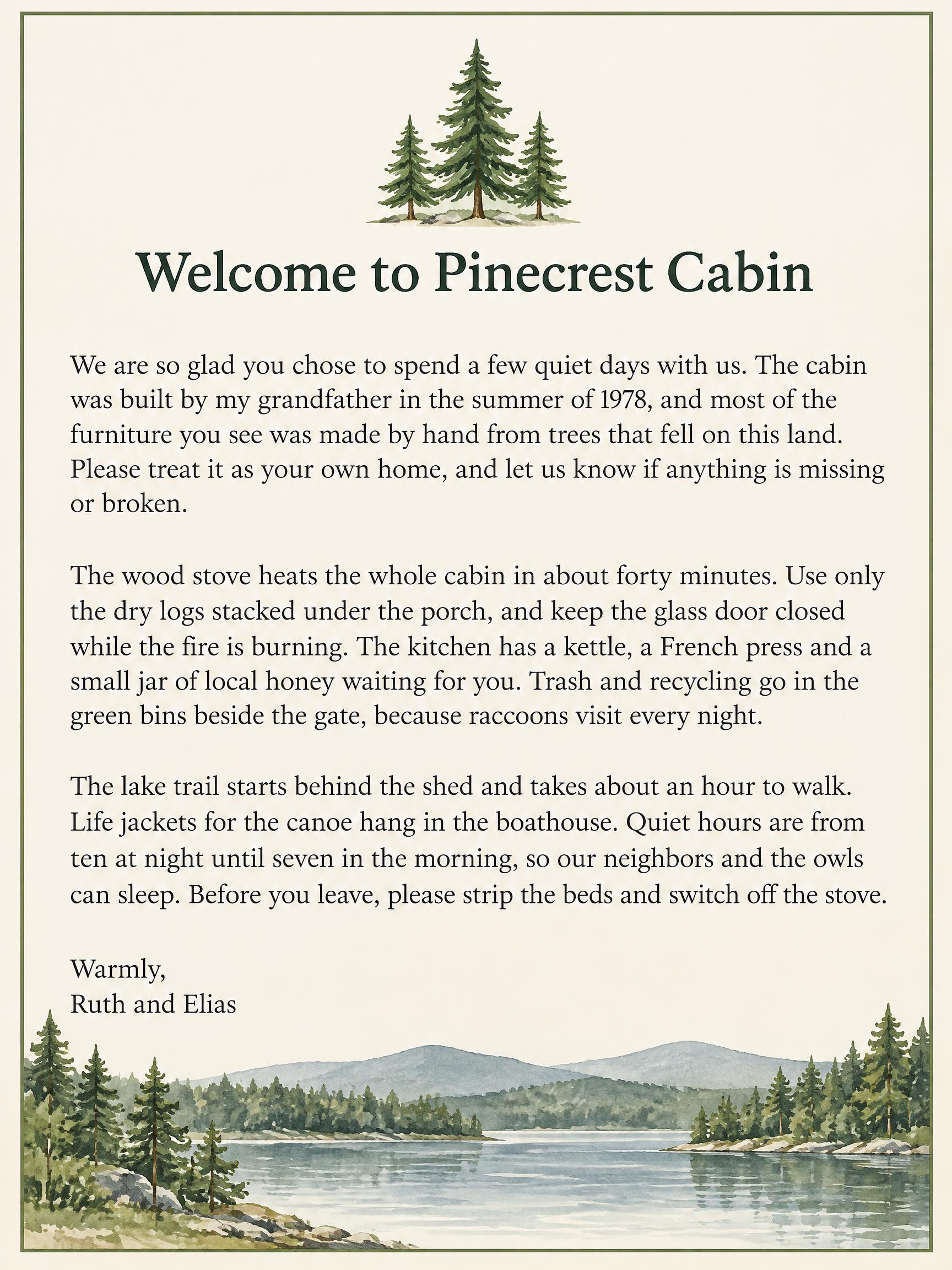
Qwen Image 3.0 Pro started breaking at 72 words and failed every image from 117 words up. At 72 words, one of its three garden notices had parts of two sentences garbled. At 117 and 189 words, all six of its images had errors. Some were single-letter slips, such as "seame" for "sesame" and "nL" for "mL", but in two images whole sentences dissolved:
The errors are not from a cut-off prompt
Jobs 4 and 5 have the two longest prompts in the test, 878 and 1,206 characters. Alibaba's Qwen-Image API reference says earlier Qwen-Image models accept up to 800 or 1,300 tokens and cut off the rest, and the Qwen Image 3.0 API reference recommends a maximum of 4,500 tokens. Our prompts are under all of these, but we still checked whether a cut-off could explain the errors. If the end of the prompt had been dropped, the last lines would be missing from the image. They are not: all six images have the final lines (the batch number on the label, the signature on the letter). The errors are in the middle of the text.
In DIY mode, FontVibe sends your prompt to the model as written, with no shortening or rewriting: the DIY prompt box takes up to 4,500 characters, and Qwen's own prompt rewriting is switched off. If you use Qwen Image 3.0 Pro on FontVibe for a long block of text, expect the same kind of errors we found here.
Numbers, made-up words, accents and Chinese
Jobs 6 to 10 each test one kind of text that a model cannot guess from word shapes.
Ticket: dates, order number, web address, phone, email
The ticket asked for 9 lines, including "Order #NLF-48213-QX", "northshorelightfest.com/entry", "+1 (604) 555-0183" and an email address.
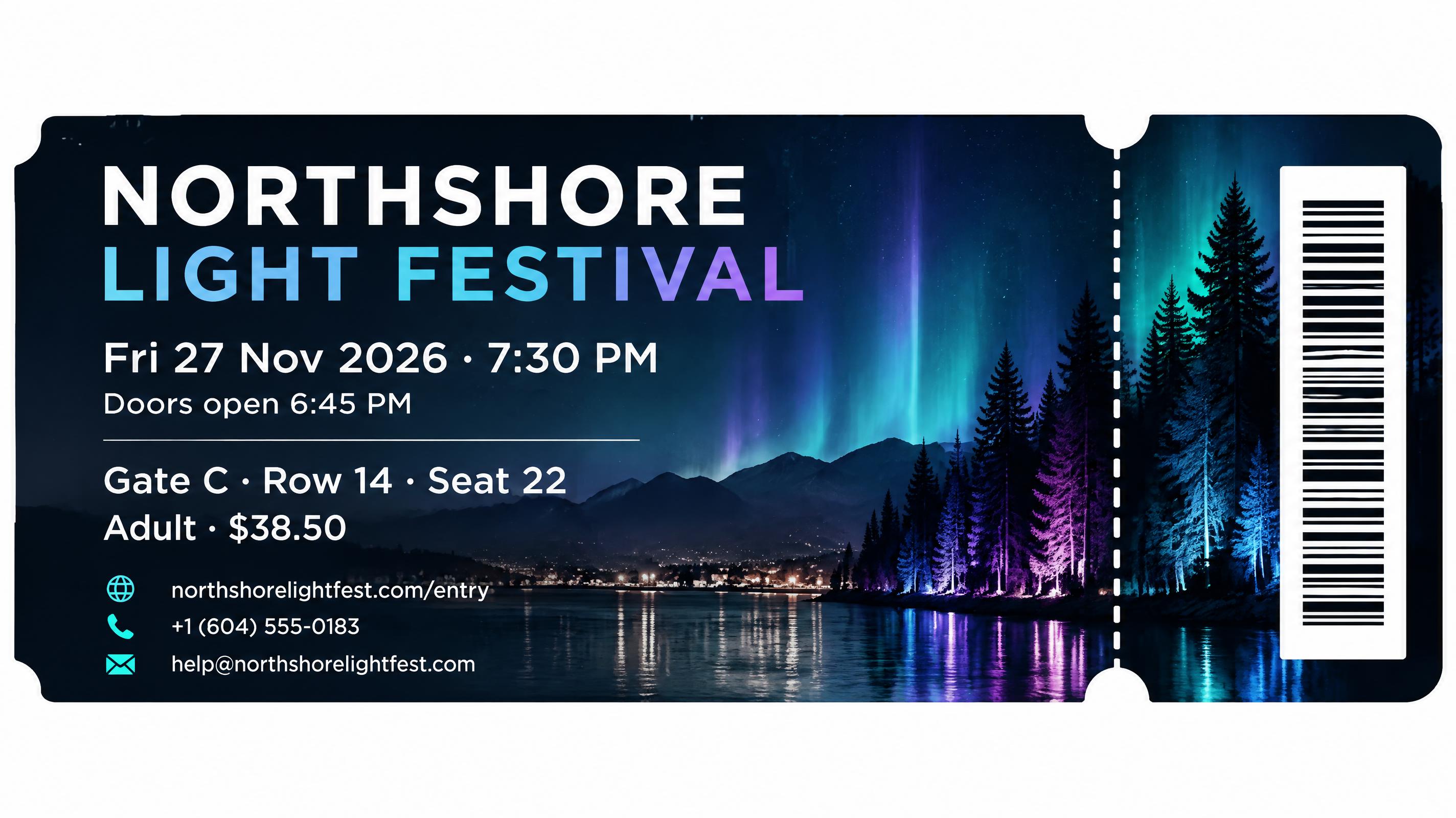
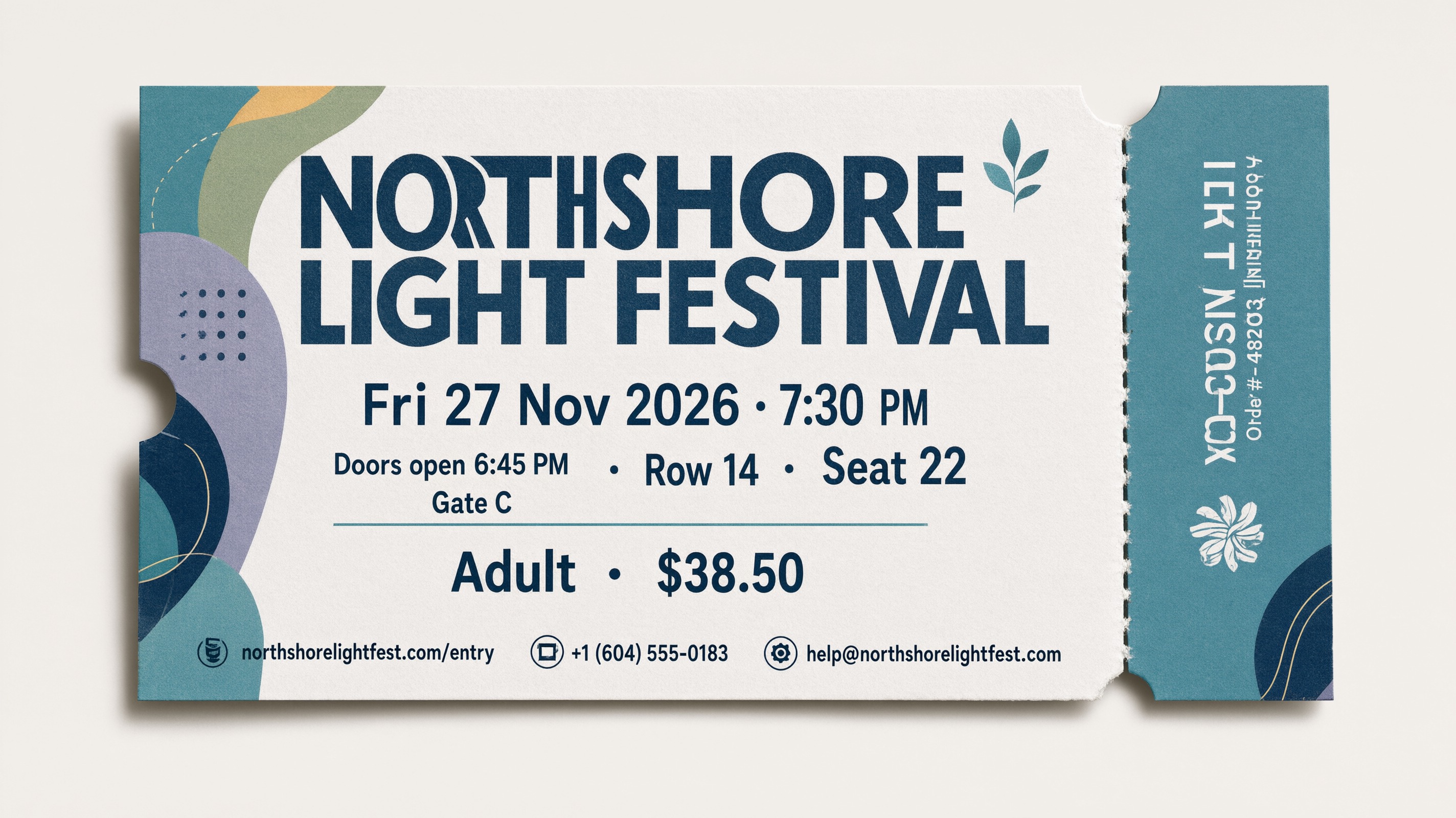
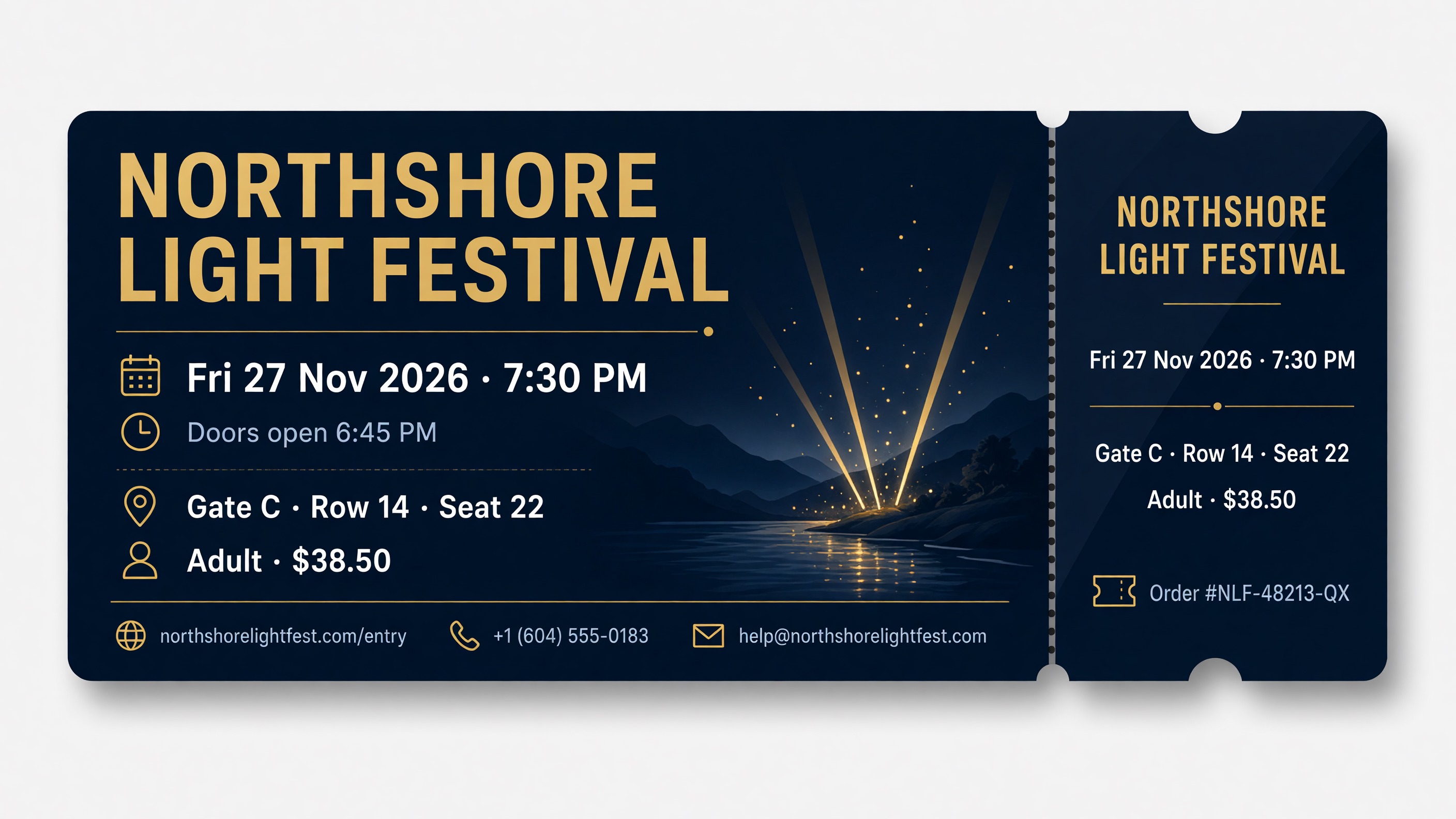
Grok Imagine 2.0, Seedream 5.0 Pro and Nano Banana 2.1 got all 9 lines right in all 3 tickets. The web address and email were correct in all 15 tickets. The order number, a mix of letters and digits with no pattern, was the line that failed for both GPT Image 2.5 Sunburst and Qwen Image 3.0 Pro. In another Qwen ticket, all 9 lines were correct but the stub carried two extra lines of unreadable marks.
Price list: 26 numbers in a table
The bike shop price list has 7 rows of service, time and price, with prices that follow no pattern ($18.75, $29.65, $64.25) and times like "2 hr 15 min". A wrong letter can be guessed from the shape of a word; a wrong digit cannot.
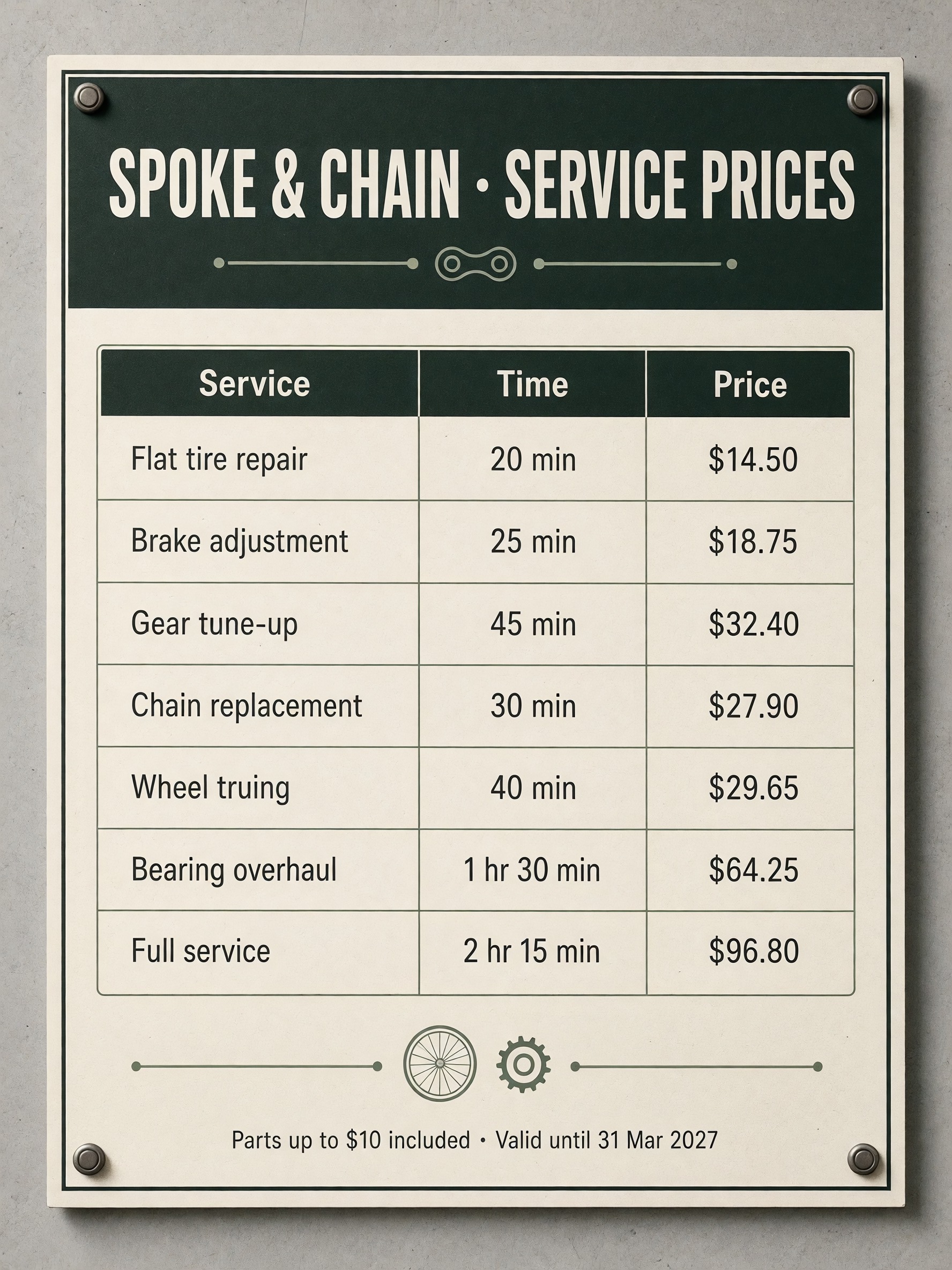
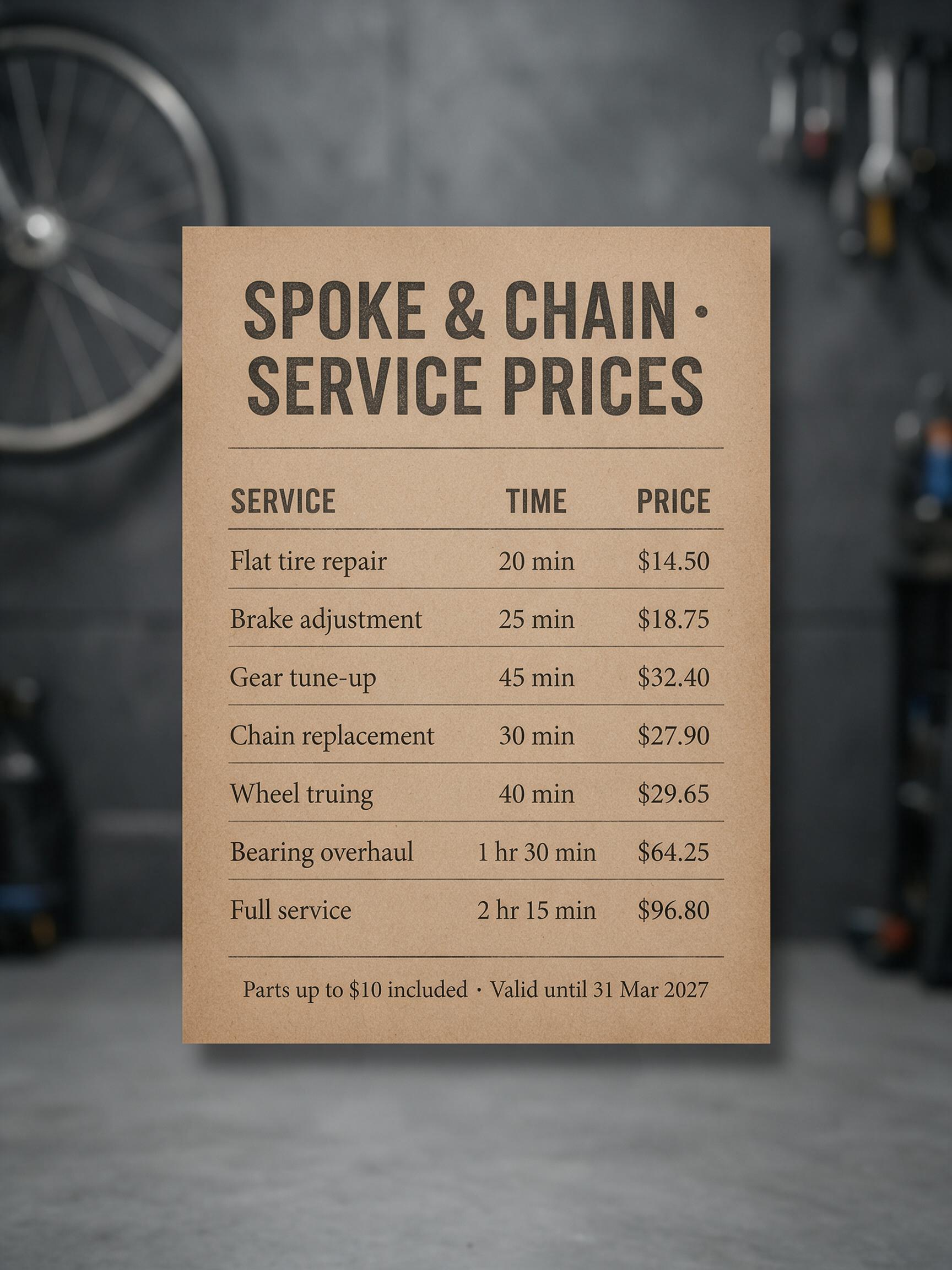
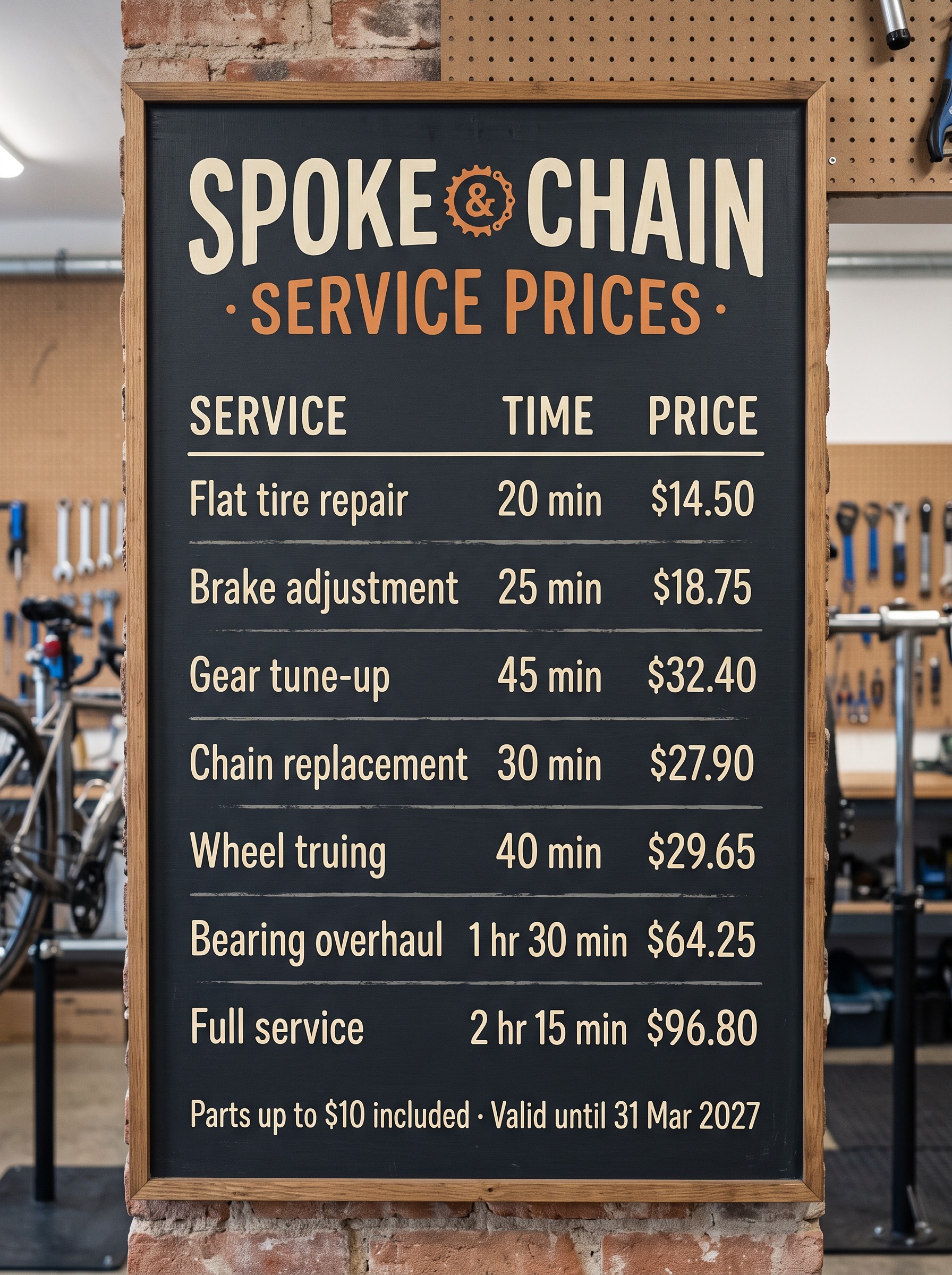
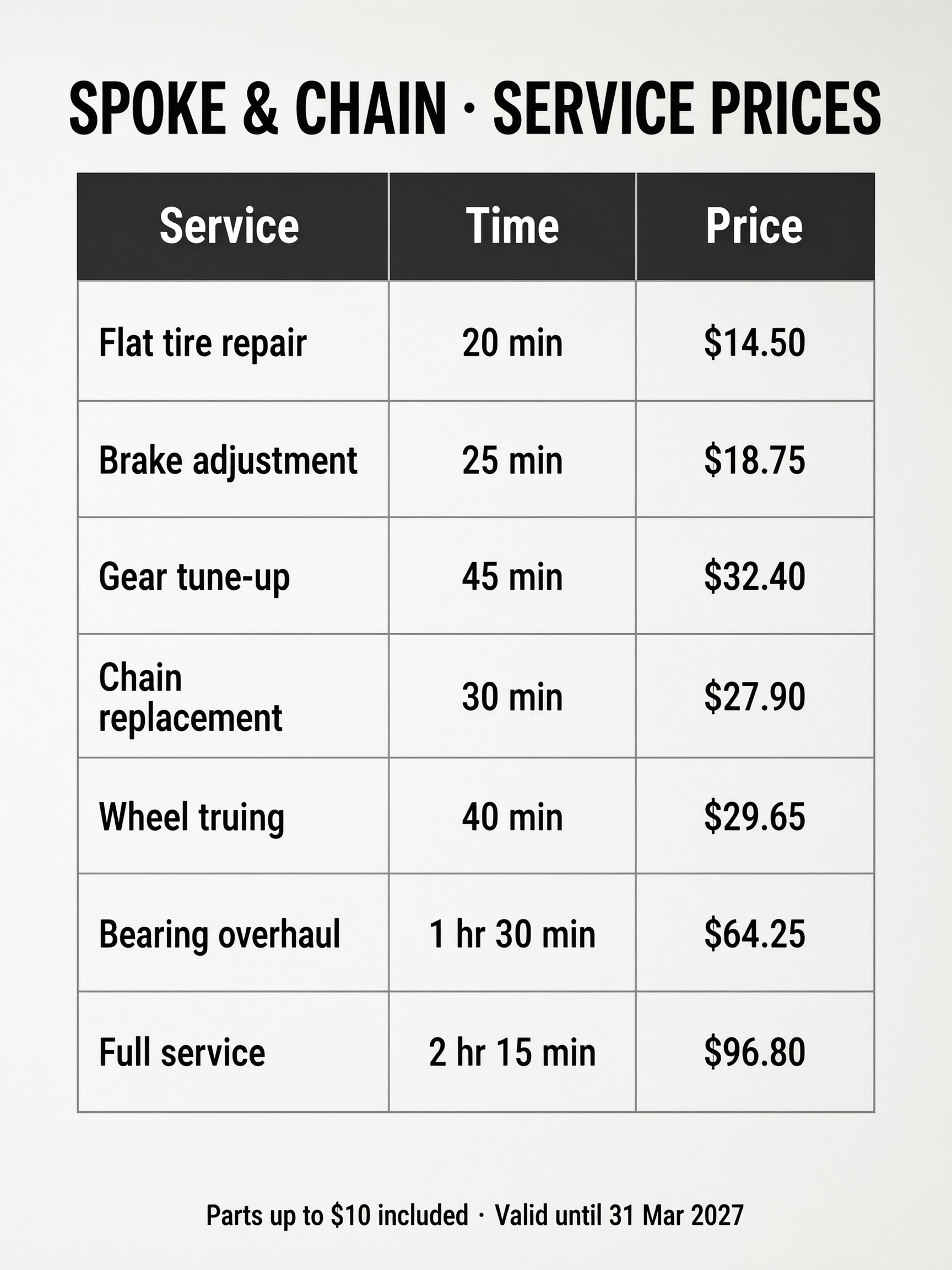
All five models wrote every row correctly in all 15 images, decimal points included. This was the job we expected to separate the models, and it did not: all five handled this 60-word table. For a printable menu or price board as a preset, see the chalk text style.
Made-up words
The soap shop sign used invented names, "BRIMWHISTLE APOTHECARY", "Zarnoveth Clay", "Quillabrine Mint", "Sorvelic Oat Crumble" and "Thornvale", so a model cannot correct them toward a real word it knows.
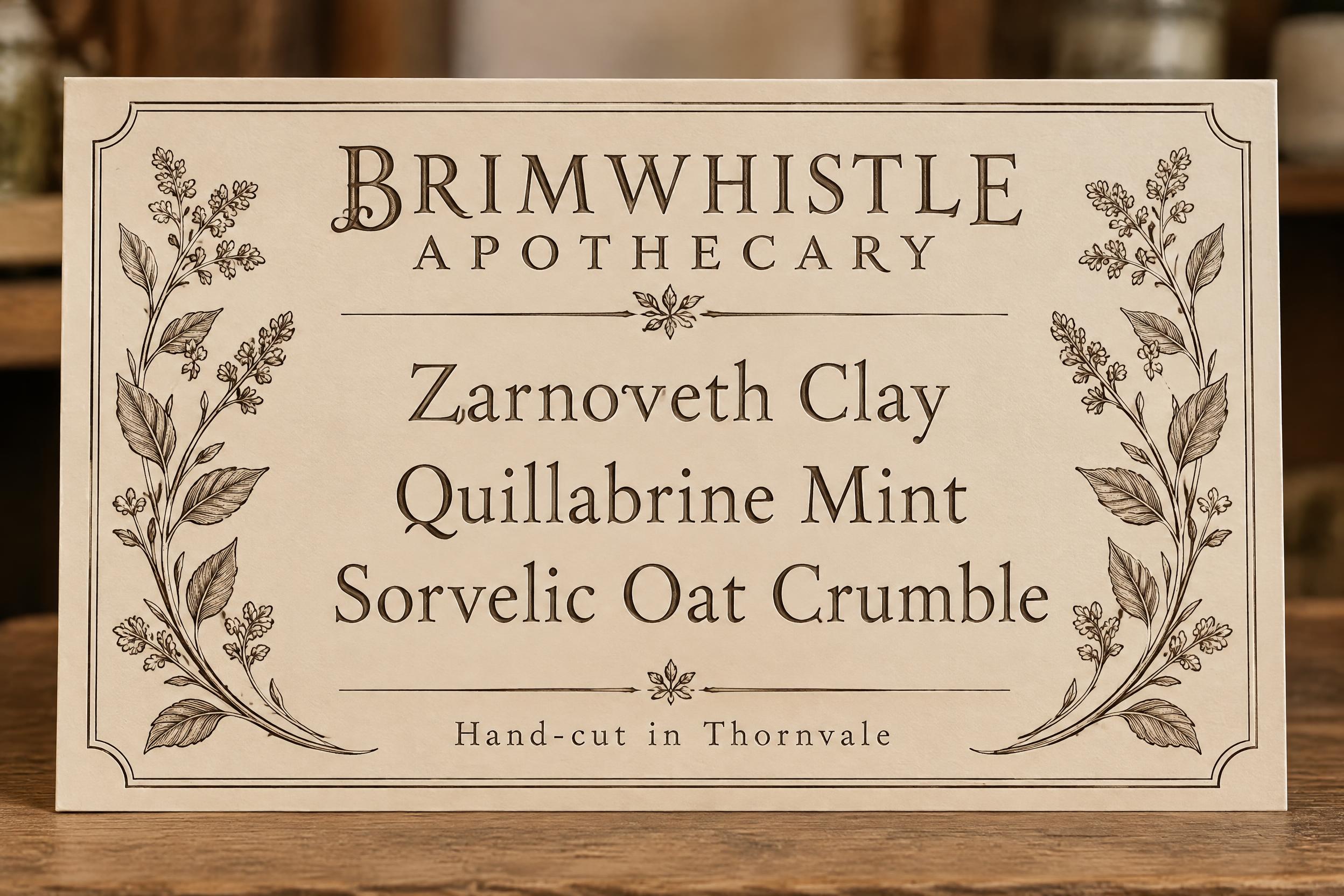
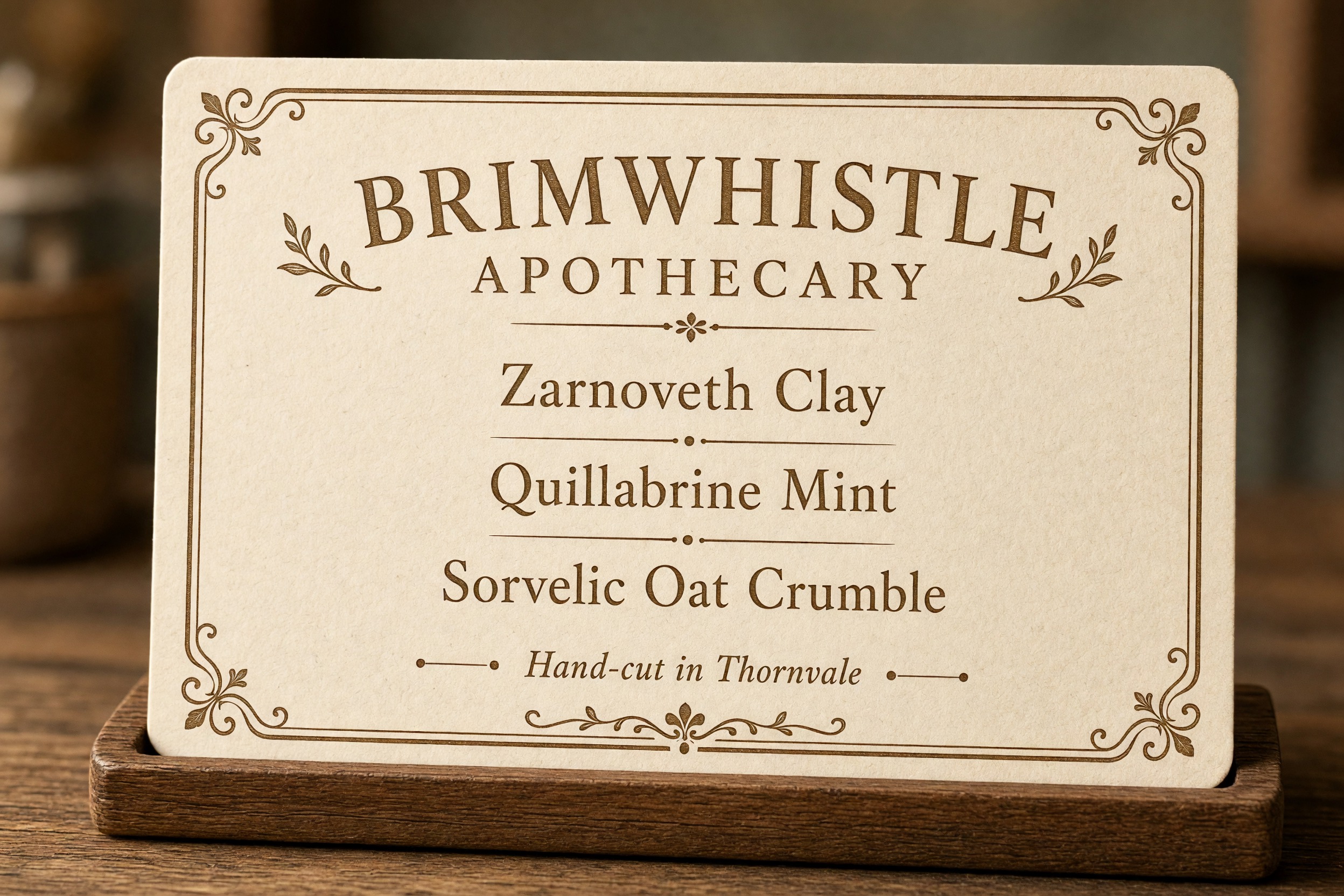
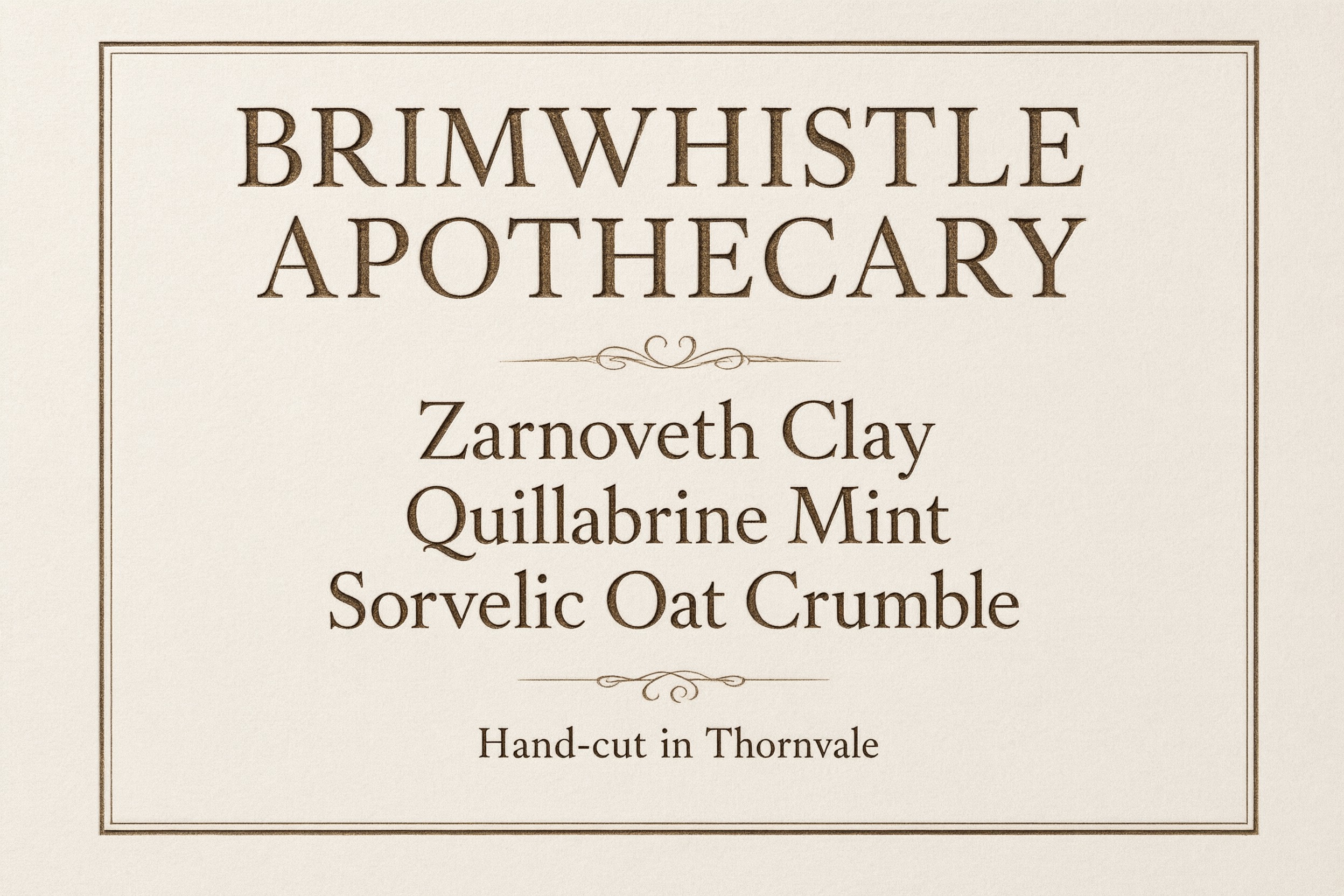
All 15 soap shop signs with invented names were spelled correctly. None of the five models "fixed" an invented word into a real one.
Spanish, Portuguese and German accents
The bakery window had three lines: "Pequeñas delicias con café recién hecho", "Pão de queijo à moda da avó" and "Frühstück für Groß und Klein".
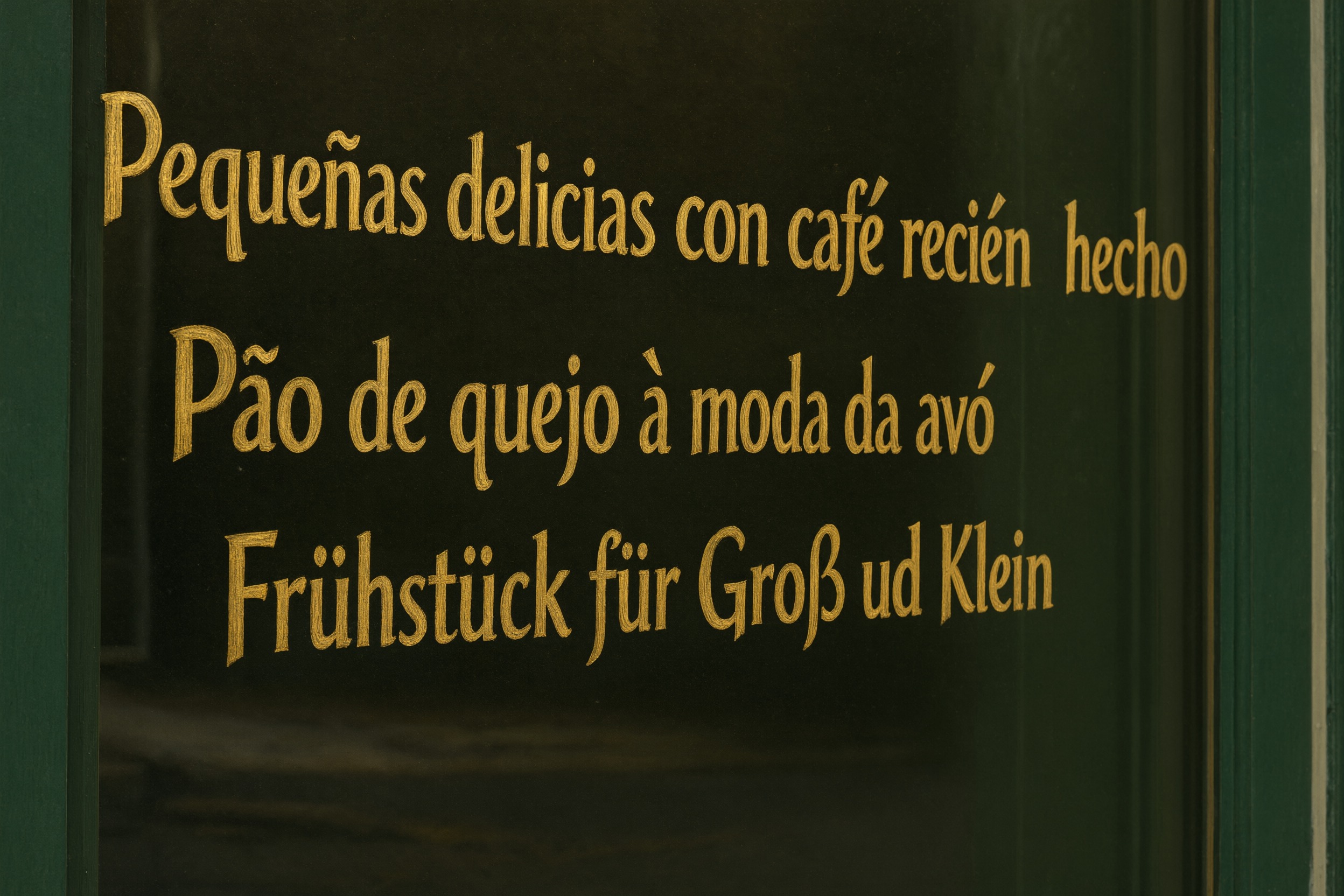
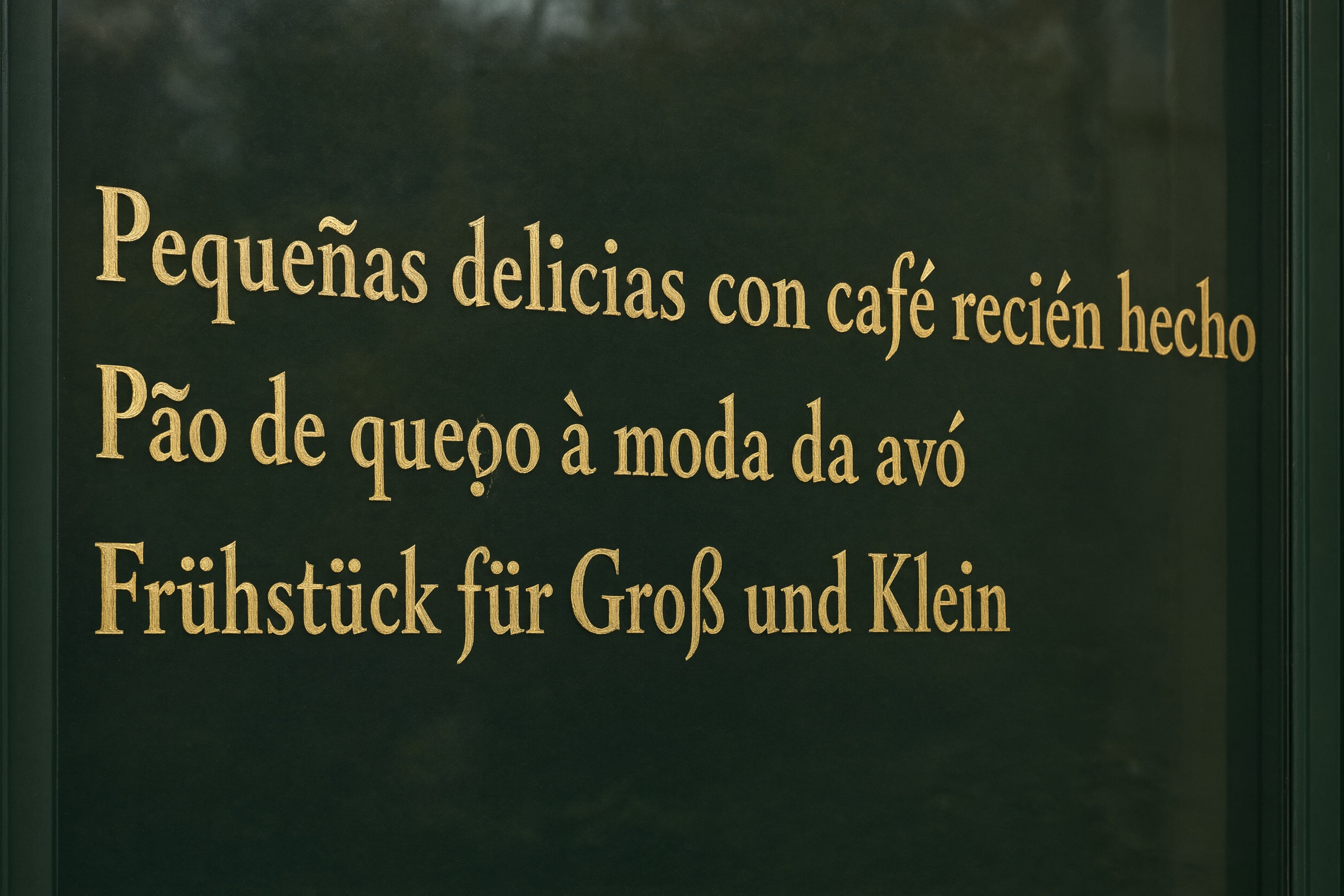
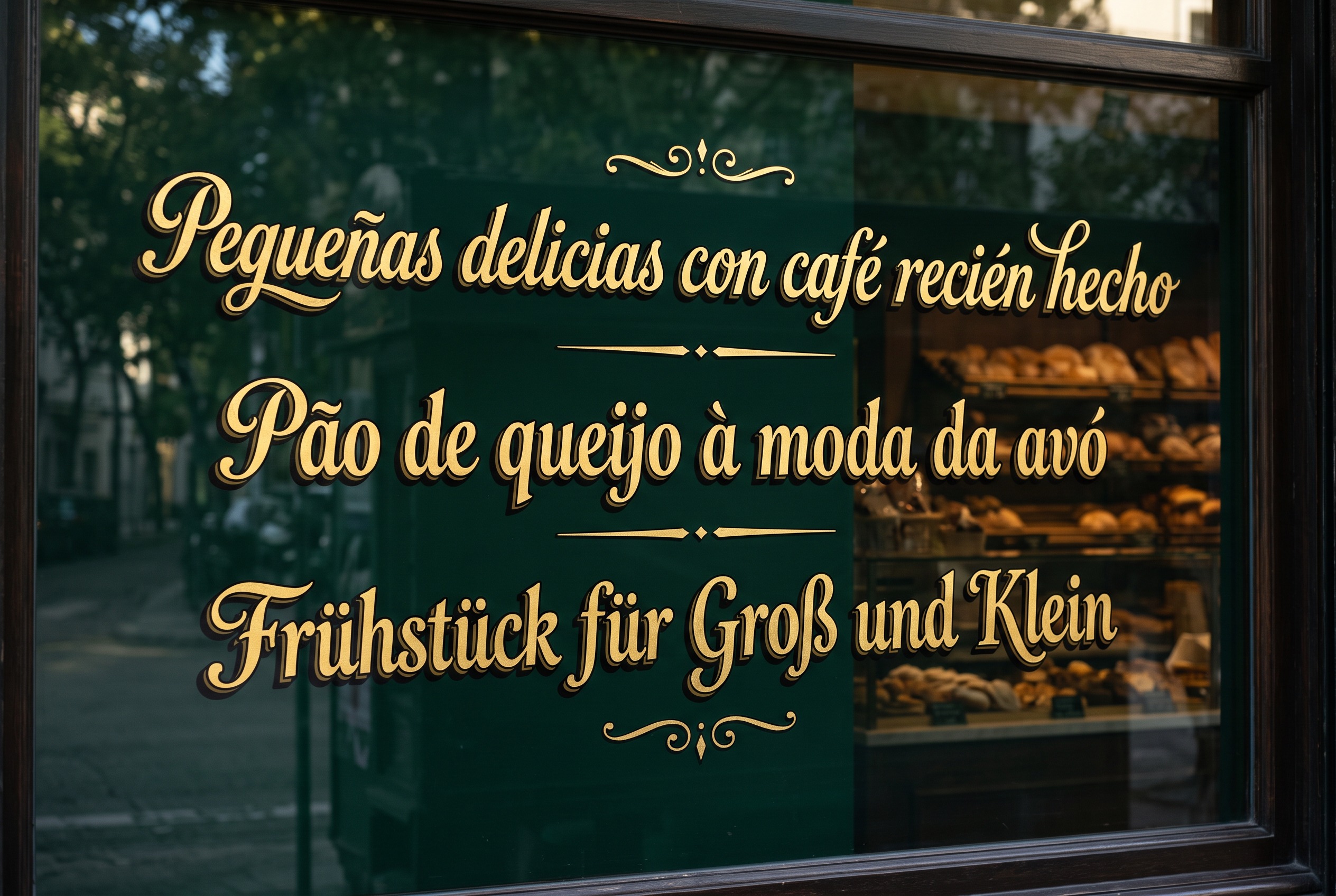
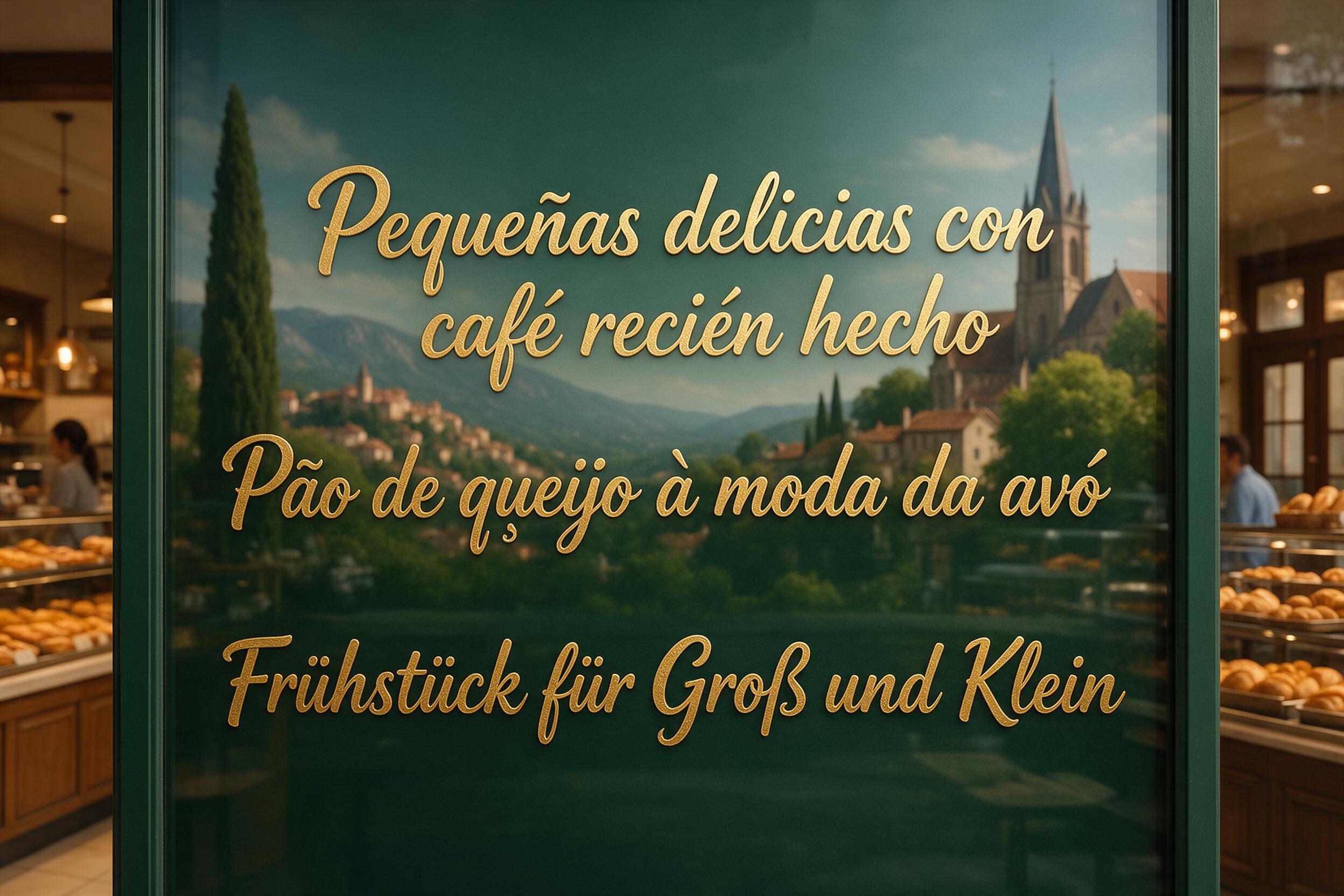
Every model kept every accent and the ß. GPT Image 2.5 Sunburst, Grok Imagine 2.0, Seedream 5.0 Pro and Nano Banana 2.1 made no errors in their 12 bakery window images. Qwen Image 3.0 Pro had 1 or 2 characters wrong in each of its 3 images, all in ordinary letters rather than accented ones ("recién" became "reeién" in image 107866).
One Chinese and one Japanese sentence
The tea shop card asked for one sentence in Simplified Chinese (30 characters) and one in Japanese (28 characters), 58 in all, counting full-width punctuation.
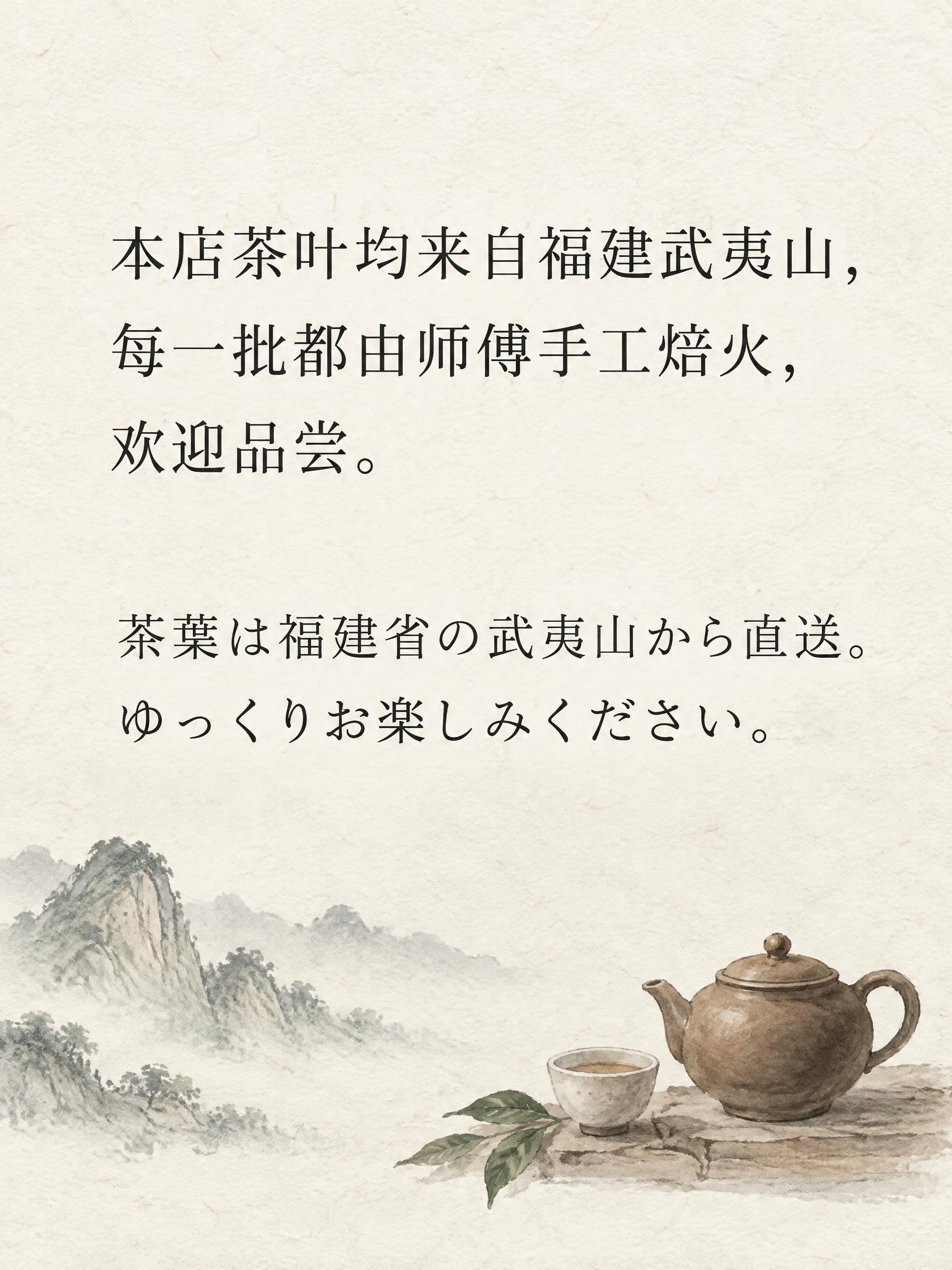
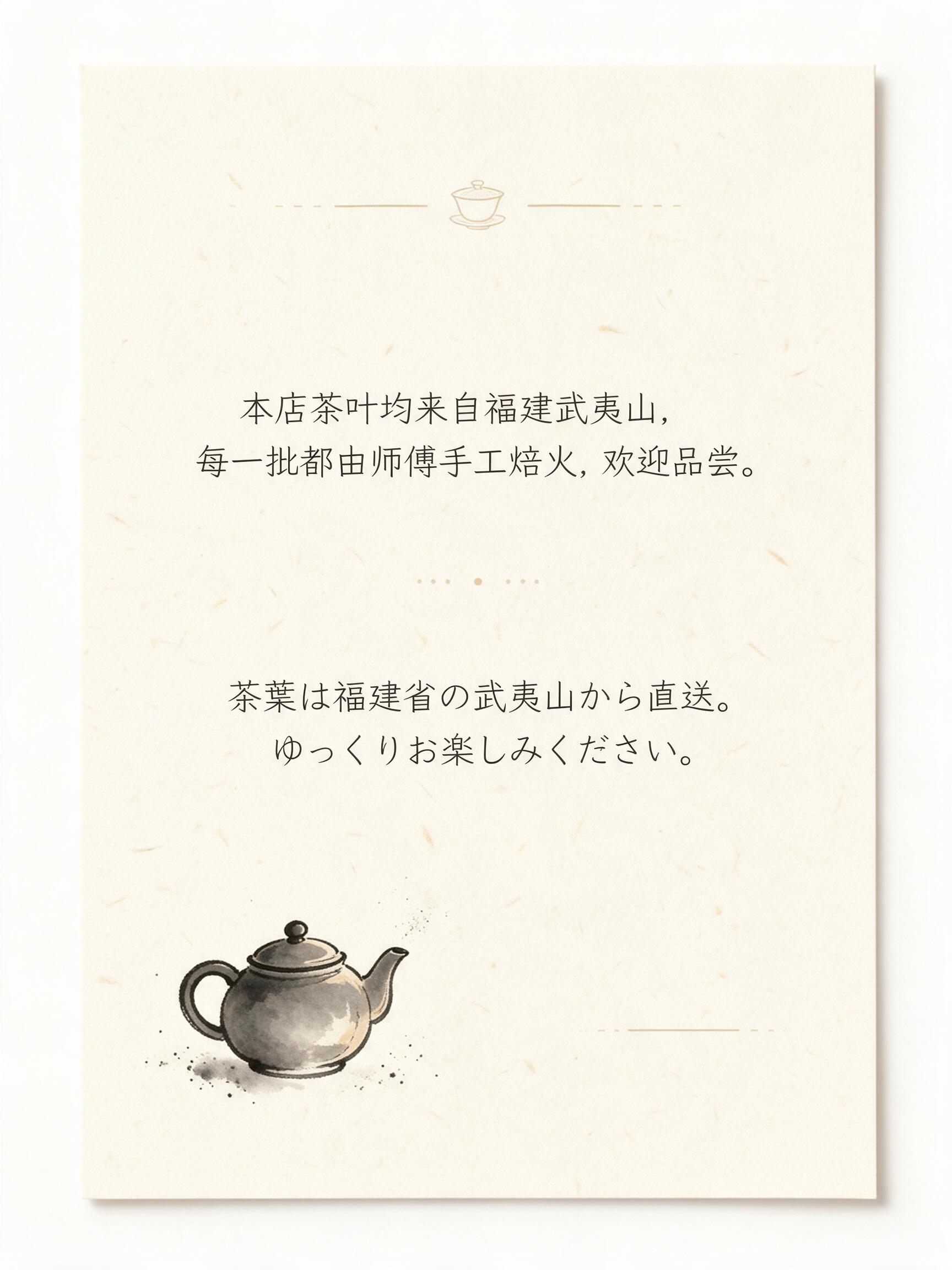
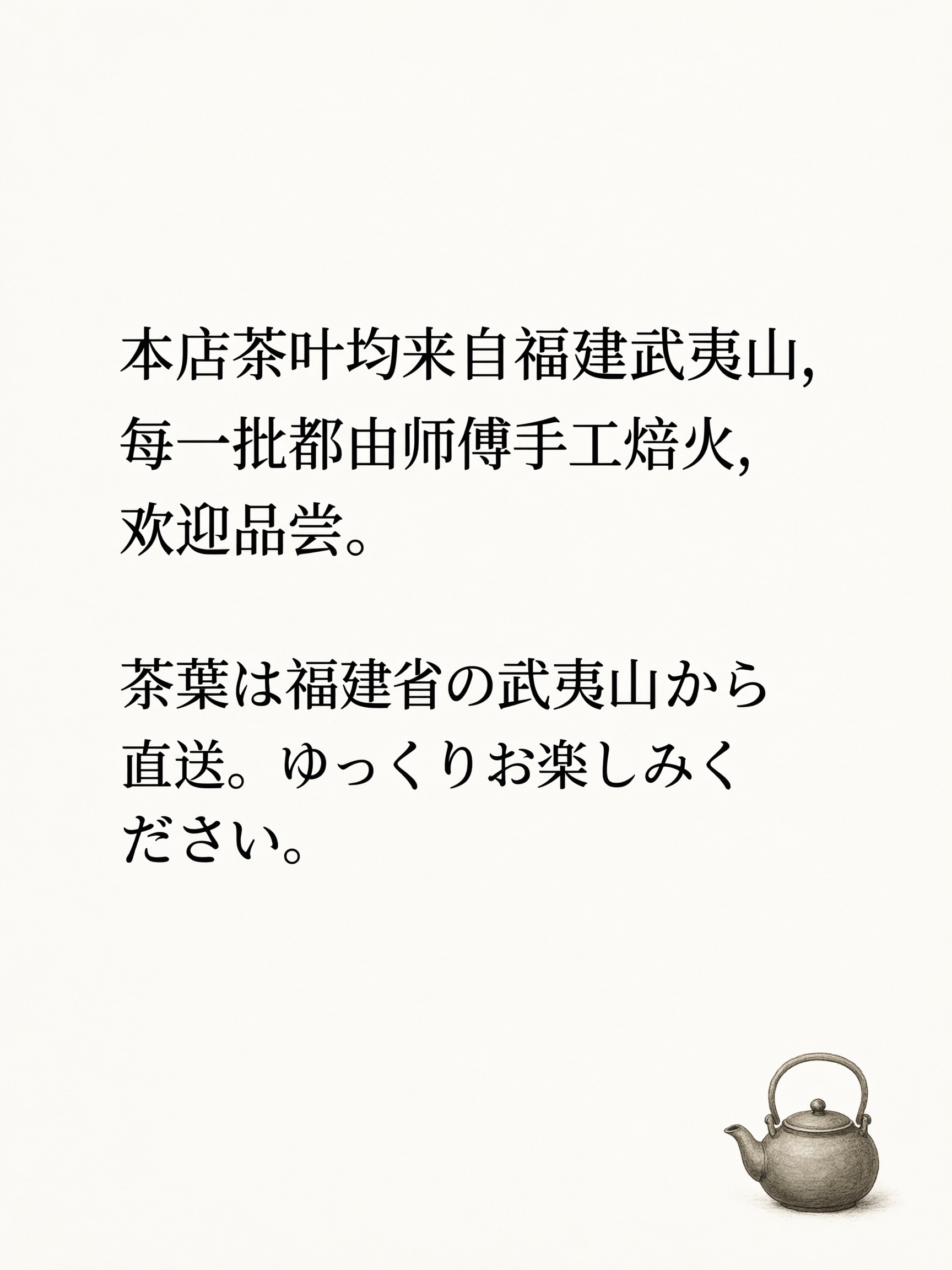
All 15 Chinese and Japanese tea shop cards had every character correct, including 傅, 焙 and 夷 in Chinese and 葉 and 楽 in Japanese. Some models used half-width commas, which counts as punctuation, not an error. This job only tests whether a model can copy one short sentence in each of these scripts; it says nothing about longer Chinese or Japanese text.
The same poster as our October tests
Job 1, the BURNING ORCHARD gig poster, uses the exact prompt from our Grok Imagine 2.0 test and Qwen Image 3.0 test in October. Job 2, the café menu, repeats a prompt from the Grok test.
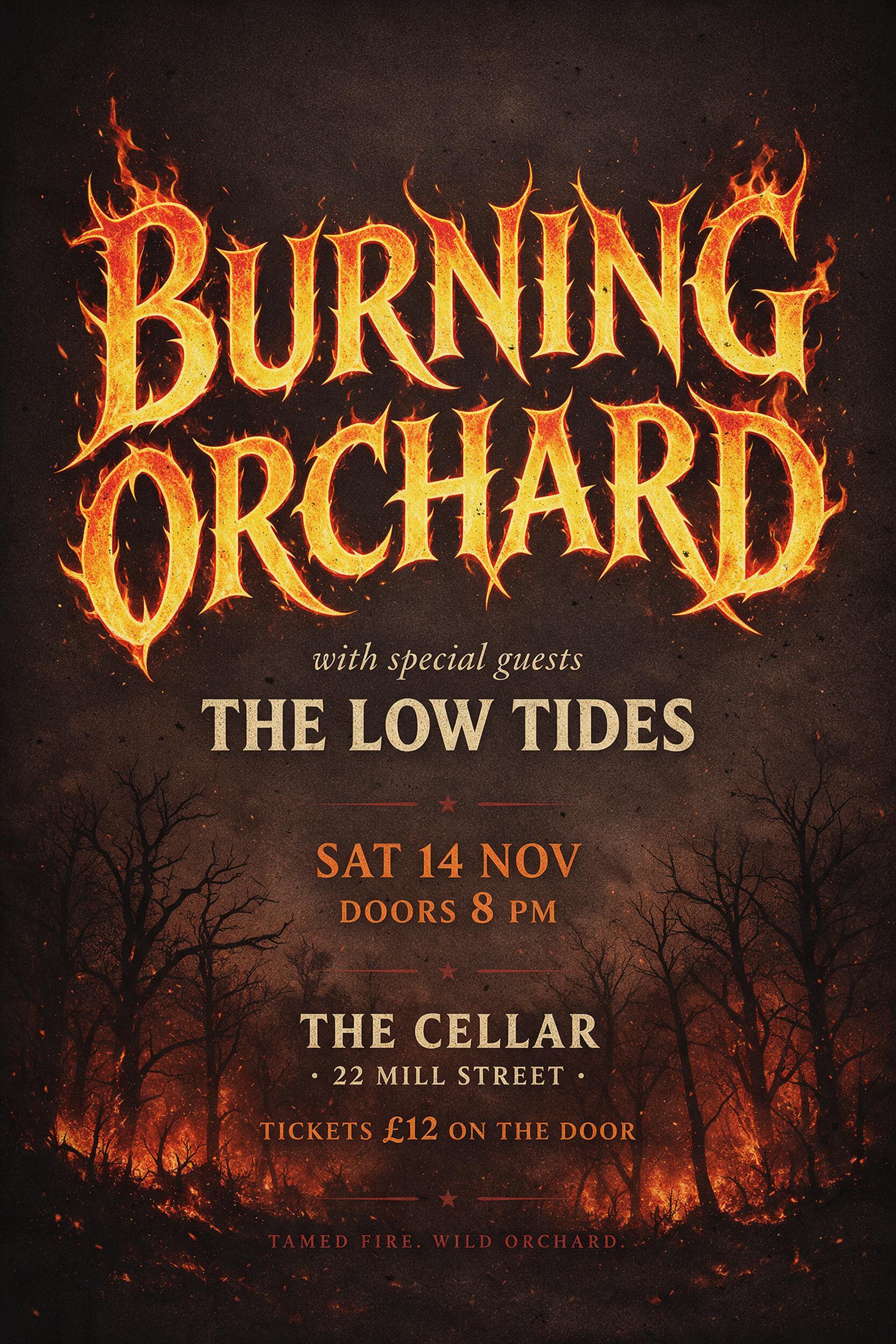
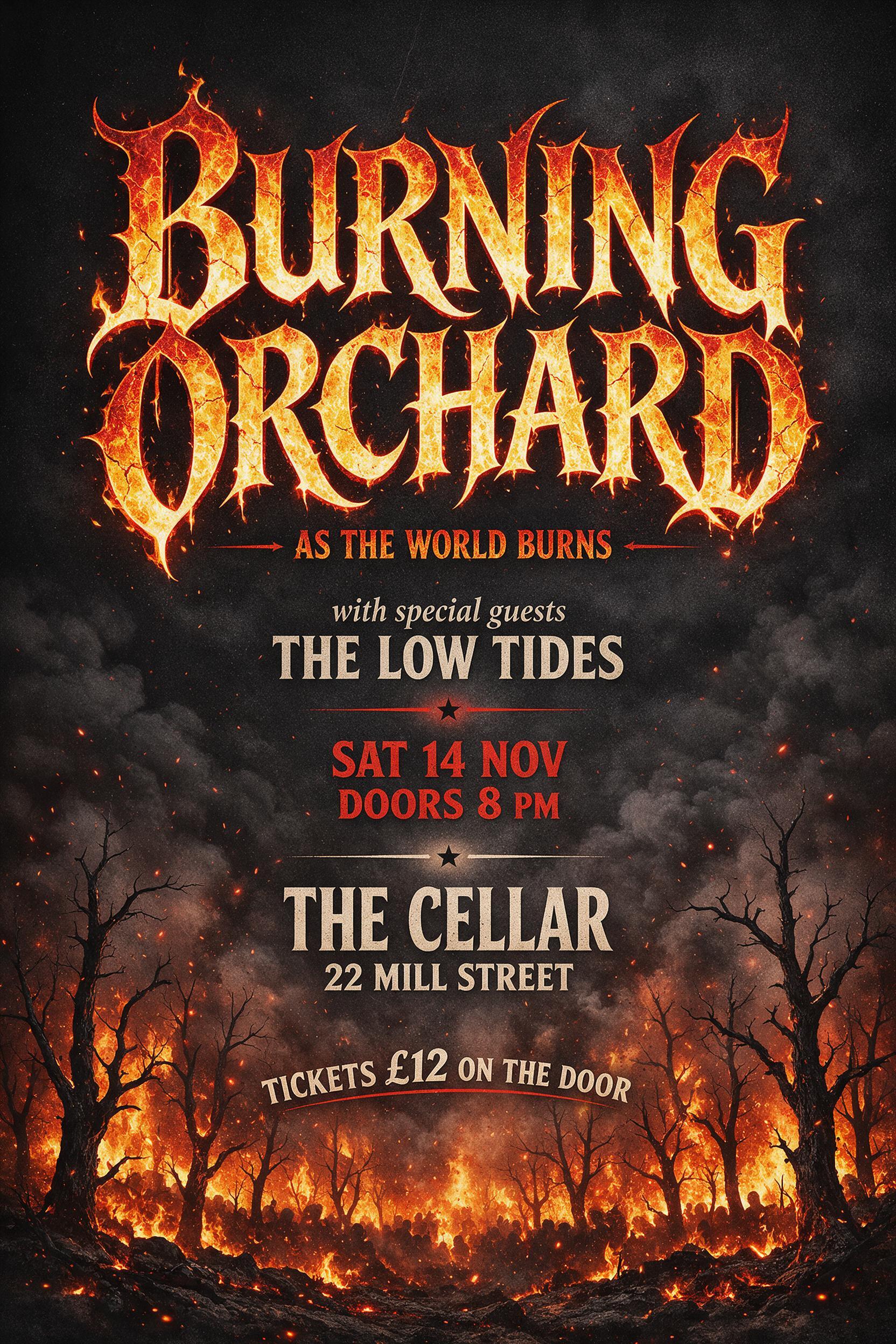
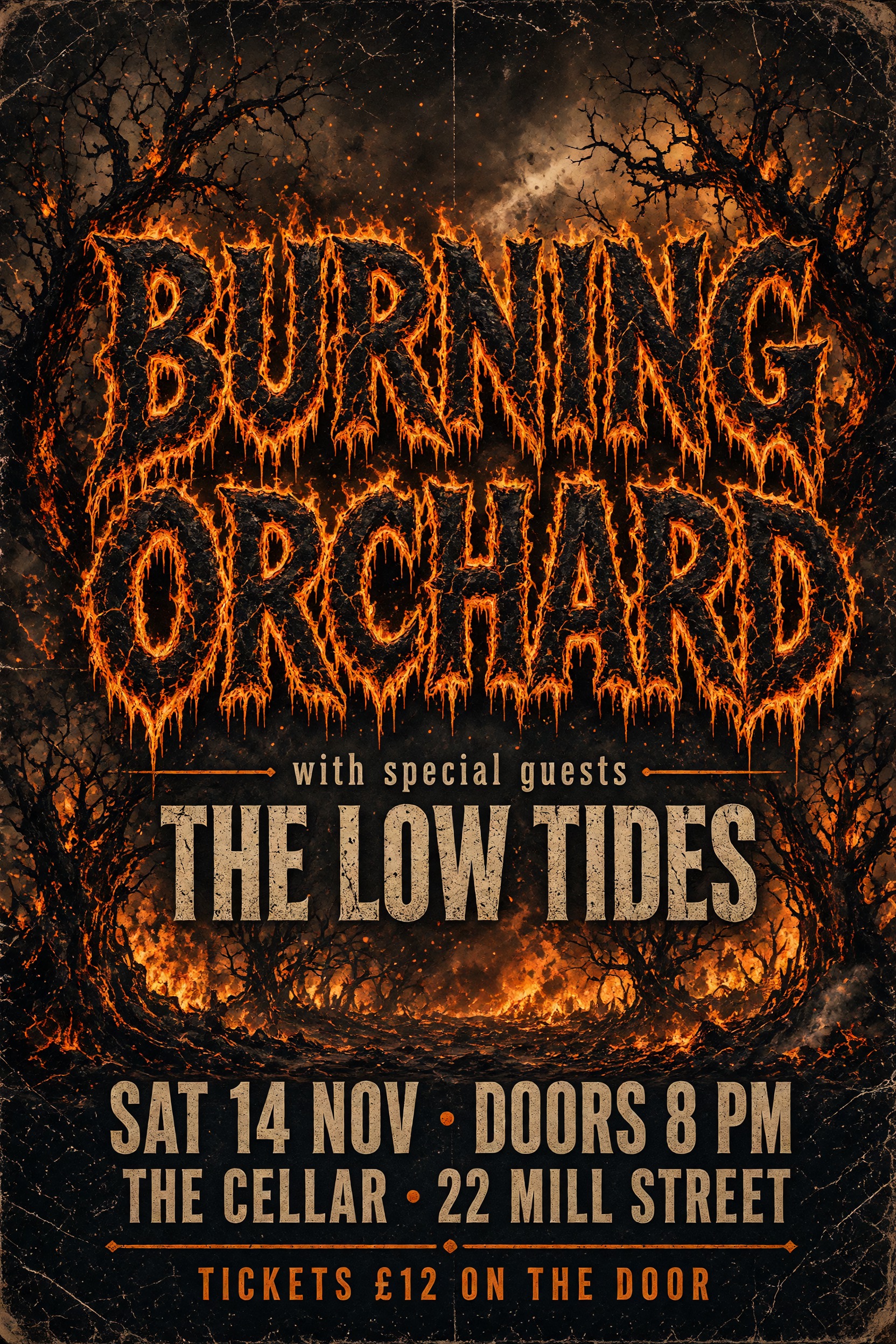
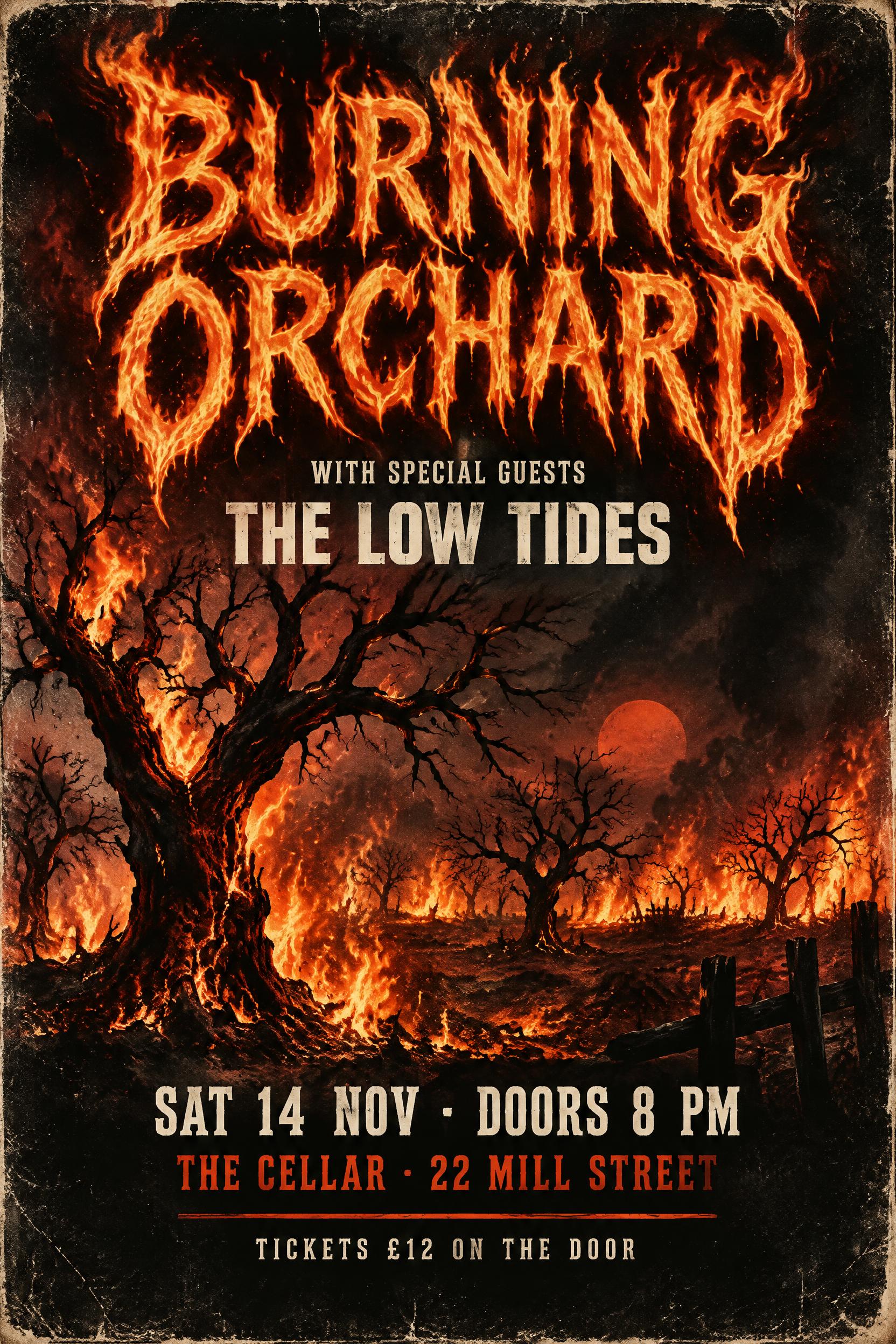
All 15 posters and all 15 menus were spelled correctly, as they were in October. These two prompts are now too easy to separate current models. What changed is extra text: Seedream 5.0 Pro added a line the prompt did not ask for to all 3 of its posters (a slogan twice, an organizer name once). We record that as added text, not as an error. Added lines are listed but never counted as errors in any job, including jobs 3 to 10, whose prompts asked for no other text (Qwen Image 3.0 Pro added lines on two job 6 tickets). If you do not want extra text, say so in the prompt and still check the result. For fire lettering as a preset, see the fire text style.
Best AI image generator for text: which one to choose
Accuracy does not separate the top four, so the choice comes down to how the image looks, what it costs, and a few habits.
The design score is a second, separate measure. Every image was scored by an AI reviewer that did not see which model made it. The reviewer gave four parts 1 to 10 each: legibility (20% of the score), lettering (35%), information and layout (25%) and first-impression appeal (20%). The design score is the weighted average, out of 10. On the reviewer's scale, 9 to 10 means the effect is fully achieved and polished, with a layout that stands out; 7 to 8 means clean and professional but more generic, or with small flaws in detail; 5 to 6 means the effect is only half there or does not fit the brief. Here are the averages with their 95% ranges:
| Model | Design score | 95% range |
|---|---|---|
| Grok Imagine 2.0 (Medium, its higher of two settings) | 8.01 | 7.86 – 8.17 |
| GPT Image 2.5 Sunburst (Medium, one step below the default High) | 7.91 | 7.62 – 8.20 |
| Nano Banana 2.1 | 7.69 | 7.34 – 8.07 |
| Seedream 5.0 Pro | 7.25 | 6.73 – 7.76 |
| Qwen Image 3.0 Pro | 5.82 | 5.02 – 6.55 |
We use the same test as for accuracy: compare two models prompt by prompt, and call them tied when the 95% range of the difference includes zero. By that test, Grok Imagine 2.0, GPT Image 2.5 Sunburst and Nano Banana 2.1 are tied on design, and so are Nano Banana 2.1 and Seedream 5.0 Pro. Grok Imagine 2.0 and GPT Image 2.5 Sunburst scored higher than Seedream 5.0 Pro (differences +0.76 and +0.67, with 95% ranges +0.24 to +1.28 and +0.06 to +1.23). All four scored higher than Qwen Image 3.0 Pro.
- For the best-looking result: Grok Imagine 2.0, GPT Image 2.5 Sunburst or Nano Banana 2.1. Their design scores are tied, and we would not pick one over another on these numbers.
- On a budget: Nano Banana 2.1, at 25 credits per image the cheapest of the five on FontVibe, with no errors in 30 images and a design score tied with Grok Imagine 2.0 and GPT Image 2.5 Sunburst.
- Seedream 5.0 Pro: no errors in 30 images, but a lower design score than Grok Imagine 2.0 and GPT Image 2.5 Sunburst, and it added its own text to every gig poster. Add "no other text" to your prompt.
- Qwen Image 3.0 Pro: check every word, at any length. In this test it made no errors on the 26- and 34-word jobs, the price list, the made-up names or the Chinese and Japanese card. But it had a letter error in all 3 of its three-line bakery signs and a wrong order number on 1 of 3 tickets, and it made errors in 1 of 3 images at 72 words and in every image from 117 words up. If you cannot proofread the result, use one of the other four.
All five models are in the model menu of the FontVibe generator, and every image in this post has a Recreate button that runs the same prompt. More tests on this topic are collected on the text rendering page.
How we tested
Models. The newest model from each of five companies that FontVibe users could select on November 9, 2026, all at 2K. (OpenAI's GPT Image 2.6 reached FontVibe the next day and was tested separately, below.)
- GPT Image 2.5 Sunburst (OpenAI), Medium quality. FontVibe's default for this model is High. We tested Medium, the setting below it. High and the settings above it were not tested and may be more accurate.
- Grok Imagine 2.0 (xAI), Medium quality, its higher of two settings.
- Seedream 5.0 Pro (ByteDance), no quality setting.
- Nano Banana 2.1 (Google), no quality setting.
- Qwen Image 3.0 Pro (Alibaba), no quality setting.
Prompts. 10 jobs, written in plain English with invented brand names, phone numbers from the 555-01xx range set aside for fiction, and no wording tied to any one model. The required text for each job was fixed in advance, line by line. Jobs 1 to 5 increase in length (26, 34, 72, 117 and 189 words). Jobs 6 to 10 each test one hard case: a ticket with numbers and addresses, a price table, made-up words, accented letters, and Chinese and Japanese. Jobs 3 to 10 end with "no other text".
Runs. Every prompt went to every model word for word through FontVibe's DIY mode, which does not rewrite prompts. The aspect ratio was set as a parameter. Each model made 3 images per job: 5 models × 10 jobs × 3 = 150 images, generated on November 9, 2026 (UTC). No returned image was rerun, discarded or picked. One GPT Image 2.5 Sunburst request returned no image (a provider error) and was sent again; that is image 107902 in the appendix. All 150 images are public on FontVibe.
GPT Image 2.6 (added November 10). GPT Image 2.6 Sunburst and GPT Image 2.6 Flare (OpenAI), both at 2K and Medium quality (FontVibe's default for both is High), ran the same 10 prompts the same way: 2 models × 10 jobs × 3 = 60 images, generated on November 10, 2026 (UTC). No request failed, and no image was rerun, discarded or picked. All 60 are public on FontVibe and listed in the appendix.
How we counted
Reading the images. Two vision models from different companies, Claude Opus 5.5 (Anthropic) and Gemini 3.7 Flash (Google), each wrote down all the text in every image. They were not shown the required text, so they could not quietly correct what they saw. Anthropic has no model in the test. Gemini 3.7 Flash comes from the same company as Nano Banana 2.1, which is why no disagreement between the two readers was settled by either reading alone: each one was checked against the original image, as described next.
Comparing. A script matched each required line against the closest passage in each reading. Then Claude Opus 5.5, run as a separate checker and this time given the required text, looked at the enlarged original image for every line the script flagged, every line where the two readers disagreed, and every possible added line, and recorded what is actually printed. That AI check is the final result (see Limits).
What counts as an error. A wrong, missing or extra letter, digit, accent or symbol (& # @ % / $ £ +) inside a required line. Whole lines the model adds on its own are listed as added text and not counted as errors. Text that cannot be read at full resolution counts as missing. Capital letters, punctuation swaps and line breaks are noted but not counted. A changed decimal point would count ("3.20" written as "320"); none occurred.
A known blind spot. The readers sometimes see the word they expect instead of the word that is printed. On one Qwen label, Gemini 3.7 Flash read the misprinted "Colories" as "Calories"; Claude Opus 5.5 read it as printed, the two disagreed, and the check against the original confirmed the error. If both readers had made the same slip, the line would have passed, because lines where both readers agreed and matched the required text were accepted without that check. To test for this, separate Claude Opus 5.5 checkers reread every required line of 15 images (3 per model, weighted toward the hardest jobs) letter by letter against the enlarged originals. All 15 matched our results; no missed error turned up.
Statistics. For each model we report error-free images, correct lines and wrong characters. To compare two models, we paired their results prompt by prompt and resampled 10,000 times. When the 95% range of the difference includes zero, we call the two models tied.
Design scores. An AI reviewer (Claude Opus 5.5, also one of the two text readers) scored every image with the model names hidden, using the same four-part rubric as our earlier tests: legibility 20%, lettering 35%, information and layout 25%, appeal 20%. The design score is shown for choosing between tied models; it is not part of the accuracy result.
GPT Image 2.6 images went through the same two readers, the same script and the same AI check against the originals (two lines in two images needed it). Separate Claude Opus 5.5 checkers reread every required line of 6 of the 60 images (3 per model, weighted toward the hardest jobs); all 6 matched our results. Their design scores come from a separate round, also scored with the model names hidden, with the 30 GPT Image 2.5 Sunburst images included for comparison, as described above.
Limits of this test
- GPT Image 2.5 Sunburst was tested at Medium, not at FontVibe's default High. Its results describe Medium. A higher setting may be more accurate.
- No person proofread the images letter by letter. All reading and checking was done by AI: the two readers, the check of flagged lines against the originals, and the 15-image recheck (plus 6 GPT Image 2.6 images). The checks used Claude Opus 5.5, the same model as one of the readers. An error that every one of these AI passes misread would not be in our results.
- The longest text was 189 words. Four models made no errors at that length, so their limit is unknown. We did not test longer text in this round.
- 3 images per model per job. That is enough to separate one model that fails often from four that rarely fail. It is not enough to rank four models that each had zero or one image with errors.
- Newer models. GPT Image 2.6 reached FontVibe on November 10 and was added that day, at Medium only; its High and higher settings were not tested. Models that reach FontVibe after November 10 are not in this test. We plan to test newer models once they are available on FontVibe and update this post.
- Short non-English text only. Chinese and Japanese were tested with one sentence each, and Spanish, Portuguese and German with one line each.
- The results describe these model versions on November 9, 2026 (GPT Image 2.6: November 10, 2026).
If you rerun one of these prompts and get a very different result, email hello@fontvibe.ai and we'll add it to this post.
For how these models compare on design jobs other than long text, see our Grok Imagine 2.0 test and Qwen Image 3.0 test. For AI tools rather than models, see our test of AI text effect generators.
Appendix: all 210 images
Each cell links to the image on FontVibe and gives the number of wrong characters in the required text. The first table has the 150 images of the main test; the 60 GPT Image 2.6 images added on November 10 are in the second table.
| Job | Model | Image 1 | Image 2 | Image 3 |
|---|---|---|---|---|
| 1 | GPT Image 2.5 Sunburst (Medium) | 107744 0 characters wrong | 107748 0 characters wrong | 107749 0 characters wrong |
| 1 | Grok Imagine 2.0 (Medium) | 107752 0 characters wrong | 107764 0 characters wrong | 107776 0 characters wrong |
| 1 | Seedream 5.0 Pro | 107754 0 characters wrong, 1 added line | 107766 0 characters wrong, 1 added line | 107777 0 characters wrong, 1 added line |
| 1 | Nano Banana 2.1 | 107746 0 characters wrong | 107750 0 characters wrong | 107756 0 characters wrong |
| 1 | Qwen Image 3.0 Pro | 107745 0 characters wrong | 107751 0 characters wrong | 107757 0 characters wrong |
| 2 | GPT Image 2.5 Sunburst (Medium) | 107753 0 characters wrong | 107755 0 characters wrong | 107759 0 characters wrong |
| 2 | Grok Imagine 2.0 (Medium) | 107789 0 characters wrong | 107800 0 characters wrong | 107809 0 characters wrong |
| 2 | Seedream 5.0 Pro | 107783 0 characters wrong | 107793 0 characters wrong | 107801 0 characters wrong |
| 2 | Nano Banana 2.1 | 107761 0 characters wrong | 107767 0 characters wrong | 107771 0 characters wrong |
| 2 | Qwen Image 3.0 Pro | 107763 0 characters wrong | 107768 0 characters wrong | 107773 0 characters wrong |
| 3 | GPT Image 2.5 Sunburst (Medium) | 107760 0 characters wrong | 107762 0 characters wrong | 107765 0 characters wrong |
| 3 | Grok Imagine 2.0 (Medium) | 107818 0 characters wrong | 107826 0 characters wrong | 107832 0 characters wrong |
| 3 | Seedream 5.0 Pro | 107807 0 characters wrong | 107814 0 characters wrong | 107822 0 characters wrong |
| 3 | Nano Banana 2.1 | 107779 0 characters wrong | 107788 0 characters wrong | 107796 0 characters wrong |
| 3 | Qwen Image 3.0 Pro | 107780 0 characters wrong | 107786 40 characters wrong | 107794 0 characters wrong |
| 4 | GPT Image 2.5 Sunburst (Medium) | 107902 0 characters wrong | 107770 0 characters wrong | 107772 0 characters wrong |
| 4 | Grok Imagine 2.0 (Medium) | 107841 0 characters wrong | 107848 0 characters wrong | 107853 0 characters wrong |
| 4 | Seedream 5.0 Pro | 107829 0 characters wrong | 107835 0 characters wrong | 107840 0 characters wrong |
| 4 | Nano Banana 2.1 | 107802 0 characters wrong | 107811 0 characters wrong | 107816 0 characters wrong |
| 4 | Qwen Image 3.0 Pro | 107799 75 characters wrong | 107803 1 character wrong | 107810 2 characters wrong |
| 5 | GPT Image 2.5 Sunburst (Medium) | 107774 0 characters wrong | 107778 0 characters wrong | 107781 0 characters wrong |
| 5 | Grok Imagine 2.0 (Medium) | 107859 0 characters wrong | 107865 0 characters wrong | 107870 0 characters wrong |
| 5 | Seedream 5.0 Pro | 107847 0 characters wrong | 107851 0 characters wrong | 107855 0 characters wrong |
| 5 | Nano Banana 2.1 | 107824 0 characters wrong | 107828 0 characters wrong | 107834 0 characters wrong |
| 5 | Qwen Image 3.0 Pro | 107813 10 characters wrong | 107820 9 characters wrong | 107825 106 characters wrong |
| 6 | GPT Image 2.5 Sunburst (Medium) | 107782 0 characters wrong | 107785 0 characters wrong | 107787 16 characters wrong |
| 6 | Grok Imagine 2.0 (Medium) | 107876 0 characters wrong | 107883 0 characters wrong | 107887 0 characters wrong |
| 6 | Seedream 5.0 Pro | 107860 0 characters wrong | 107864 0 characters wrong | 107869 0 characters wrong |
| 6 | Nano Banana 2.1 | 107839 0 characters wrong | 107844 0 characters wrong | 107850 0 characters wrong |
| 6 | Qwen Image 3.0 Pro | 107830 0 characters wrong | 107833 7 characters wrong, 1 added line | 107838 0 characters wrong, 2 added lines |
| 7 | GPT Image 2.5 Sunburst (Medium) | 107790 0 characters wrong | 107795 0 characters wrong | 107797 0 characters wrong |
| 7 | Grok Imagine 2.0 (Medium) | 107890 0 characters wrong | 107893 0 characters wrong | 107896 0 characters wrong |
| 7 | Seedream 5.0 Pro | 107874 0 characters wrong | 107879 0 characters wrong | 107884 0 characters wrong |
| 7 | Nano Banana 2.1 | 107854 0 characters wrong | 107857 0 characters wrong | 107861 0 characters wrong |
| 7 | Qwen Image 3.0 Pro | 107842 0 characters wrong | 107846 0 characters wrong | 107849 0 characters wrong |
| 8 | GPT Image 2.5 Sunburst (Medium) | 107798 0 characters wrong | 107804 0 characters wrong | 107806 0 characters wrong |
| 8 | Grok Imagine 2.0 (Medium) | 107899 0 characters wrong | 107905 0 characters wrong | 107907 0 characters wrong |
| 8 | Seedream 5.0 Pro | 107886 0 characters wrong | 107889 0 characters wrong | 107892 0 characters wrong |
| 8 | Nano Banana 2.1 | 107863 0 characters wrong | 107867 0 characters wrong | 107871 0 characters wrong |
| 8 | Qwen Image 3.0 Pro | 107852 0 characters wrong | 107856 0 characters wrong | 107858 0 characters wrong |
| 9 | GPT Image 2.5 Sunburst (Medium) | 107808 0 characters wrong | 107812 0 characters wrong | 107815 0 characters wrong |
| 9 | Grok Imagine 2.0 (Medium) | 107909 0 characters wrong | 107910 0 characters wrong | 107912 0 characters wrong |
| 9 | Seedream 5.0 Pro | 107895 0 characters wrong | 107897 0 characters wrong | 107900 0 characters wrong |
| 9 | Nano Banana 2.1 | 107873 0 characters wrong | 107878 0 characters wrong | 107881 0 characters wrong |
| 9 | Qwen Image 3.0 Pro | 107862 2 characters wrong | 107866 1 character wrong | 107868 2 characters wrong |
| 10 | GPT Image 2.5 Sunburst (Medium) | 107819 0 characters wrong | 107821 0 characters wrong | 107823 0 characters wrong |
| 10 | Grok Imagine 2.0 (Medium) | 107913 0 characters wrong | 107916 0 characters wrong | 107918 0 characters wrong |
| 10 | Seedream 5.0 Pro | 107903 0 characters wrong | 107906 0 characters wrong | 107908 0 characters wrong |
| 10 | Nano Banana 2.1 | 107885 0 characters wrong | 107888 0 characters wrong | 107891 0 characters wrong |
| 10 | Qwen Image 3.0 Pro | 107872 0 characters wrong | 107875 0 characters wrong | 107880 0 characters wrong |
The 12 images with errors, as printed:
- 107786, Qwen, job 3: "gloves are" → letter-like shapes; most of "Rain moves everything to the church hall on Birch Lane." unreadable.
- 107787, GPT Image 2.5 Sunburst, job 6: "Order #NLF-48213-QX" missing.
- 107799, Qwen, job 4: "SMOKED PEPPER" → "MOKED PEOKKELPPAPIA R"; first sentence unreadable after "slow-smoked"; "kitchen" → "klthun"; "Calories" → "Colories".
- 107803, Qwen, job 4: "sesame" → "seame".
- 107810, Qwen, job 4: "mL" → "nL"; "Calories" → "Colories".
- 107813, Qwen, job 5: "recycling" → "recycal"; "jackets" → "jackdes"; "canoe" → "canse"; "ten" → "tever".
- 107820, Qwen, job 5: "recycling" → "recycal"; "canoe" → "cone"; "ten" → "tever".
- 107825, Qwen, job 5: "recycling" → "recycal"; several errors in the life-jacket sentence; the quiet-hours and check-out sentences unreadable.
- 107833, Qwen, job 6: "Order #NLF-48213-QX" → "#-48203" plus unreadable marks.
- 107862, Qwen, job 9: "queijo" → "quejo"; "und" → "ud".
- 107866, Qwen, job 9: "recién" → "reeién".
- 107868, Qwen, job 9: "queijo" → garbled "ij".
Added text (not counted as errors): Seedream 5.0 Pro, job 1, images 107754, 107766 and 107777 (one line each); Qwen Image 3.0 Pro, job 6, images 107833 (one line) and 107838 (two lines).
GPT Image 2.6 images (added November 10)
| Job | Model | Image 1 | Image 2 | Image 3 |
|---|---|---|---|---|
| 1 | GPT Image 2.6 Sunburst (Medium) | 108313 0 characters wrong | 108316 0 characters wrong | 108320 0 characters wrong |
| 1 | GPT Image 2.6 Flare (Medium) | 108311 0 characters wrong | 108312 0 characters wrong | 108314 0 characters wrong |
| 2 | GPT Image 2.6 Sunburst (Medium) | 108324 0 characters wrong | 108328 0 characters wrong | 108331 0 characters wrong |
| 2 | GPT Image 2.6 Flare (Medium) | 108315 0 characters wrong | 108317 0 characters wrong | 108318 0 characters wrong |
| 3 | GPT Image 2.6 Sunburst (Medium) | 108335 0 characters wrong | 108338 0 characters wrong | 108341 0 characters wrong |
| 3 | GPT Image 2.6 Flare (Medium) | 108319 0 characters wrong | 108321 0 characters wrong | 108322 0 characters wrong |
| 4 | GPT Image 2.6 Sunburst (Medium) | 108345 0 characters wrong | 108348 0 characters wrong | 108351 0 characters wrong |
| 4 | GPT Image 2.6 Flare (Medium) | 108323 0 characters wrong | 108325 0 characters wrong | 108326 0 characters wrong |
| 5 | GPT Image 2.6 Sunburst (Medium) | 108353 0 characters wrong | 108354 0 characters wrong | 108355 0 characters wrong |
| 5 | GPT Image 2.6 Flare (Medium) | 108327 0 characters wrong | 108329 0 characters wrong | 108330 0 characters wrong |
| 6 | GPT Image 2.6 Sunburst (Medium) | 108356 16 characters wrong | 108357 0 characters wrong | 108359 0 characters wrong |
| 6 | GPT Image 2.6 Flare (Medium) | 108332 0 characters wrong | 108333 0 characters wrong | 108334 0 characters wrong |
| 7 | GPT Image 2.6 Sunburst (Medium) | 108360 0 characters wrong | 108363 0 characters wrong | 108365 0 characters wrong |
| 7 | GPT Image 2.6 Flare (Medium) | 108336 0 characters wrong | 108337 0 characters wrong | 108339 0 characters wrong |
| 8 | GPT Image 2.6 Sunburst (Medium) | 108366 0 characters wrong | 108367 0 characters wrong | 108368 0 characters wrong |
| 8 | GPT Image 2.6 Flare (Medium) | 108340 0 characters wrong | 108342 0 characters wrong | 108343 0 characters wrong |
| 9 | GPT Image 2.6 Sunburst (Medium) | 108369 0 characters wrong | 108370 0 characters wrong | 108371 0 characters wrong |
| 9 | GPT Image 2.6 Flare (Medium) | 108344 0 characters wrong | 108346 0 characters wrong | 108347 0 characters wrong |
| 10 | GPT Image 2.6 Sunburst (Medium) | 108372 0 characters wrong | 108373 0 characters wrong | 108374 0 characters wrong |
| 10 | GPT Image 2.6 Flare (Medium) | 108349 0 characters wrong | 108350 0 characters wrong | 108352 0 characters wrong |
The one GPT Image 2.6 image with errors, as printed:
- 108356, GPT Image 2.6 Sunburst, job 6: "Order #NLF-48213-QX" missing.
Added text: none in the 60 GPT Image 2.6 images.
よくある質問
What is the best AI image generator for text?
In our November 2026 test of 150 images, four models wrote text with almost no errors and could not be told apart: GPT Image 2.5 Sunburst, Grok Imagine 2.0, Seedream 5.0 Pro and Nano Banana 2.1. Together they produced 119 error-free images out of 120, up to a 189-word letter. Qwen Image 3.0 Pro made errors in 11 of its 30 images. To choose among the four, look at design quality and price: Grok Imagine 2.0, GPT Image 2.5 Sunburst and Nano Banana 2.1 scored within noise of each other on design, and Nano Banana 2.1 costs the fewest credits on FontVibe. GPT Image 2.6 Sunburst and GPT Image 2.6 Flare, added on November 10, tied with the four as well, but as of that date only FontVibe's own test accounts can use them.
How much text can an AI image generator write before it makes mistakes?
In our test, GPT Image 2.5 Sunburst, Grok Imagine 2.0, Seedream 5.0 Pro and Nano Banana 2.1 wrote a 189-word, three-paragraph letter with no errors in all 3 tries each. Their limit is above 189 words, and we did not test longer text. Qwen Image 3.0 Pro wrote a 72-word notice correctly in 2 of 3 tries and made errors in all 3 tries at 117 words and at 189 words.
Is Qwen Image 3.0 Pro good at writing long text?
No, in our test, and short text needs checking too. We tested Qwen Image 3.0 Pro; the non-Pro Qwen Image 3.0 was not tested. It made errors in 1 of 3 images on the 72-word notice and in all six images for the 117-word food label and the 189-word letter, including misspellings such as "recycal" for "recycling" and whole sentences turned into letter-like shapes. The last lines of every one of those images were present, so the errors were not caused by the prompt being cut off. Short text was not always right either: it was error-free on the 26- and 34-word jobs, the price list, the made-up names and the Chinese and Japanese card, but it had a letter error in all 3 of its three-line bakery signs and a wrong order number on 1 of 3 tickets. Check every word, whatever the length.
Is GPT Image 2.6 better at text than GPT Image 2.5?
Not measurably, in our November 2026 test. On the same 10 prompts at 2K, GPT Image 2.6 Sunburst had an error in 1 of 30 images, the same missing order-number line as GPT Image 2.5 Sunburst, and GPT Image 2.6 Flare had none in 30; compared prompt by prompt, neither differs from GPT Image 2.5 Sunburst by more than chance, and their design scores are tied too. All three were tested at Medium, one step below FontVibe's default, High, so a higher setting may be more accurate. As of November 10, 2026, GPT Image 2.6 is in preview on FontVibe, open only to FontVibe's own test accounts.
Can AI image generators write numbers, URLs and accented letters correctly?
Mostly, yes. On a ticket with a date, order number, web address, phone number and email, GPT Image 2.5 Sunburst, Grok Imagine 2.0, Seedream 5.0 Pro and Nano Banana 2.1 had errors in 1 of 12 images: GPT Image 2.5 Sunburst left out the order number once. All five models wrote a 26-number bike shop price list correctly in all 15 images. All five models wrote every accent and the German ß correctly in all 15 Spanish, Portuguese and German window signs. Qwen Image 3.0 Pro still had a spelling error in all 3 of its signs, but in ordinary letters ("queijo" became "quejo"), not in the accents; the other four models made none.
コメント