Qwen Image 3.0 vs GPT Image, Nano Banana, Seedream & Grok
I gave Qwen Image 3.0 Pro and four rival models the same 10 text-heavy prompts and scored the first image from each. No cherry-picking.
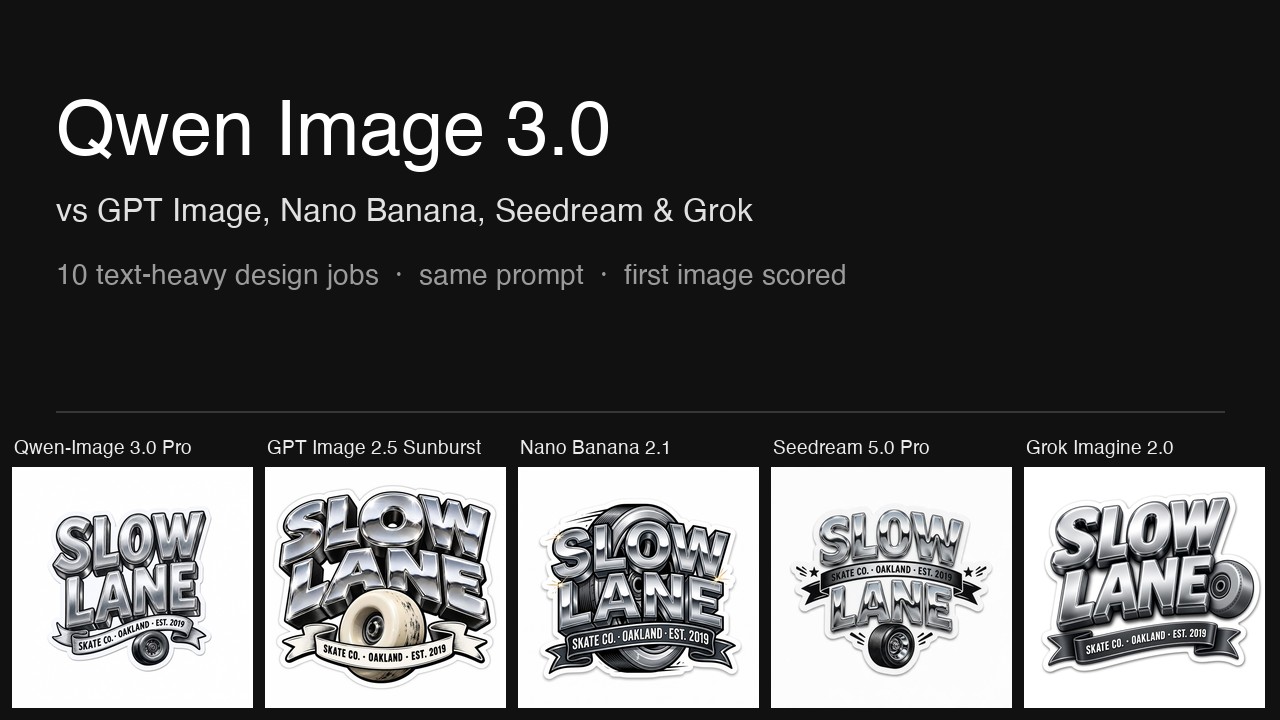
Qwen Image 3.0 Pro is Alibaba's image model. Its makers say it renders text as small as 10 pixels, renders 12 languages natively and handles dense information layouts. I tested it against four other image models on 10 design jobs that all have text in them: an invitation, a sticker, a poster, a conference schedule, a bilingual tea label, a Japanese poster set vertically, a logo, a photo, an edit and a two-reference job. Each model got the identical prompt, and I scored the first image each one returned.
The five setups, all at 2K resolution:
- Qwen Image 3.0 Pro (Alibaba). Qwen Image 3.0 Pro has two resolutions, 1K and 2K, and no quality setting. Its built-in prompt rewriting was off, so it received the prompt unchanged like the other four.
- GPT Image 2.5 Sunburst (OpenAI), High quality. GPT Image 2.5 has five quality settings: Low, Medium, High, Extra High and Max. I tested High, which is the default on FontVibe. Extra High and Max were not tested.
- Nano Banana 2.1 (Google). Nano Banana 2.1 has no quality setting.
- Seedream 5.0 Pro (ByteDance). Seedream 5.0 Pro has no quality setting.
- Grok Imagine 2.0 (xAI), Medium quality. Medium is Grok Imagine 2.0's highest setting. My Grok Imagine 2.0 test compared its Low and Medium settings, and Medium scored higher.
The results
| Model (setting) | Legibility | Lettering and finish | Information and layout | Appeal | Overall | Median time | FontVibe credits |
|---|---|---|---|---|---|---|---|
| Grok Imagine 2.0 (Medium) | 9.9 | 8.8 | 8.9 | 8.6 | 9.01 | 95 s | 40 |
| GPT Image 2.5 Sunburst (High) | 9.4 | 9.0 | 8.7 | 8.9 | 8.99 | 41 s | 40 |
| Nano Banana 2.1 | 9.7 | 8.8 | 8.3 | 8.3 | 8.76 | 28 s | 25 |
| Seedream 5.0 Pro | 10.0 | 8.7 | 8.0 | 8.5 | 8.75 | 73 s | 40 |
| Qwen Image 3.0 Pro | 10.0 | 8.8 | 7.7 | 7.8 | 8.57 | 23 s | 40 |
Scores are out of 10 and averaged over the first image of each of the 10 jobs. Median time covers the new images from jobs 1 to 8 and 10, two per job, at 2K: 18 per model, 17 for Seedream 5.0 Pro because of the failures described in job 10. Credits are what one 2K image costs on FontVibe. Every individual score is in the appendix. In a separate blind pass with the model names hidden, Qwen Image 3.0 Pro also came last, and GPT Image 2.5 came first.
Grok Imagine 2.0 Medium scored highest, 9.01 out of 10. GPT Image 2.5 Sunburst scored 8.99, 0.02 lower. Nano Banana 2.1 scored 8.76 and Seedream 5.0 Pro 8.75, 0.01 apart. Qwen Image 3.0 Pro scored lowest, 8.57, which is 0.18 below Seedream 5.0 Pro. All five averages are within 0.44 points. Changing one score by 1 point in one job moves a model's average by 0.02 to 0.035, so the order of the first two, and the order of the third and fourth, each depend on single scores.
Qwen Image 3.0 Pro and Seedream 5.0 Pro had the highest legibility score, 10.0: the main line in every one of their scored images reads at a glance. Qwen Image 3.0 Pro had the lowest information-and-layout score, 7.7, and the lowest appeal score, 7.8. Three of its 10 scored images changed or misspelled a required line, in job 5 it drew a tea tin instead of the label the prompt asked for, and its schedule is the plainest layout in that job. It did not score highest in any job.
GPT Image 2.5 was tested at High, the third of its five quality settings. The other four models were tested at their highest setting. This test does not show how GPT Image 2.5 Extra High or Max would score.
Text accuracy
In the 50 scored images, 47 have every required line spelled correctly. The three that do not are all from Qwen Image 3.0 Pro:
- Job 1: "Mia's" became "MiA'S", with capital letters in the middle of the name.
- Job 4: the footer URL "formfunction.design" became "formfunction.deign".
- Job 9: the edit was supposed to keep "18+" unchanged, and it became "$Z+".
Smaller problems in the other models' scored images:
- GPT Image 2.5, job 8: it added a chalkboard listing five dishes that the prompt did not ask for, and one line on that board is garbled, unreadable lettering. The "·" on the requested menu board became a wavy line.
- Nano Banana 2.1, job 8: the "·" on the menu board is out of place.
- Lines the prompt did not ask for: Seedream 5.0 Pro added "ONE-DAY DESIGN CONFERENCE" in job 4; Nano Banana 2.1 added "WEEKEND ART EVENT" in job 10; Grok Imagine 2.0 repeated "OPEN STUDIO" in job 10; Qwen Image 3.0 Pro copied "NEON OUTLINE" from a reference image in job 10.
- GPT Image 2.5 and Nano Banana 2.1 each added a red seal stamp with characters to the tea label in job 5, which asked for no other text.
Qwen Image 3.0's three claims, checked
Claim 1: text as small as 10 pixels. Partly supported. Job 4 asked for 10 lines of schedule text. All 10 lines in Qwen Image 3.0 Pro's image are sharp and readable, and its legibility score was 10. But the footer URL lost a letter ("formfunction.deign"), and the same misspelling appeared in 3 of Qwen's 4 schedule images (both 1K images and the first 2K image). The other four models spelled the URL correctly in all 8 of their schedule images.
Claim 2: 12 languages rendered natively. Supported for the two languages tested. In job 5, Qwen Image 3.0 Pro wrote all four Chinese and English lines correctly in Simplified Chinese, including 〇 in "二〇二七年春". In job 6, it set all three Japanese lines vertically and correctly. The other 10 languages were not tested.
Claim 3: dense information layouts. Not supported by this test. Qwen Image 3.0 Pro's schedule in job 4 scored 7.4, the lowest score in that job: black text on a white page, with no grouping and a large empty area at the bottom. Its average information-and-layout score, 7.7, was the lowest of the five models.
How I tested
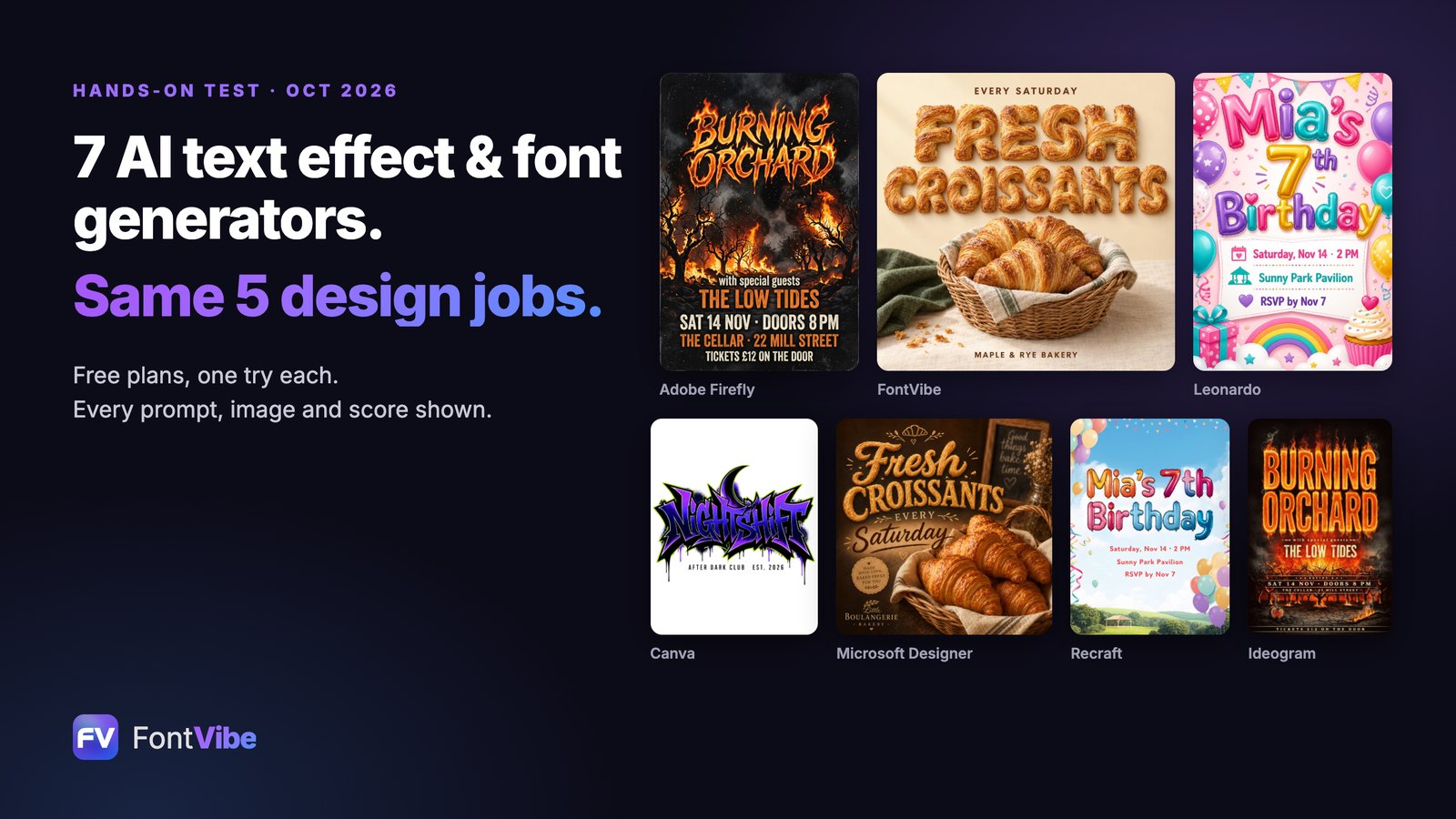
The 10 jobs. Jobs 1 and 3 use the same prompts as my Grok Imagine 2.0 test and my earlier test of seven AI design tools. The other eight prompts are new.
- Kids' birthday invitation (3:4): glossy balloon letters, three lines of details
- Skate shop sticker (1:1): chunky chrome 3D letters, a ribbon line, isolated on white
- Gig poster (2:3): molten fire lettering, four lines of details
- Conference schedule (3:4): 8 time slots, an em dash, a slash and a URL
- Tea tin label (3:4): Chinese brush calligraphy with an English line
- Japanese bookstore poster (2:3): every line set vertically
- Outdoor brand badge (1:1): an "FW" monogram and the full name in small caps
- Photo of a food truck (3:2): painted lettering on the truck and a menu board
- Edit an existing image (2:3): change a date and a price, keep everything else
- Two reference images (3:4): layout from image 1, lettering from image 2
The test covers design images with text. Portraits, landscapes and other images without text were not tested. The full prompt for each job is printed in its section below. The rules:
- Every model got the identical prompt, word for word, through FontVibe's DIY mode, which sends the prompt to the model unchanged. No prompt rewriting and no style presets.
- The aspect ratio was set as a parameter, the same for every model.
- Each setup made two images per job. Only the first image is scored and shown. The second image was used only to check spelling consistency. When the first image failed, it was retried once, and the first image that succeeded is the one scored.
- All images were generated on October 21, 2026 and are public on FontVibe.
The scoring rubric
The rubric is FontVibe's internal standard for rating generated designs, written in October 2026 before this test. It is the same rubric used in the Grok Imagine 2.0 test. Each image gets four scores from 1 to 10, and I wrote down the reason for every deduction before giving the number.
| What I scored | Weight | What I looked at |
|---|---|---|
| Legibility | 20% | First a check for hard errors: garbled letters, cut off text, text covered by other elements, broken letter shapes. No hard error means 7 to 10, depending on how easily the main line reads. Any hard error means 1 to 4. |
| Lettering and finish | 35% | Whether the image has the lettering effect the prompt asked for (balloons, chrome, fire, brush, neon), and how well it is made. |
| Information and layout | 25% | First, whether the image is the thing the prompt asked for and the information is complete and accurate: every line from the prompt is present, spelled and punctuated as written, and nothing the prompt did not ask for is added. Each missing, altered or added line or mark costs at least 1 point. Second, whether the most important line reads first and the lines are in the right order. |
| Appeal | 20% | Whether the image looks like a professional designer made it. |
The overall score is calculated, not judged: 0.20 × legibility + 0.35 × lettering + 0.25 × information and layout + 0.20 × appeal.
Four points on how the rubric was applied. Legibility is judged on the main line, as the rubric says; secondary lines that are too small or too pale to read easily were scored under information and layout. A consistent all-caps treatment, such as "WITH SPECIAL GUESTS", was not counted as a change, but capitals placed at random inside a word, as in "MiA'S", were. Garbled lettering on a sign or board large enough that a viewer would try to read it counted as a hard error, as in the Grok Imagine 2.0 test; tiny background labels that cannot be read at the image's own resolution did not. When the prompt asked for a design file, such as a label or a printed schedule, and the image showed it as a photographed object instead, information and layout lost 3 points, because the result cannot be sent to a printer as it is.
I knew which model made each image while scoring it. To check for bias, I also ran a blind pass where the model names were hidden.
Jobs 9 and 10 start from existing images. All three were taken from FontVibe's public gallery, and none was made by the five models being tested. All three were made by Seedream 5.0, the previous model in the same family as Seedream 5.0 Pro.
Job by job
Job 1: Kids' birthday invitation
Birthday party invitation for my daughter, "Mia's 7th Birthday" in glossy balloon letters, "Saturday, Nov 14 · 2 PM", "Sunny Park Pavilion", "RSVP by Nov 7", bright and playful, portrait card
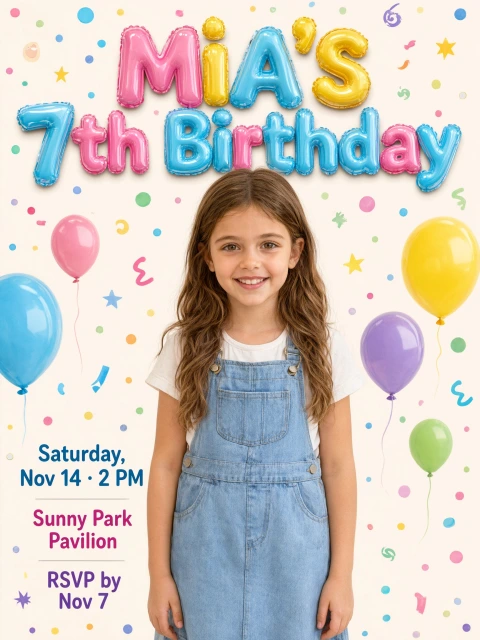
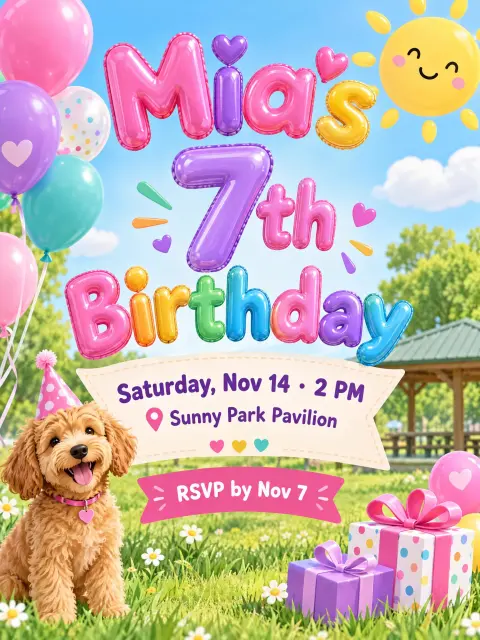
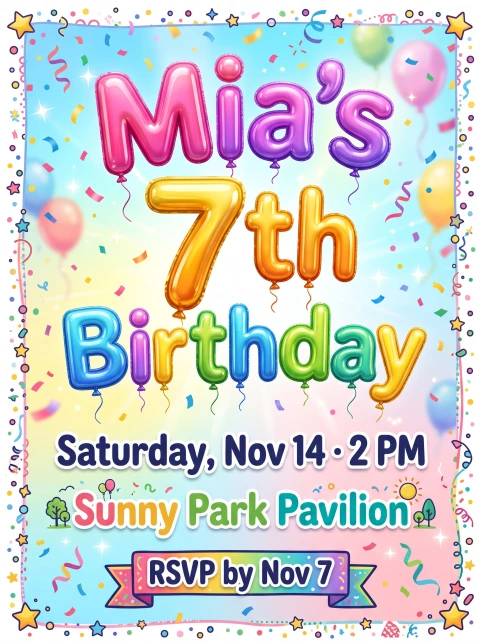
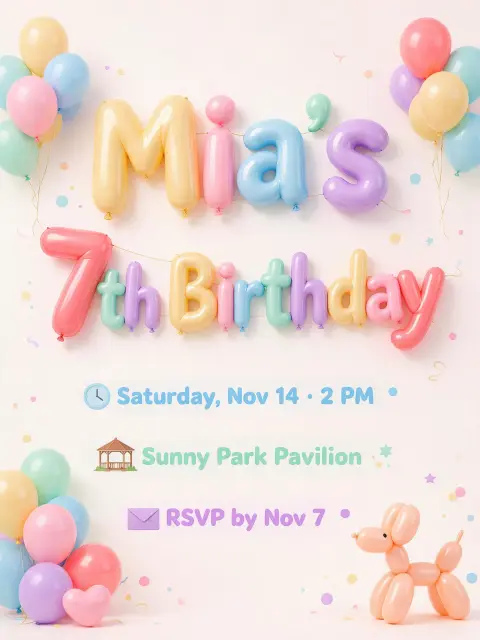
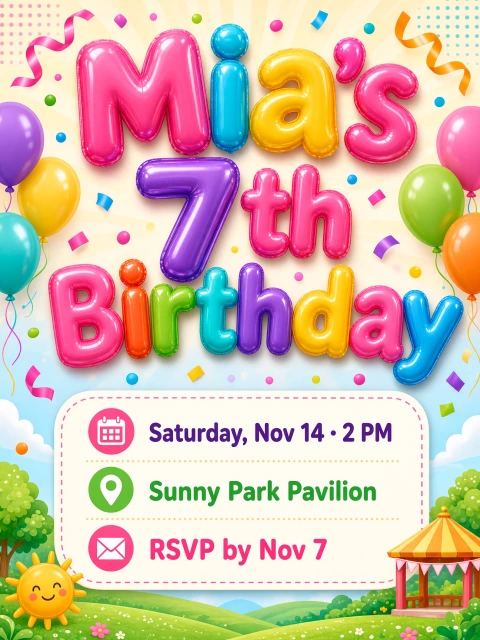
GPT Image 2.5 and Grok Imagine 2.0 tied for the highest score, 9.2. Both grouped the three detail lines clearly, GPT Image 2.5 on a ribbon and Grok in a card with icons. Qwen Image 3.0 Pro scored lowest, 8.3: it wrote the name as "MiA'S", and a photo of a girl takes up the center of the card, which leaves the three detail lines in a narrow column on the left. Seedream 5.0 Pro set the three detail lines in pale text on a pale background, which cost a point on information and layout. For balloon lettering as a preset, see the bubble letter style.
Job 2: Skate shop sticker
Die-cut sticker for my skate shop, "SLOW LANE" in chunky chrome 3D lettering, small "SKATE CO. · OAKLAND · EST. 2019" on a ribbon banner underneath, a skateboard wheel graphic, thick white sticker border, isolated on plain white
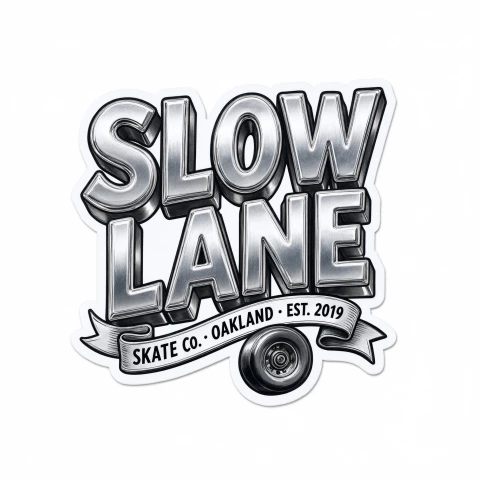
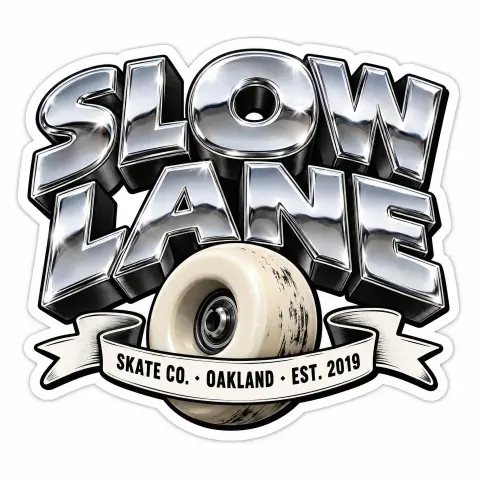
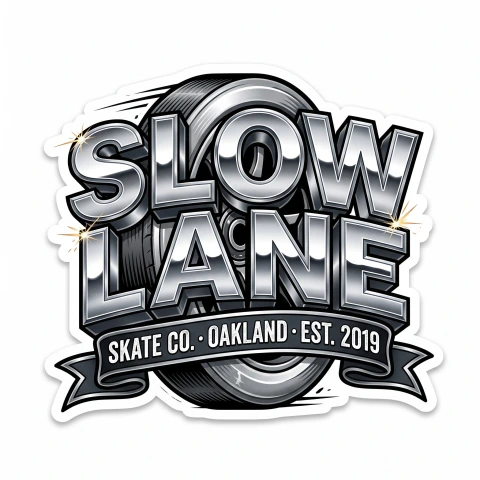
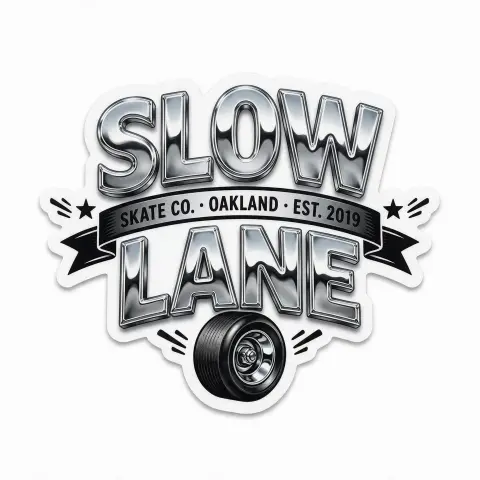
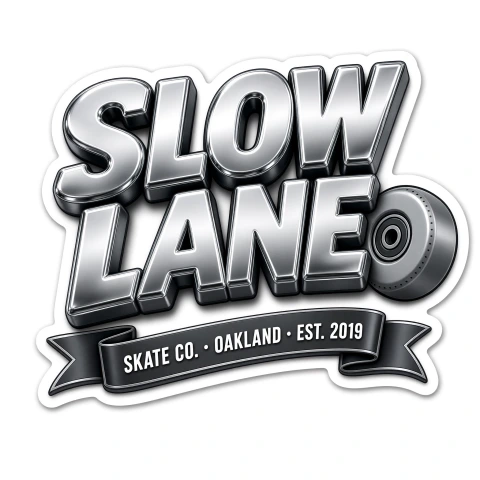
All five models spelled both lines correctly. GPT Image 2.5 and Nano Banana 2.1 tied for the highest score, 9.2: GPT Image 2.5's chrome letters have the most depth, and Nano Banana 2.1 put a large wheel behind the letters. Qwen Image 3.0 Pro and Grok Imagine 2.0 both scored 9.0. Seedream 5.0 Pro scored lowest, 8.15, because it put the ribbon between "SLOW" and "LANE" instead of underneath. For chrome lettering as a preset, see the metallic text style.
Job 3: Gig poster
A3 gig poster for my band "BURNING ORCHARD", band name in molten fire lettering as the main focus, "with special guests THE LOW TIDES", "SAT 14 NOV · DOORS 8 PM", "THE CELLAR · 22 MILL STREET", "TICKETS £12 ON THE DOOR", gritty rock atmosphere with burning trees
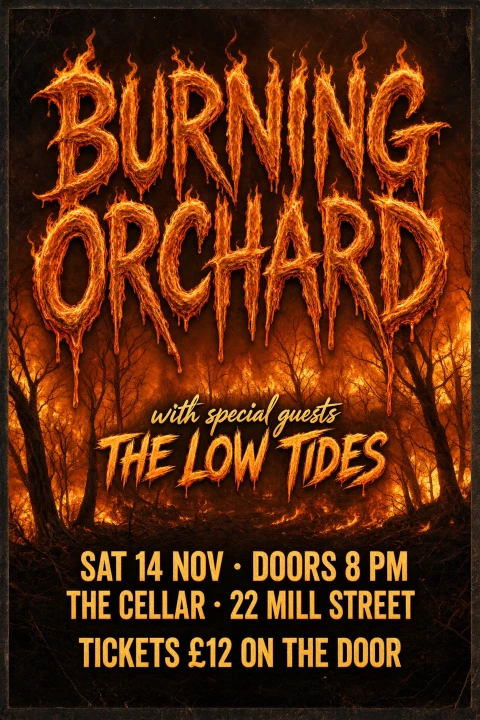
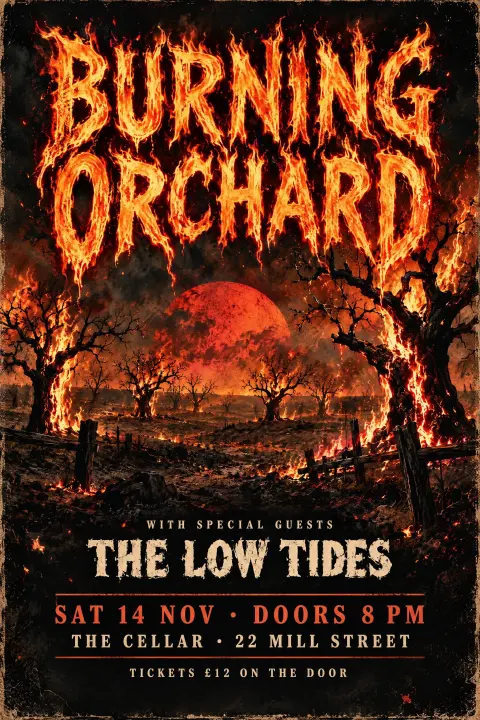
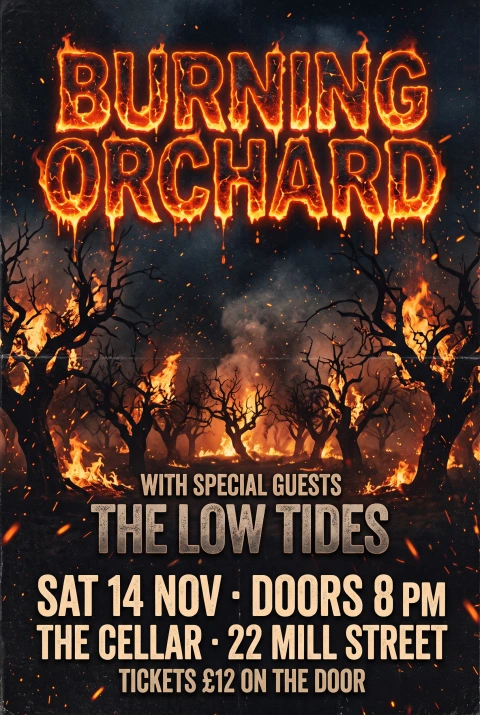
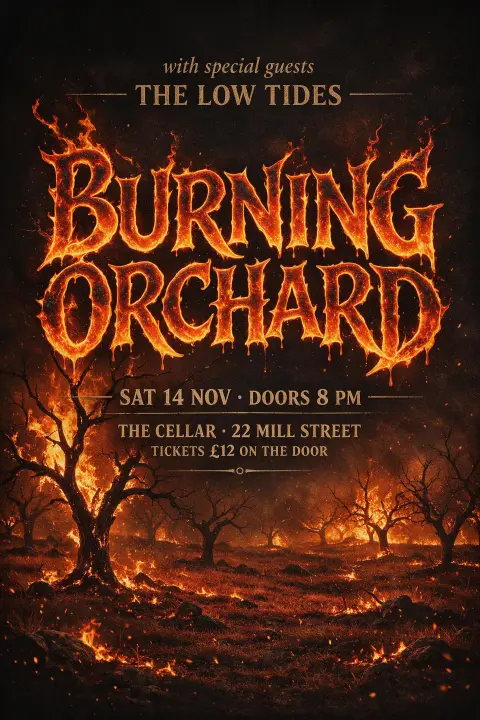
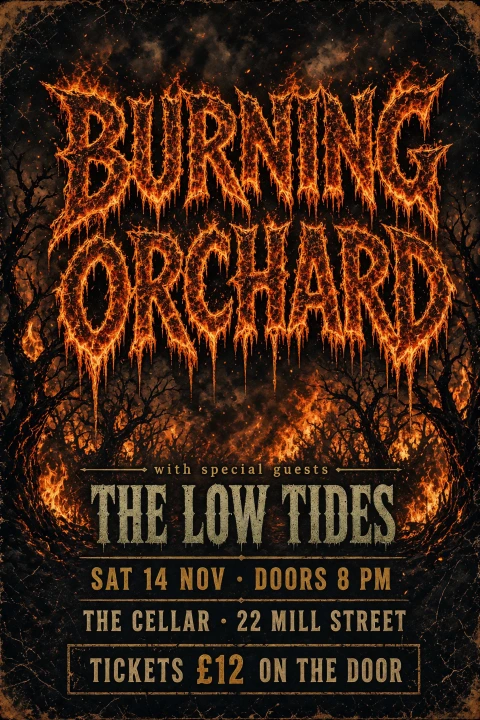
GPT Image 2.5 scored highest, 9.2: legibility 10 and 9 on each of the other three scores, with a blood-red moon over the burning orchard. Qwen Image 3.0 Pro, Nano Banana 2.1 and Grok Imagine 2.0 scored 9.0; Qwen and Nano Banana 2.1 scored 8 on appeal, and Grok scored 9 on legibility. Qwen set the support act in a hand-drawn script that separates it from the headliner. Grok's fire texture is the heaviest of the five, so its title takes a second look. Seedream 5.0 Pro scored 8.5 because it placed the support act above the headliner, the same billing-order mistake it made with this prompt in the Grok Imagine 2.0 test. For fire lettering as a preset, see the fire text style.
Job 4: Conference schedule
Printed schedule for a one-day design conference, title "FORM & FUNCTION 2027" in bold geometric lettering, then this exact list, one line each: "09:00 Registration & Coffee", "09:30 Opening Keynote — Ada Moreno", "10:15 Type in Motion", "11:00 Panel: Designing for Screens", "12:30 Lunch Break", "13:30 Workshop A / Workshop B", "15:00 Color Systems at Scale", "16:00 Closing Talk — Ken Ito", and a small footer "Hall 3 · Riverside Center · formfunction.design"
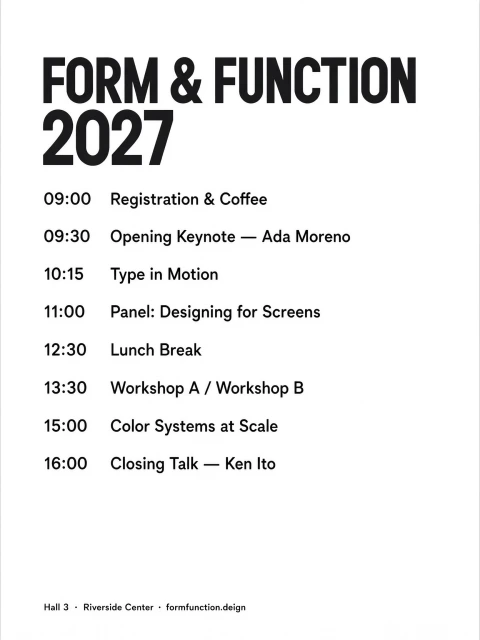
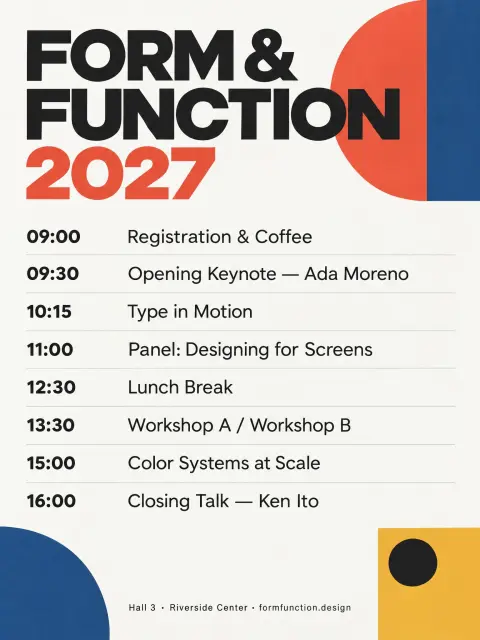
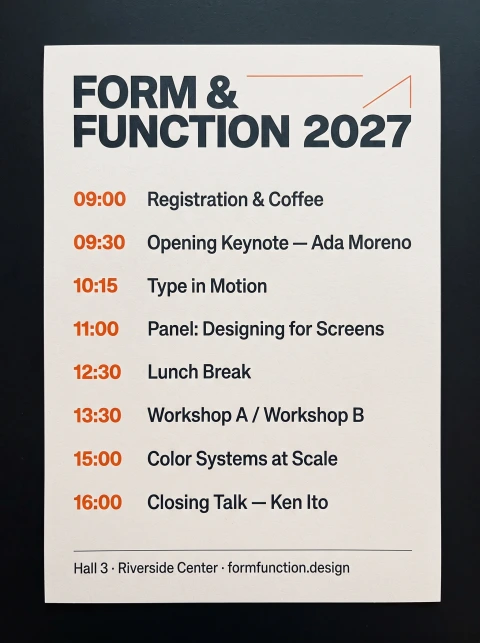
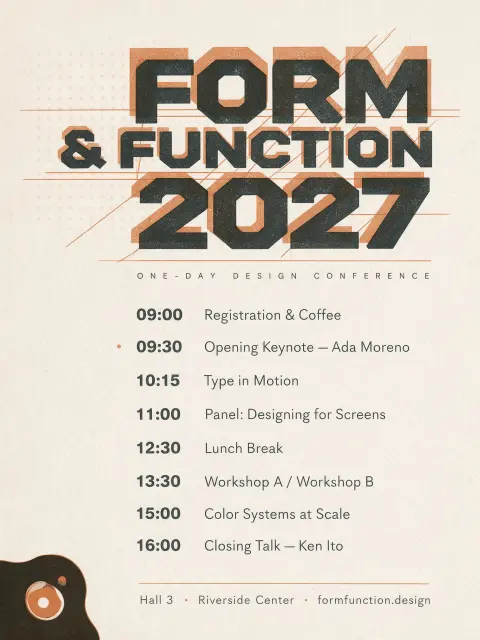
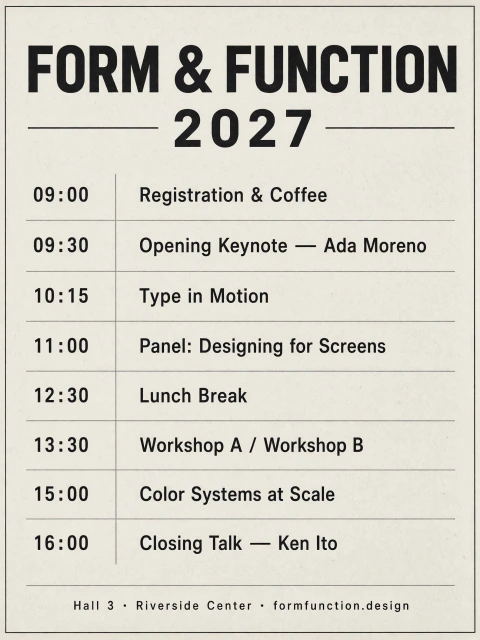
GPT Image 2.5 scored highest, 9.2, with a Bauhaus-style title, color blocks and a rule between every time slot. All five models wrote the 8 time slots, the em dashes and the slash correctly in their scored images. Nano Banana 2.1 has the largest, clearest text, but it delivered a photo of a printed card lying on a dark table rather than the schedule itself, and scored 7.9. Qwen Image 3.0 Pro and Grok Imagine 2.0 set the title in a condensed sans serif rather than the geometric lettering the prompt asked for; Grok scored 8.3. Qwen Image 3.0 Pro also wrote the footer URL as "formfunction.deign" and scored 7.4, the lowest score in this job: its page is black text on white with no grouping and a large empty area at the bottom. Seedream 5.0 Pro added a subtitle, "ONE-DAY DESIGN CONFERENCE", that the prompt did not contain. In GPT Image 2.5's second, unscored image, the line "Panel: Designing for Screens" is missing and only "11:00" remains.
Job 5: Tea tin label
Front label for a tea tin, brand name "山间茶事" in elegant brush-and-ink calligraphy, English line "MOUNTAIN TEA HOUSE", product line "明前龙井 · 二〇二七年春", net weight "净含量 100 克", misty green mountains, no other text
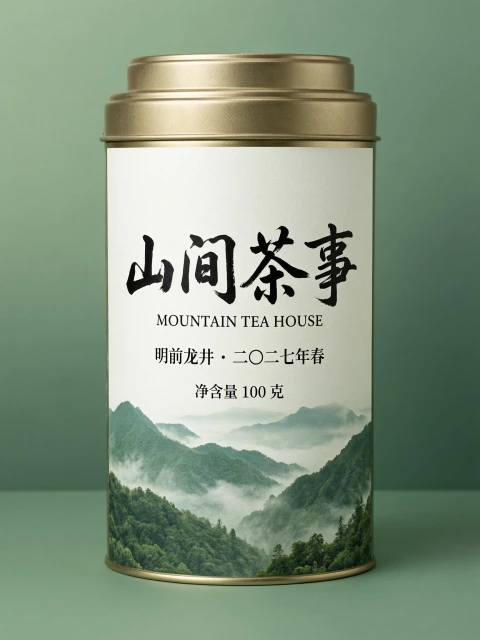
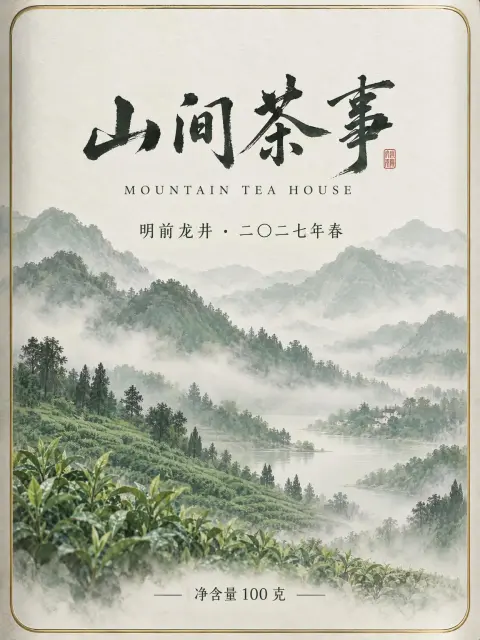
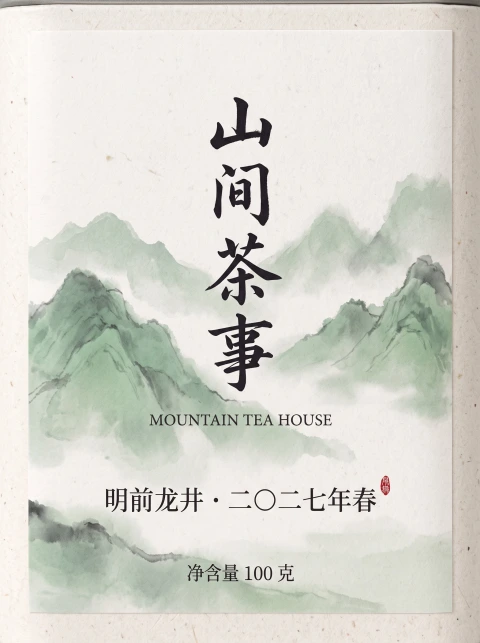
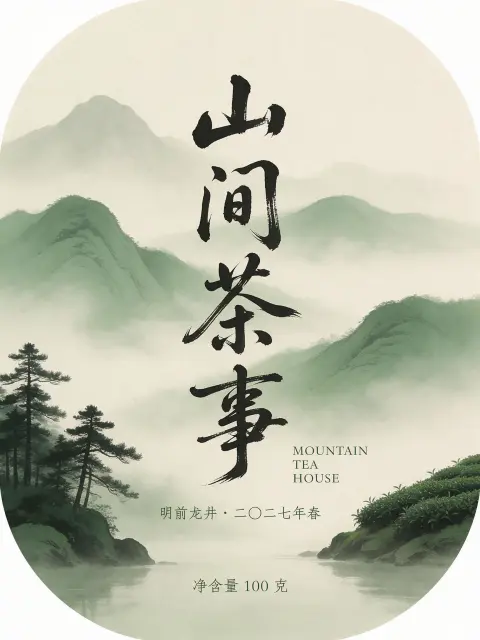
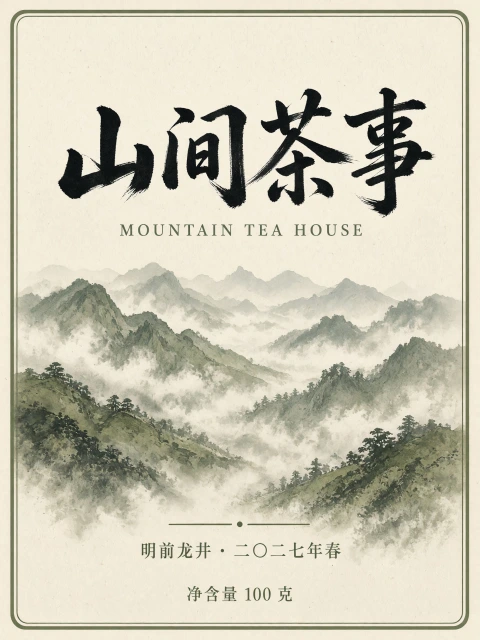
All five models wrote all four lines correctly in Simplified Chinese, including 龙 (not the traditional 龍) and 〇. The prompt asked for the label, and four models delivered a flat label. Qwen Image 3.0 Pro drew a photo of a whole tea tin with the label on it, which cannot be printed as a label, and scored 8.45, the lowest in this job. Grok Imagine 2.0 scored highest, 9.2: a flat label with every line in place and nothing added. GPT Image 2.5 and Nano Banana 2.1 each added a small red seal stamp with characters, which the prompt's "no other text" rules out, and both scored 8.95. For brush calligraphy as a preset, see the Chinese ink brush style.
Job 6: Japanese bookstore poster
Poster for a bookstore's autumn reading week, headline "秋の読書週間" set vertically in elegant Mincho lettering, sub-line "十月二十七日〜十一月九日", and "全品ポイント二倍", warm maple leaves, all Japanese text written vertically, no other text
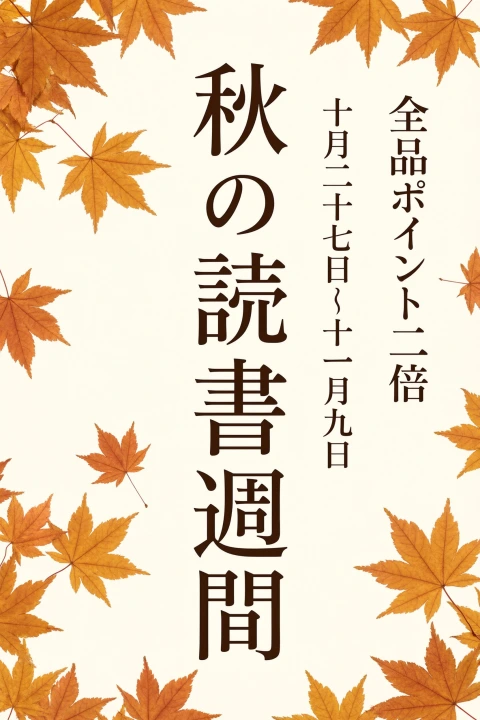

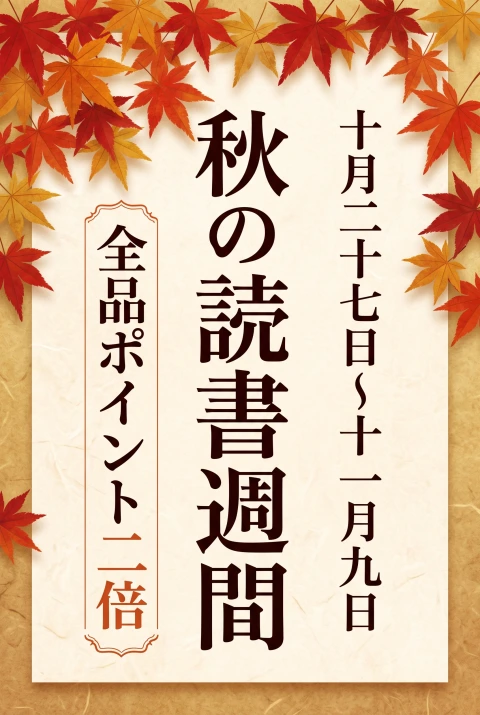
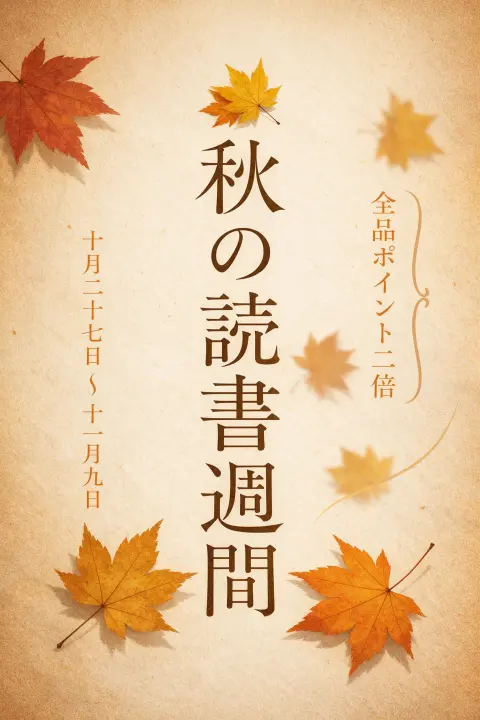

All five models set all three lines vertically and wrote them correctly, and all five used the Mincho lettering the prompt asked for. GPT Image 2.5 scored highest, 9.2, with a bookshop scene and the points offer on a red vertical banner. Qwen Image 3.0 Pro, Nano Banana 2.1 and Grok Imagine 2.0 scored 9.0. Seedream 5.0 Pro scored 8.95: its date column is pale and thin.
Job 7: Outdoor brand badge
Badge logo for a hiking outfitter called "Fernwood Outfitters", an interlocking "FW" monogram with a fern leaf in the center, the full name in clean small caps around the badge, flat vector look, two colors, on plain white, no other text
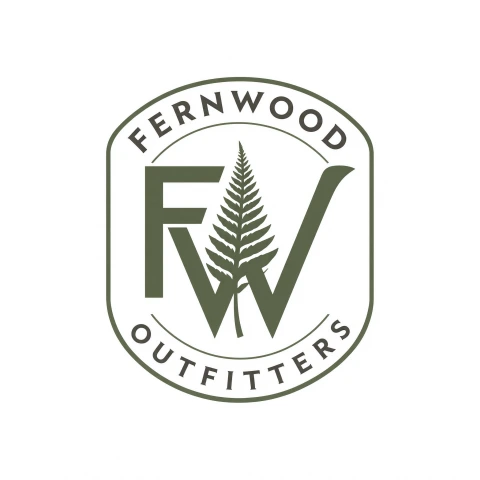
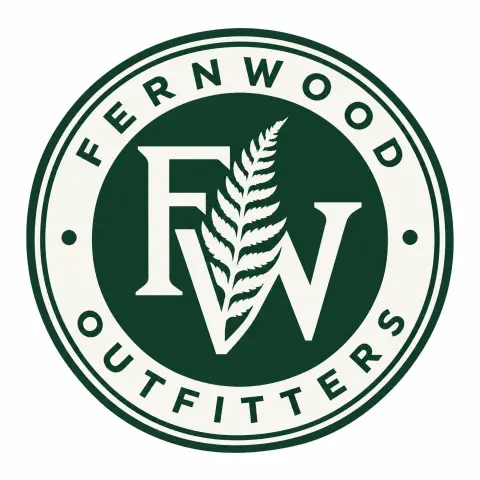
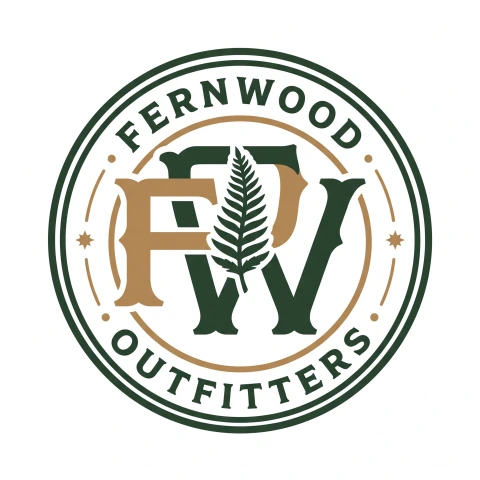
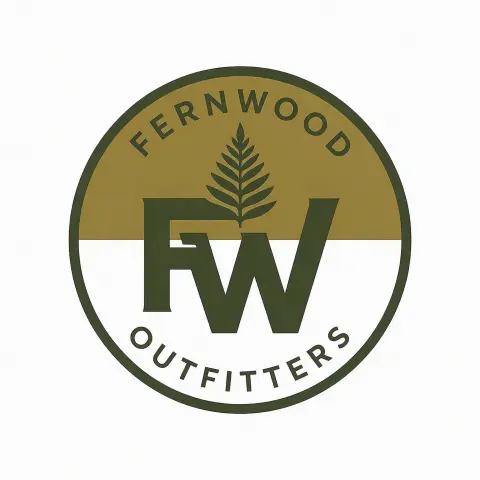
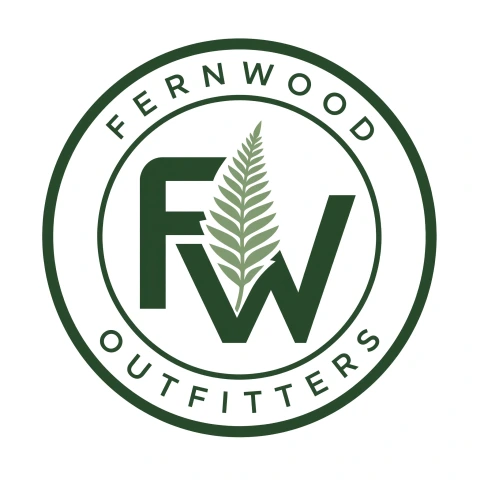
GPT Image 2.5 and Grok Imagine 2.0 tied for the highest score, 9.2. Qwen Image 3.0 Pro scored 9.0 with a fern growing through the monogram. Nano Banana 2.1 scored lowest, 8.05: its monogram has an extra bowl that makes it read like "FPW" at first glance. Seedream 5.0 Pro scored 8.3: its F and W sit side by side instead of interlocking, and the fern is above the letters instead of in the center. In Qwen's second, unscored image, the full name appears twice around the badge.
Job 8: Photo of a food truck
Realistic photo of a vintage food truck parked by the beach at noon, hand-painted lettering on its side reads "SALT & LIME TACOS", a menu board next to it reads "3 TACOS $9 · HORCHATA $4", bright sunlight, shot on a 50mm lens
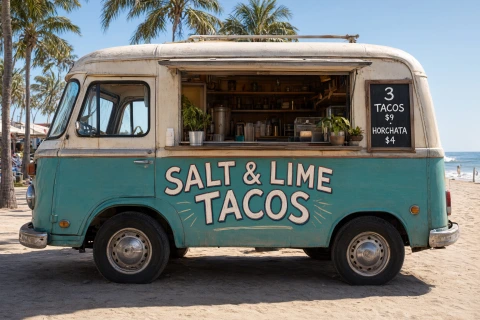
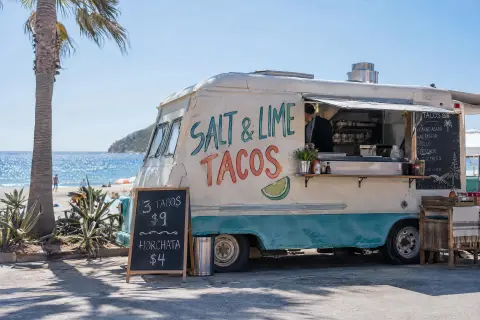
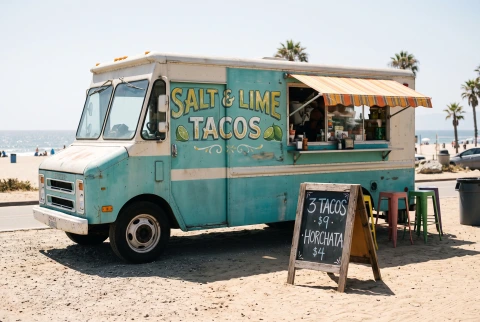
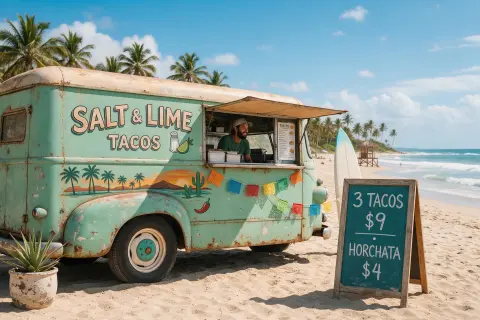
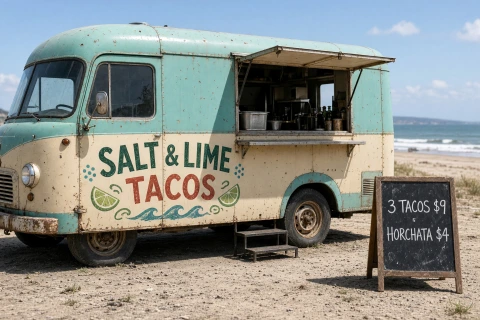
All five models wrote both required lines correctly. Seedream 5.0 Pro and Grok Imagine 2.0 tied for the highest score, 9.2, with the menu board standing next to the truck as the prompt asked. GPT Image 2.5 scored lowest, 7.5: next to the serving window it added a second chalkboard that lists five dishes, and one line on that board is garbled lettering, which is a hard error under the rubric, so its legibility score is 4. It also drew the "·" on the requested menu board as a wavy line. Qwen Image 3.0 Pro hung the menu board on the truck instead of next to it and scored 8.75.
Job 9: Edit an existing image
Change the date to "FRIDAY • NOVEMBER 13 • 2026" and the price to "$20", and keep everything else exactly as it is
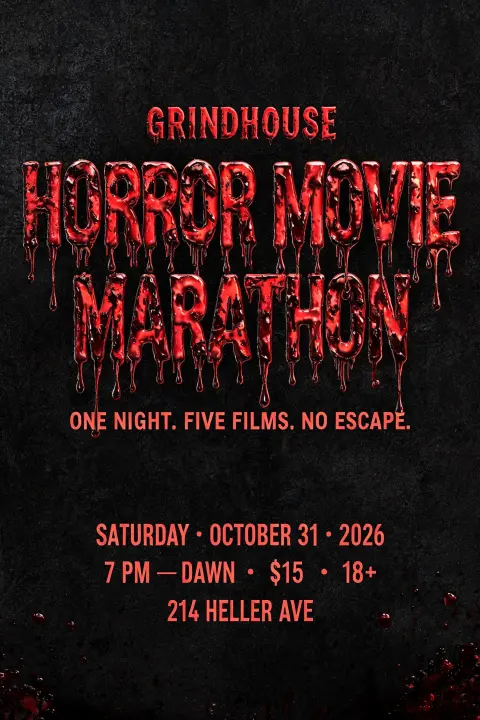
The original poster has six lines of text. The prompt asked for two of them to change: the date and the price. The other four lines and the "18+" had to stay the same.
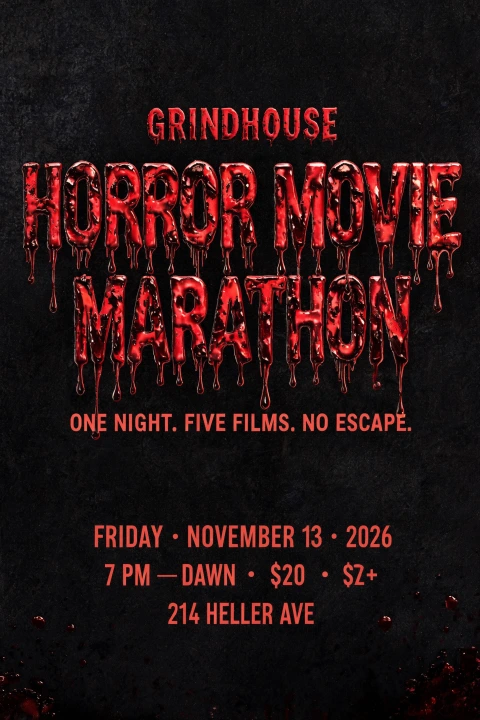
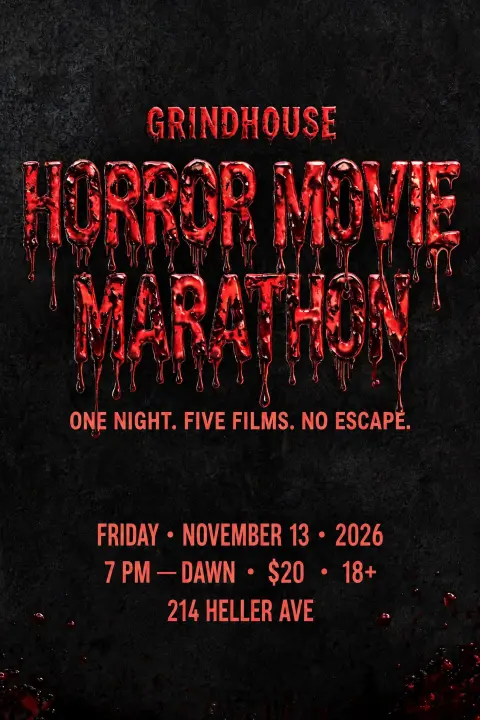
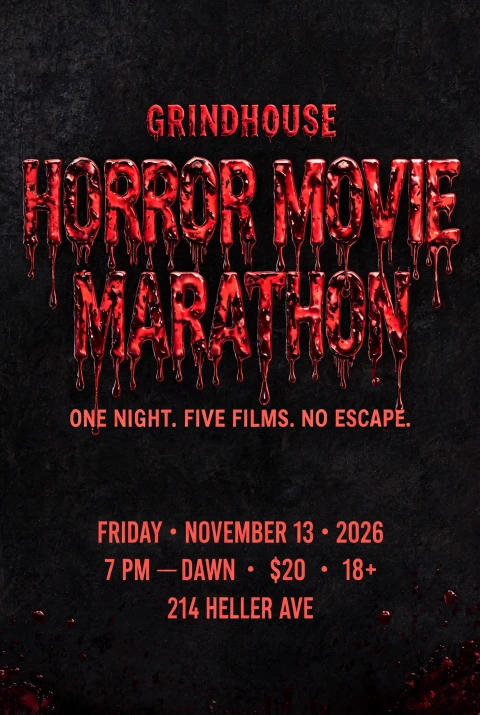
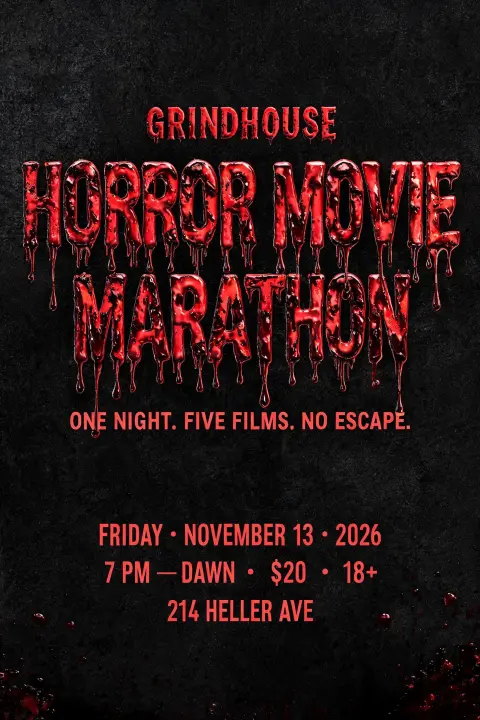
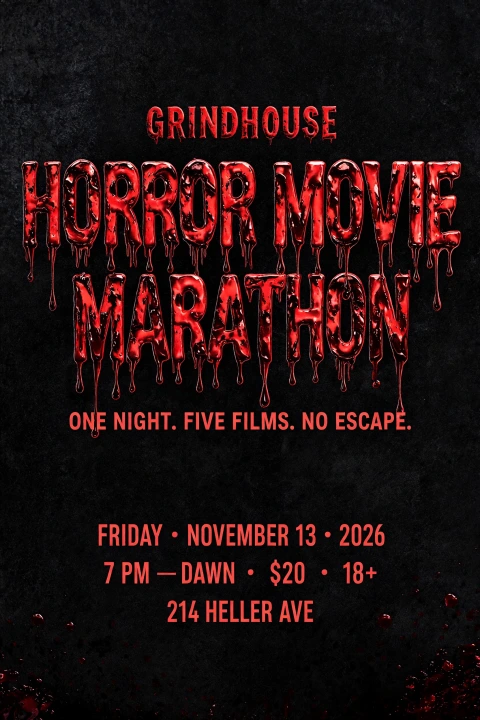
Four models changed the date and price correctly and left everything else unchanged, and all four scored 9.0. Qwen Image 3.0 Pro changed the date and price correctly but also changed "18+" to "$Z+", and scored 8.5. Its second image kept "18+" correctly.
The rubric does not measure whether the rest of the image stayed the same, so I measured that separately, as in the Grok test. Each result and the original were resized to 800 × 1200 and converted to grayscale, and I took the mean absolute pixel difference (0 to 255) outside the two lines that were meant to change. Lower means closer to the original.
| Model | Difference from original |
|---|---|
| Seedream 5.0 Pro | 2.6 |
| GPT Image 2.5 Sunburst | 5.7 |
| Nano Banana 2.1 | 8.2 |
| Grok Imagine 2.0 Medium | 10.0 |
| Qwen Image 3.0 Pro | 12.2 |
The original is 1664 × 2496 pixels. Every model returned that size except Nano Banana 2.1, which returned 1696 × 2528, so part of its difference comes from resizing. Seedream 5.0 Pro was also closest to the original in the Grok test's edit job. Its median edit time here was 118 seconds, against 23 to 55 seconds for the other four.
Job 10: Two reference images
Portrait poster that says "OPEN STUDIO" with a small line "Sat & Sun · 11 AM–6 PM". Use the layout of reference image 1 and the lettering style of reference image 2.


Reference image 1 is a pop art gallery poster: a blue band at the top, a huge two-line title on a red halftone background, and a date at the bottom. Reference image 2 is a thin blue neon outline wordmark on a starry background. The correct result is reference 1's layout with reference 2's neon lettering.
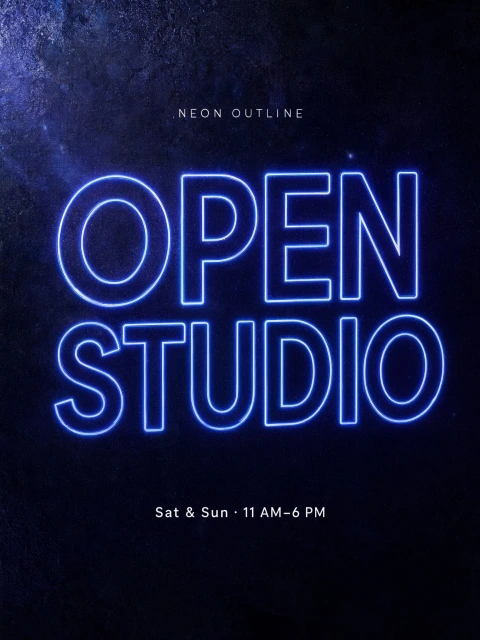
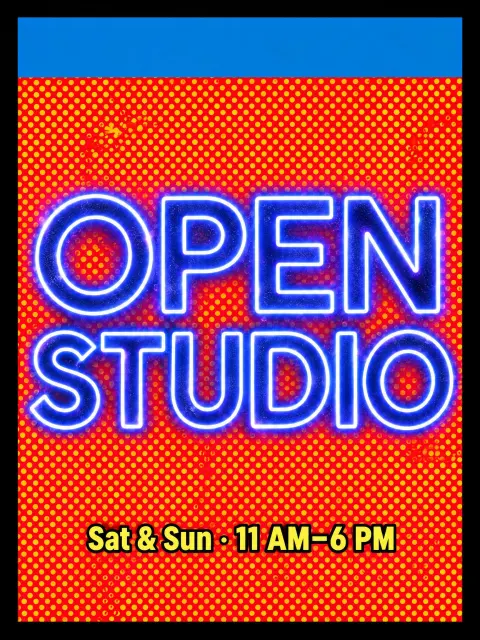
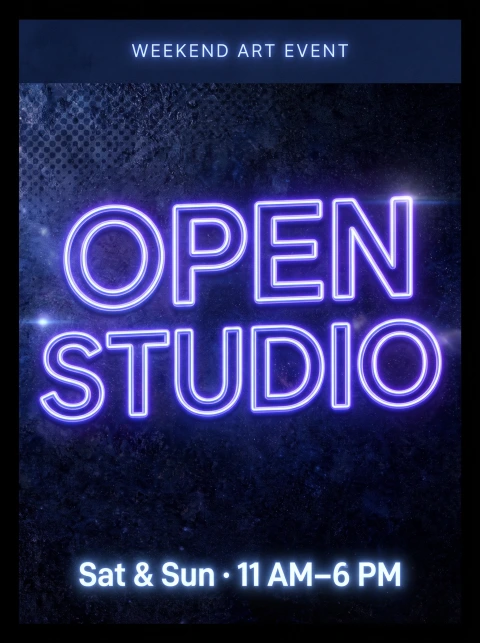
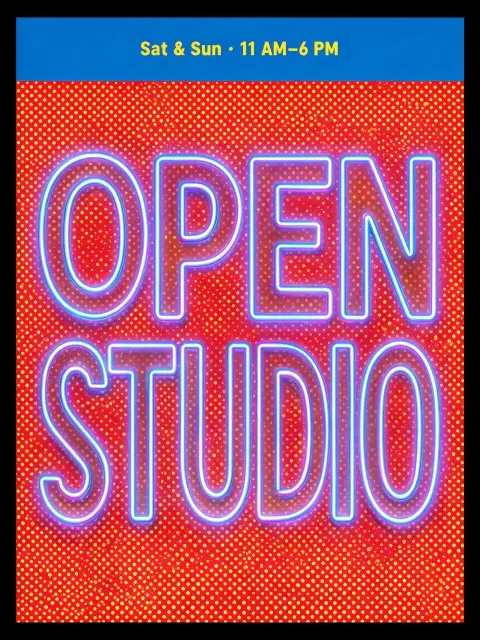
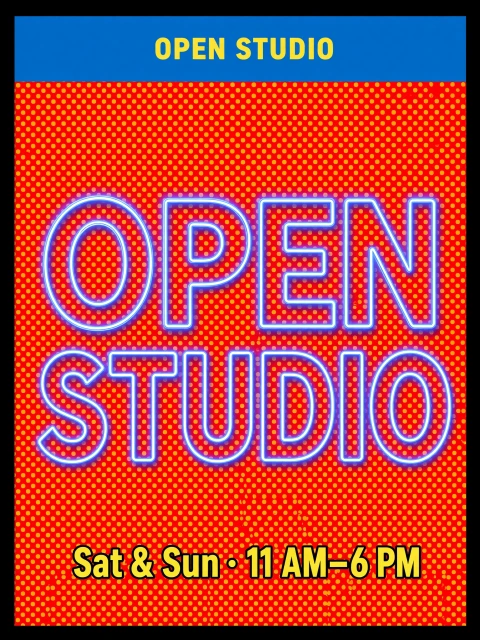
GPT Image 2.5 and Seedream 5.0 Pro got both parts right and tied for the highest score, 9.2. Grok Imagine 2.0 also got both parts right but wrote "OPEN STUDIO" a second time in the top band, and scored 8.95. Nano Banana 2.1 used the neon lettering and the top band but put it on reference 2's starry background, and added a line, "WEEKEND ART EVENT", that the prompt did not contain. Qwen Image 3.0 Pro followed reference 2 for both the lettering and the layout, and copied the words "NEON OUTLINE" from it. Its second image did the same.
Seedream 5.0 Pro's first attempt at this job failed. On FontVibe, a Seedream 5.0 Pro request is stopped after 2 minutes. Seedream 5.0 Pro reached that limit on 3 of its 4 attempts at this job, at 2K with two reference images, and the one image that succeeded took 121 seconds. That image is the one scored. Nano Banana 2.1 also failed once, on its second image for job 7, and succeeded on the retry. Failed requests are refunded on FontVibe.
Qwen Image 3.0: 1K or 2K?
On FontVibe, a Qwen Image 3.0 Pro image costs 22 credits at 1K and 40 credits at 2K. I ran jobs 4 and 5, the two jobs with the smallest text, at 1K as well, two images each.
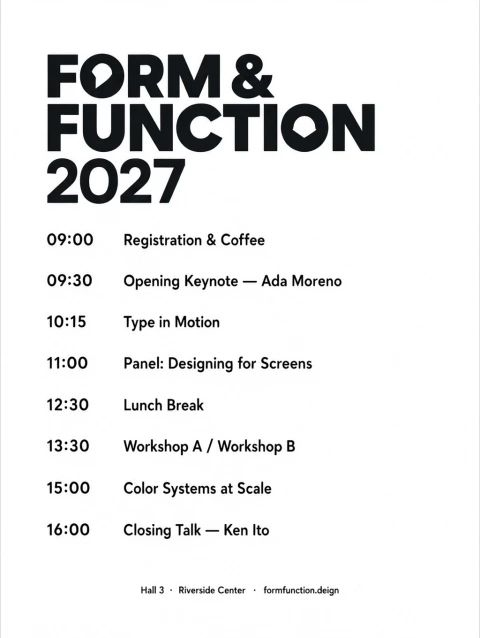
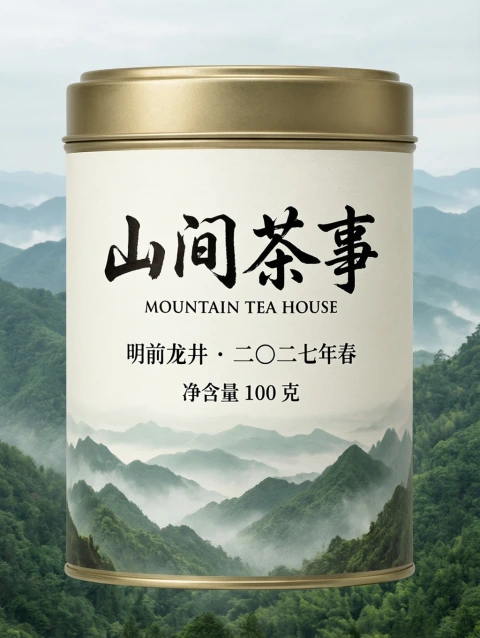
The 1K images are 1024 × 1360 pixels and the 2K images are 1728 × 2304. At 1K, all 10 schedule lines and all four tea label lines are still readable, and both jobs scored the same as at 2K: 7.4 and 8.45. At 1K, Qwen also drew a tea tin instead of a label. Both 1K schedules have the "formfunction.deign" misspelling, against one of the two 2K schedules. The 1K median time was 14 seconds, against 23 seconds at 2K.
For drafts and social images viewed on a phone, 1K costs 55% of 2K in this test and its text stayed readable. For print, 2K has 2.9 times as many pixels.
To try Qwen Image 3.0 Pro, choose it in the model menu on FontVibe's generator. It accepts up to 3 images per request, counting the image being edited and any reference images. Every image in this post opens its page on FontVibe when clicked, and hovering over it shows a Recreate button that runs the same prompt.
Two tests compared
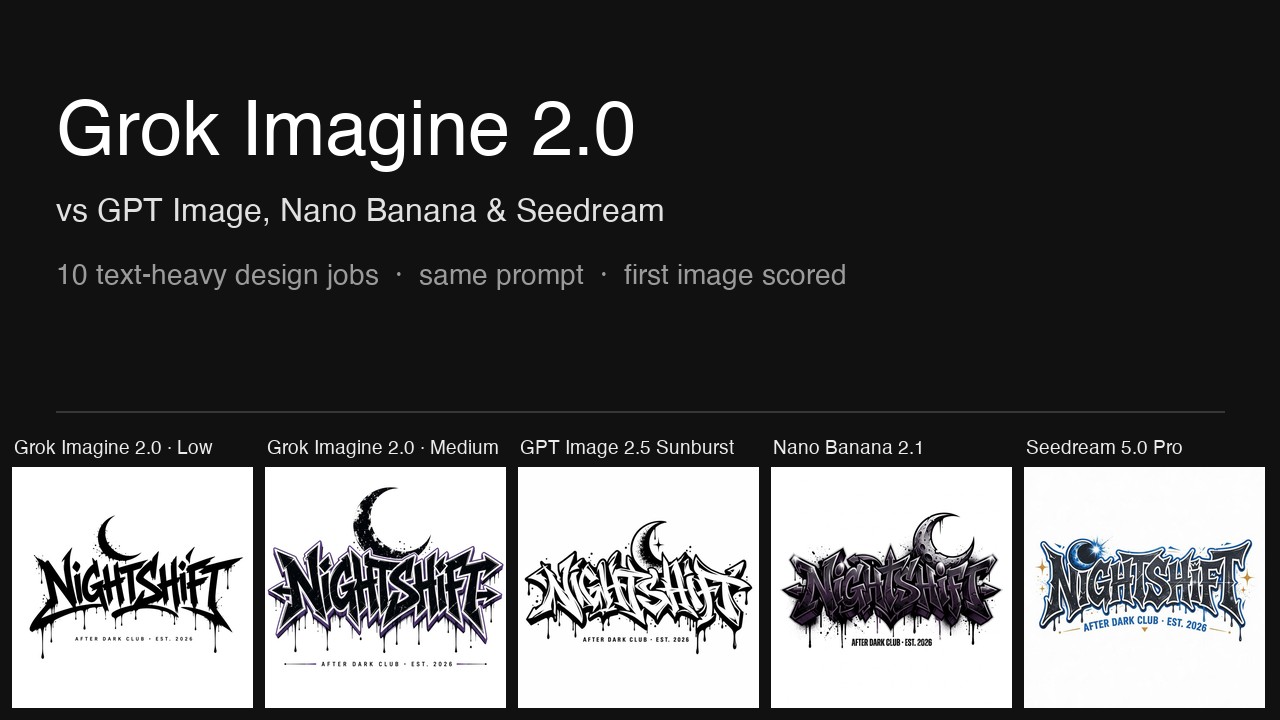
GPT Image 2.5 Sunburst, Grok Imagine 2.0 Medium, Nano Banana 2.1 and Seedream 5.0 Pro were also in my Grok Imagine 2.0 test, which used eight different prompts.
| Model | Grok Imagine 2.0 test | This test |
|---|---|---|
| GPT Image 2.5 Sunburst (High) | 8.90 (1st) | 8.99 (2nd) |
| Grok Imagine 2.0 Medium | 8.84 (2nd) | 9.01 (1st) |
| Nano Banana 2.1 | 8.55 (4th of 5 setups) | 8.76 (3rd) |
| Seedream 5.0 Pro | 8.20 (5th) | 8.75 (4th) |
GPT Image 2.5 and Grok Imagine 2.0 Medium swapped first and second place: they were 0.06 apart in the Grok test and are 0.02 apart here. Nano Banana 2.1 was ahead of Seedream 5.0 Pro in both tests, by 0.35 in the Grok test and by 0.01 here. Nano Banana 2.1 is listed 4th in the Grok test because that test also included Grok Imagine 2.0 Low, which scored 8.59.
Jobs 1 and 3 used the same prompts in both tests, so they are a direct comparison. In job 1, Qwen Image 3.0 Pro scored 8.3, lower than all four other models in either test. In job 3, it scored 9.0, the same as GPT Image 2.5 and Nano Banana 2.1 in this test.
Each model, briefly
Grok Imagine 2.0 Medium, 9.01. Highest information-and-layout score, 8.9. Highest or tied-highest score in 5 of the 10 jobs. No missing or misspelled text in any scored image. Lowest score 8.3, on the schedule, where its title is a condensed sans serif instead of geometric lettering. Median time 95 seconds, the slowest in this test.
GPT Image 2.5 Sunburst (High), 8.99. Highest lettering score, 9.0, and highest appeal score, 8.9. Highest or tied-highest score in 8 of the 10 jobs. Lowest score 7.5, on the food truck photo, where it added a chalkboard with a garbled line. Tested at High; Extra High and Max were not tested.
Nano Banana 2.1, 8.76. Costs 25 credits per 2K image on FontVibe, the lowest of the five models. Lowest score 7.9, on the schedule, where it delivered a photo of a printed card. Followed only half of the layout reference in job 10.
Seedream 5.0 Pro, 8.75. Highest legibility score, 10.0, shared with Qwen Image 3.0 Pro. Closest to the original in the edit job, with a pixel difference of 2.6. Reached FontVibe's 2-minute limit on 3 of 4 attempts at the two-reference job. Lowest score 8.15, on the sticker.
Qwen Image 3.0 Pro, 8.57. Highest legibility score, 10.0, shared with Seedream 5.0 Pro, and the fastest median time, 23 seconds. Lowest information-and-layout score, 7.7, and lowest appeal score, 7.8. Changed or misspelled a required line in 3 of its 10 scored images, and drew a tea tin when the prompt asked for a label. Did not score highest in any job.
A blind check
Because I knew which model made each image while scoring, I also ran a blind pass. A private page showed the five images for each job in random order with the model names hidden. Each image got a 1 to 5 score for the lettering, a 1 to 5 score for the layout, and one of three verdicts: ready to use, needs a small fix, or unusable.
| Model | Blind lettering (1–5) | Blind layout (1–5) | Ready / small fix / unusable |
|---|---|---|---|
| GPT Image 2.5 Sunburst | 4.4 | 4.8 | 8 / 2 / 0 |
| Seedream 5.0 Pro | 4.3 | 4.3 | 4 / 4 / 2 |
| Nano Banana 2.1 | 4.3 | 4.2 | 4 / 4 / 2 |
| Grok Imagine 2.0 Medium | 4.0 | 4.2 | 4 / 5 / 1 |
| Qwen Image 3.0 Pro | 3.4 | 3.5 | 1 / 2 / 7 |
The blind pass and the rubric agree on last place, Qwen Image 3.0 Pro. The blind pass put GPT Image 2.5 first, where the rubric puts it 0.02 behind Grok Imagine 2.0 Medium, and it ordered Seedream 5.0 Pro, Nano Banana 2.1 and Grok Imagine 2.0 the other way round from the rubric. The blind pass was harsher on Qwen Image 3.0 Pro than the rubric: it marked 7 of Qwen's 10 images unusable, against 2 or fewer for each of the other four models.
Limits of this test
- One image per model per job was scored, and one person scored all 50.
- Grok Imagine 2.0 Medium and GPT Image 2.5 are 0.02 apart, and Nano Banana 2.1 and Seedream 5.0 Pro are 0.01 apart. Changing one score by 1 point in one job moves a model's average by 0.02 to 0.035, so both orders depend on single scores.
- GPT Image 2.5 was tested at its third of five quality settings. The other four models were tested at their highest setting.
- Qwen Image 3.0 Pro was tested with its built-in prompt rewriting off. With it on, the model rewrites the prompt before generating, so its results could differ.
- The edit and reference images came from Seedream 5.0, the previous model in Seedream 5.0 Pro's family.
- Only Chinese and Japanese were tested out of the 12 languages Qwen Image 3.0 Pro lists.
- The results describe these model versions on October 21, 2026.
Every image is public on FontVibe and every score has a written reason. If you rerun a prompt and get a very different result, email hello@fontvibe.ai and I'll add it to this post.
Appendix: every score
Legibility / lettering / information and layout / appeal, then the weighted overall. First image of each model (job 10, Seedream 5.0 Pro: the only successful image).
| Job | Qwen Image 3.0 Pro | GPT Image 2.5 (High) | Nano Banana 2.1 | Seedream 5.0 Pro | Grok Imagine 2.0 Medium |
|---|---|---|---|---|---|
| 1 Invitation | 10/9/7/7 = 8.30 | 10/9/9/9 = 9.20 | 10/9/9/8 = 9.00 | 10/9/7/8 = 8.50 | 10/9/9/9 = 9.20 |
| 2 Sticker | 10/9/9/8 = 9.00 | 10/9/9/9 = 9.20 | 10/9/9/9 = 9.20 | 10/8/7/8 = 8.15 | 10/9/9/8 = 9.00 |
| 3 Poster | 10/9/9/8 = 9.00 | 10/9/9/9 = 9.20 | 10/9/9/8 = 9.00 | 10/9/7/8 = 8.50 | 9/9/9/9 = 9.00 |
| 4 Schedule | 10/7/7/6 = 7.40 | 10/9/9/9 = 9.20 | 10/8/6/8 = 7.90 | 10/9/8/9 = 8.95 | 10/7/9/8 = 8.30 |
| 5 Tea label | 10/9/6/9 = 8.45 | 10/9/8/9 = 8.95 | 10/9/8/9 = 8.95 | 10/9/7/9 = 8.70 | 10/9/9/9 = 9.20 |
| 6 Japanese poster | 10/9/9/8 = 9.00 | 10/9/9/9 = 9.20 | 10/9/9/8 = 9.00 | 10/9/8/9 = 8.95 | 10/9/9/8 = 9.00 |
| 7 Badge logo | 10/9/9/8 = 9.00 | 10/9/9/9 = 9.20 | 7/8/9/8 = 8.05 | 10/7/9/8 = 8.30 | 10/9/9/9 = 9.20 |
| 8 Food truck | 10/9/8/8 = 8.75 | 4/9/7/9 = 7.50 | 10/9/8/9 = 8.95 | 10/9/9/9 = 9.20 | 10/9/9/9 = 9.20 |
| 9 Edit | 10/9/7/8 = 8.50 | 10/9/9/8 = 9.00 | 10/9/9/8 = 9.00 | 10/9/9/8 = 9.00 | 10/9/9/8 = 9.00 |
| 10 References | 10/9/6/8 = 8.25 | 10/9/9/9 = 9.20 | 10/9/7/8 = 8.50 | 10/9/9/9 = 9.20 | 10/9/8/9 = 8.95 |
Qwen Image 3.0 Pro at 1K (not in the averages): job 4, 10/7/7/6 = 7.40; job 5, 10/9/6/9 = 8.45.
The written reason for every score is kept on file and available on request.
Frequently asked questions
Is Qwen Image 3.0 good at design with text?
In this test, Qwen Image 3.0 Pro tied with Seedream 5.0 Pro for the highest legibility score, 10.0, and had the lowest overall score of five models, 8.57 out of 10. Three of its 10 scored images changed or misspelled a required line, and its layouts scored lowest on information and layout, 7.7.
Which AI image model scored highest for design with text?
Grok Imagine 2.0 Medium scored 9.01 out of 10, the highest of five models across 10 jobs, and GPT Image 2.5 Sunburst at High quality scored 8.99, 0.02 lower. Nano Banana 2.1 scored 8.76, Seedream 5.0 Pro 8.75 and Qwen Image 3.0 Pro 8.57.
Can Qwen Image 3.0 write Chinese and Japanese?
Yes, in this test. It wrote a bilingual Chinese and English tea label correctly in Simplified Chinese and set a three-line Japanese poster vertically with every character correct. All four other models did the same.
Can Qwen Image 3.0 edit images?
Yes. In the edit job it changed a date and a price correctly, but in its first image it also changed "18+" to "$Z+", and its result had the largest pixel difference from the original of the five models, 12.2 on a 0 to 255 scale.
Is Qwen Image 3.0 at 1K good enough?
In the two jobs with the smallest text, the 1K images scored the same as the 2K images, 7.4 and 8.45, and every line stayed readable. 1K costs 22 credits on FontVibe and 2K costs 40.
Was GPT Image 2.5 tested at its highest quality?
No. GPT Image 2.5 Sunburst was tested at High, the third of its five quality settings and FontVibe's default. Extra High and Max were not tested.
Can I try all five models in one place?
All five models are in the model menu on FontVibe, and the same prompt can be run on each.
Ready to try it yourself?
Put these prompt techniques into practice — no account needed to start.
✦ Start GeneratingAdd FontVibe as a preferred source on Google
Put these prompt techniques into practice — no account needed to start.
Start creating
Comments