FontVibe
ホーム制作スタイルギャラリーフォントツール料金プランブログ
日本語▾
FontVibe
✦FontVibe
FontVibe

無料の AI フォントジェネレーター —— 必要なものを伝えるか、スタイルを選ぶだけで、仕上がった文字作品が手に入ります。134+ 種のスタイル、PNG/JPG をすぐダウンロード。

プロダクト

制作スタイルギャラリー料金プラン

人気のシーン

ハロウィンデザインチャンネルデザインハロウィンフォント

リソース

ブログAIフォントライブラリ背景透過ツールアスキーアート作成フォントツール

法的情報

利用規約プライバシーポリシー法的情報お問い合わせ
© 2026 FontVibe. 無断転載を禁じます。
プライバシーポリシー|利用規約|法的情報|特定商取引法に基づく表記
FontVibe

無料の AI フォントジェネレーター —— 必要なものを伝えるか、スタイルを選ぶだけで、仕上がった文字作品が手に入ります。134+ 種のスタイル、PNG/JPG をすぐダウンロード。

プロダクト
制作スタイルギャラリー料金プラン
人気のシーン
ハロウィンデザインチャンネルデザインハロウィンフォント
リソース
ブログAIフォントライブラリ背景透過ツールアスキーアート作成フォントツール
法的情報
規約プライバシー法的情報お問い合わせ
© 2026 FontVibe. 無断転載を禁じます。
Privacy|Terms|Legal|特商法
ホーム››Classroom Ink Guide (DIY)›How to Draw a Snowman 1 2 3 4 5 6
How to Draw a Snowman
1
2
3
4
5
6 - Classroom Ink Guide (DIY) text effect - create a clean, child-friendly landscape step-by-step drawin
イラスト・描き方

How to Draw a Snowman 1 2 3 4 5 6 - Classroom Ink Guide Text Effect

23 時間前に作成
J
@jack
公開作品 582 件
›
スタイル
Classroom Ink Guide (DIY)
AIフォント
Friendly Marker
レイアウト
Six-Step Grid
画像サイズ
1824 × 1024
✦ あなたの文字でこのデザインを作り直す

この作品と同じ OpenAI GPT-Image-2.5 Sunburst を使用 · 15 クレジット

33/500
透過エフェクト
✦ 透過エフェクト
背景を取り除いたPNGを生成します。残るのは文字とその効果だけです。きれいに切り抜けるよう、スタイルに応じて最適な背景色をAIが自動で選びます。
透過を劣化なく保つため、出力は常にPNGです。
この作品について

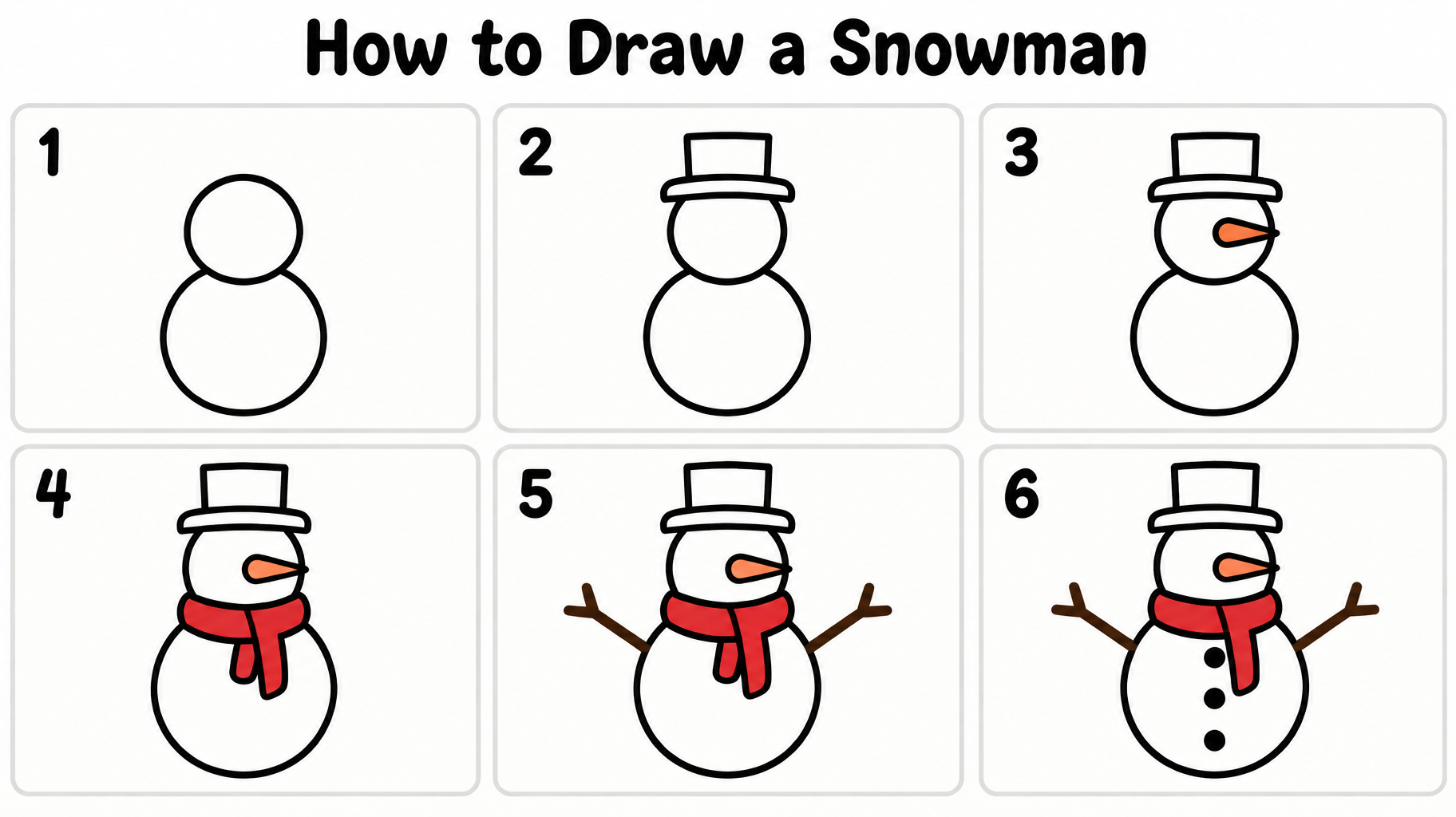
"How to Draw a Snowman" は、漫画風の線画で描いた6ステップの描き方ガイドです。太い黒の丸みのある文字のタイトルの下に、番号付きの6つのパネルが並び、2つの円から、シルクハット、オレンジのニンジンの鼻、赤いマフラー、枝の腕、黒いボタンを備えた雪だるまが完成します。見出しと各パネルの絵を差し替えれば、自分のタイトルやテーマ、ステップ数で作り直せます。

作成プロンプト

Create a clean, child-friendly landscape step-by-step drawing guide on a plain warm-white sheet of paper. Use a 16:9 canvas with generous safe margins. At the top, set the exact title “How to Draw a Snowman” in large, bold, rounded hand-lettered black text, clear at phone size. Below it, arrange six equally sized drawing panels in a precise 3-column by 2-row grid, read left to right across each row. Give each panel a very light warm-gray outline and ample white space. The only other text is one large, bold black step number in each panel: “1”, “2”, “3”, “4”, “5”, “6”. No captions, extra words, logos, or decorative Christmas motifs. Show the SAME simple snowman at the SAME scale and front-facing angle in all six panels, with previous lines retained exactly as each drawing progresses. Use thick, smooth, rounded black outlines, simple geometric shapes, no shading, no hatching, and no realistic detail; every mark should be easy for a seven-year-old to copy. Panel 1: only two stacked circles, a smaller head above a larger body. Panel 2: the same two circles plus a simple brimmed top hat resting on the head. Panel 3: add one small, tapered orange carrot nose pointing sideways. Panel 4: add a simple bright-red scarf wrapped around the neck, with two short hanging ends. Panel 5: add two straight, slightly forked stick arms extending from the upper body. Panel 6: add three round black buttons down the body, showing the complete snowman with all earlier features. Keep each step uncluttered and make the final drawing unmistakably match the accumulated steps. Flat white paper, crisp black linework, minimal flat orange and red accents; no gradients, no heavy shadows, no background scene.

タグ

用途
作ったものイラスト・描き方
ビジュアル
雰囲気カートゥーン›ムード明るい›フレンドリー›エフェクトフラット›書体サンセリフ›字形の特徴丸み›極太›レイアウト一行›カラー白›モチーフマフラー›枝›対象先生›子ども›言語英語›

2026年10月19日に生成 · 1824 × 1024 · PNG · OpenAI GPT-Image-2.5 Sunburst · レイアウト:Six-Step Grid · 制作者がシェア · 商用利用無料(CC BY 4.0)

✦ AI文字エフェクトのスタイルを見る

AI文字エフェクトのスタイルを見る

すべてのスタイルを見る →
バイキング
バイキング923
映画 & フィルム
映画 & フィルム8.7K
サイバーパンク
サイバーパンク776
Netflix・ストリーミング
Netflix・ストリーミング1.8K
ネオングロー
ネオングロー1.6K
3D 太字
3D 太字1.4K
ホーム››Classroom Ink Guide (DIY)›How to Draw a Snowman 1 2 3 4 5 6
How to Draw a Snowman
1
2
3
4
5
6 - Classroom Ink Guide (DIY) text effect - create a clean, child-friendly landscape step-by-step drawin
PNGをダウンロード
イラスト・描き方

How to Draw a Snowman 1 2 3 4 5 6 - Classroom Ink Guide Text Effect

23 時間前に作成
J
@jack
公開作品 582 件 · このクリエイターの作品をすべて見る →
スタイル
Classroom Ink Guide (DIY)
AIフォント
Friendly Marker
レイアウト
Six-Step Grid
画像サイズ
1824 × 1024
✦ あなたの文字でこのデザインを作り直す

この作品と同じ OpenAI GPT-Image-2.5 Sunburst を使用 · 15 クレジット

33/500
透過エフェクト
✦ 透過エフェクト
背景を取り除いたPNGを生成します。残るのは文字とその効果だけです。きれいに切り抜けるよう、スタイルに応じて最適な背景色をAIが自動で選びます。
透過を劣化なく保つため、出力は常にPNGです。
この作品について

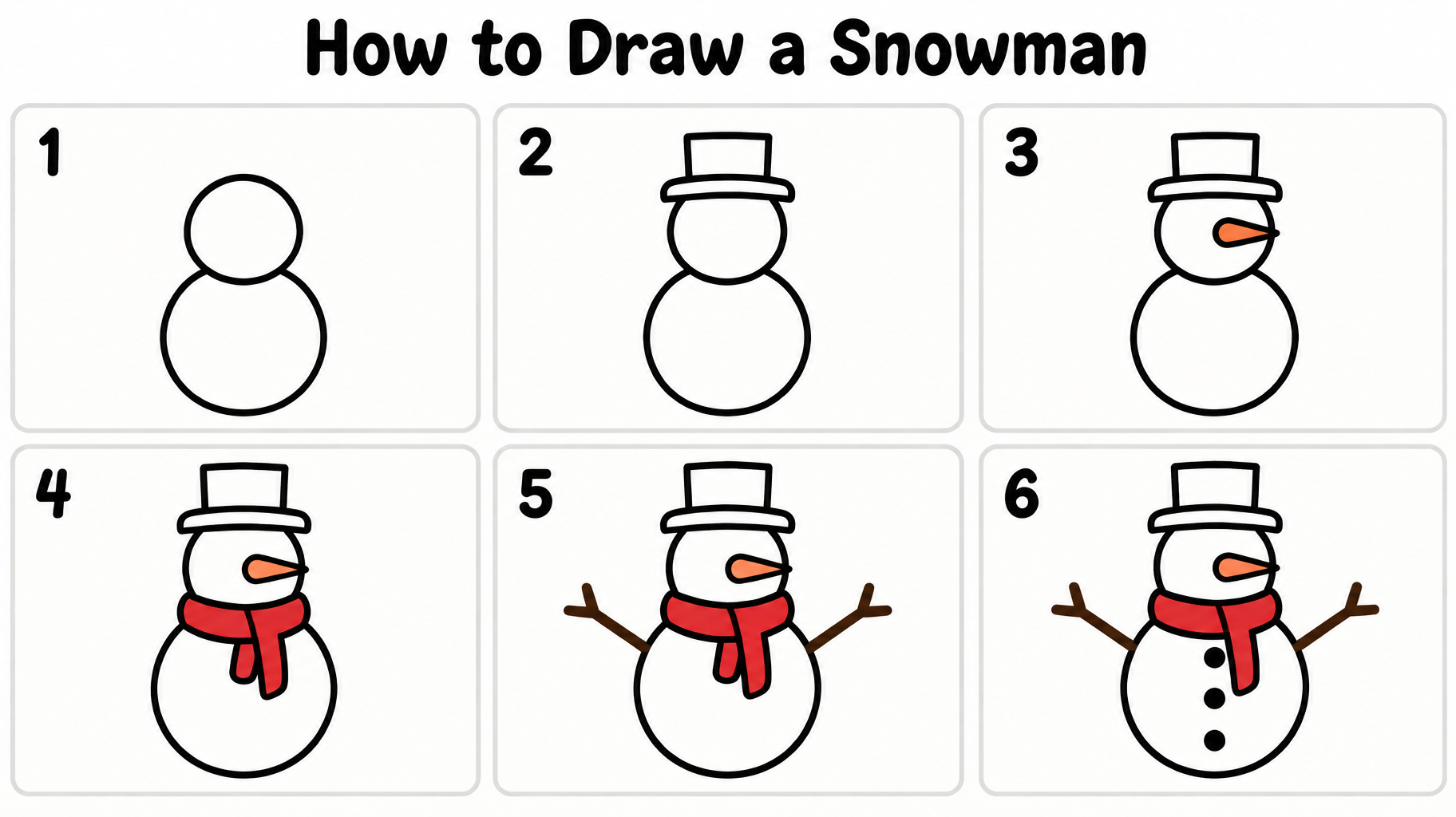
"How to Draw a Snowman" は、漫画風の線画で描いた6ステップの描き方ガイドです。太い黒の丸みのある文字のタイトルの下に、番号付きの6つのパネルが並び、2つの円から、シルクハット、オレンジのニンジンの鼻、赤いマフラー、枝の腕、黒いボタンを備えた雪だるまが完成します。見出しと各パネルの絵を差し替えれば、自分のタイトルやテーマ、ステップ数で作り直せます。

作成プロンプト

Create a clean, child-friendly landscape step-by-step drawing guide on a plain warm-white sheet of paper. Use a 16:9 canvas with generous safe margins. At the top, set the exact title “How to Draw a Snowman” in large, bold, rounded hand-lettered black text, clear at phone size. Below it, arrange six equally sized drawing panels in a precise 3-column by 2-row grid, read left to right across each row. Give each panel a very light warm-gray outline and ample white space. The only other text is one large, bold black step number in each panel: “1”, “2”, “3”, “4”, “5”, “6”. No captions, extra words, logos, or decorative Christmas motifs. Show the SAME simple snowman at the SAME scale and front-facing angle in all six panels, with previous lines retained exactly as each drawing progresses. Use thick, smooth, rounded black outlines, simple geometric shapes, no shading, no hatching, and no realistic detail; every mark should be easy for a seven-year-old to copy. Panel 1: only two stacked circles, a smaller head above a larger body. Panel 2: the same two circles plus a simple brimmed top hat resting on the head. Panel 3: add one small, tapered orange carrot nose pointing sideways. Panel 4: add a simple bright-red scarf wrapped around the neck, with two short hanging ends. Panel 5: add two straight, slightly forked stick arms extending from the upper body. Panel 6: add three round black buttons down the body, showing the complete snowman with all earlier features. Keep each step uncluttered and make the final drawing unmistakably match the accumulated steps. Flat white paper, crisp black linework, minimal flat orange and red accents; no gradients, no heavy shadows, no background scene.

タグ

用途
作ったものイラスト・描き方
ビジュアル
雰囲気カートゥーン›ムード明るい›フレンドリー›エフェクトフラット›書体サンセリフ›字形の特徴丸み›極太›レイアウト一行›カラー白›モチーフマフラー›枝›対象先生›子ども›言語英語›

2026年10月19日に生成 · 1824 × 1024 · PNG · OpenAI GPT-Image-2.5 Sunburst · レイアウト:Six-Step Grid · 制作者がシェア · 商用利用無料(CC BY 4.0)

✦ AI文字エフェクトのスタイルを見る

AI文字エフェクトのスタイルを見る

すべてのスタイルを見る →
バイキング
スタイルを見る →
バイキング923 点
MetallicCarvedAggressiveRugged
映画 & フィルム
スタイルを見る →
映画 & フィルム8.7K 点
EpicDramaticCinematicGold
サイバーパンク
スタイルを見る →
サイバーパンク776 点
NeonCyberpunkDarkGlitch
Netflix・ストリーミング
スタイルを見る →
Netflix・ストリーミング1.8K 点
ModernDarkCinematicGlow
ネオングロー
スタイルを見る →
ネオングロー1.6K 点
GlowDreamyNeonTubular
3D 太字
スタイルを見る →
3D 太字1.4K 点
3DStrikingHeavyChunky

もっと文字スタイルが欲しいときは、無料のフォント変換ツールへ。おしゃれ文字・筆記体・ブラックレターなど。

人気の検索:
AI text effect generatortext effect generatorAI typography generatortext art makerfancy font generator
お知らせ
お知らせはまだありません