FontVibe
HomeGenerateStylesGalleryFontsPricingBlog
English▾
FontVibe
✦FontVibe
FontVibe

Free AI font generator — describe what you need or pick a style, and get finished text artwork. 126+ styles, instant PNG/JPG download.

Product

GenerateStylesGalleryPricing

Popular Scenes

Halloween designsChannel designsHalloween font

Resources

BlogAI Font LibraryTransparent Background MakerASCII Art GeneratorFont Tools

Legal

Terms of ServicePrivacy PolicyLegalContact
© 2026 FontVibe. All rights reserved.
Privacy Policy|Terms & Conditions|Legal|特定商取引法に基づく表記
FontVibe

Free AI font generator — describe what you need or pick a style, and get finished text artwork. 126+ styles, instant PNG/JPG download.

Product
GenerateStylesGalleryPricing
Popular Scenes
Halloween designsChannel designsHalloween font
Resources
BlogAI Font LibraryTransparent Background MakerASCII Art GeneratorFont Tools
Legal
TermsPrivacyLegalContact
© 2026 FontVibe. All rights reserved.
Privacy|Terms|Legal|特商法
✦FontVibe
Notifications
No notifications yet
Home››Cyan Stream Interface (DIY)›CodeWithKai Starting Soon
CodeWithKai
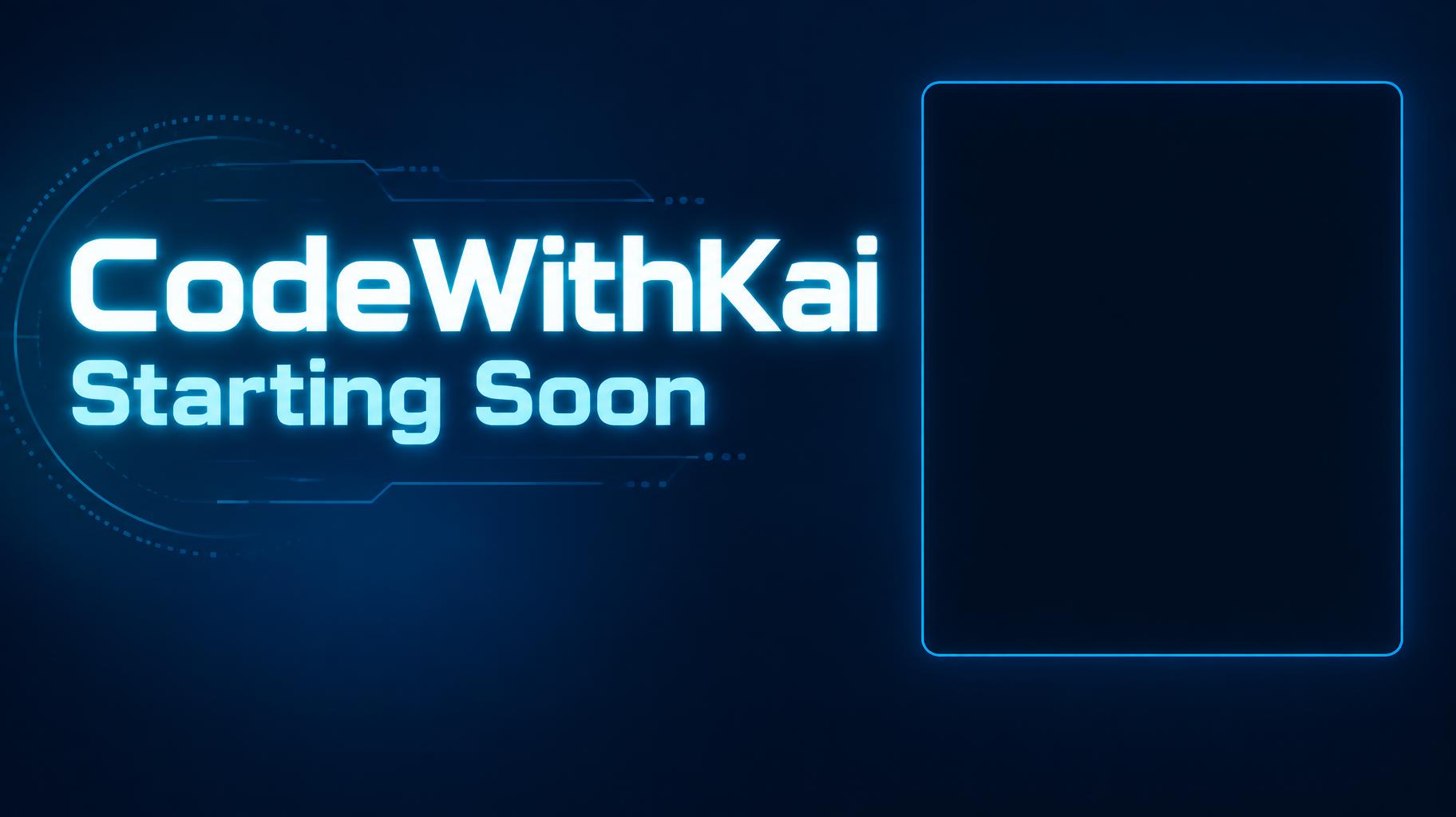
Starting Soon - Cyan Stream Interface (DIY) text effect - create a finished full-screen stream overlay for obs or stre
Channel›Overlay›

CodeWithKai Starting Soon - Cyan Stream Interface Text Effect

Created 2 days ago
F
@FontVibe
9072 public designs
›
Style
Cyan Stream Interface (DIY)
AI font
Kai Display Sans
Layout
Text Left Webcam Right
Image Size
1824 × 1024
Made for
stream overlay screen
→
✦ Remake this design with your text

Uses OpenAI GPT-Image-2.5 Sunburst, the model behind this artwork · 15 credits

25/250
Transparent Effect
✦ Transparent Effect
Generates a PNG with the background removed — only the text and its visual effects remain. The AI automatically selects the optimal background color for clean removal based on your style.
Output is always PNG for lossless transparency.
About this artwork

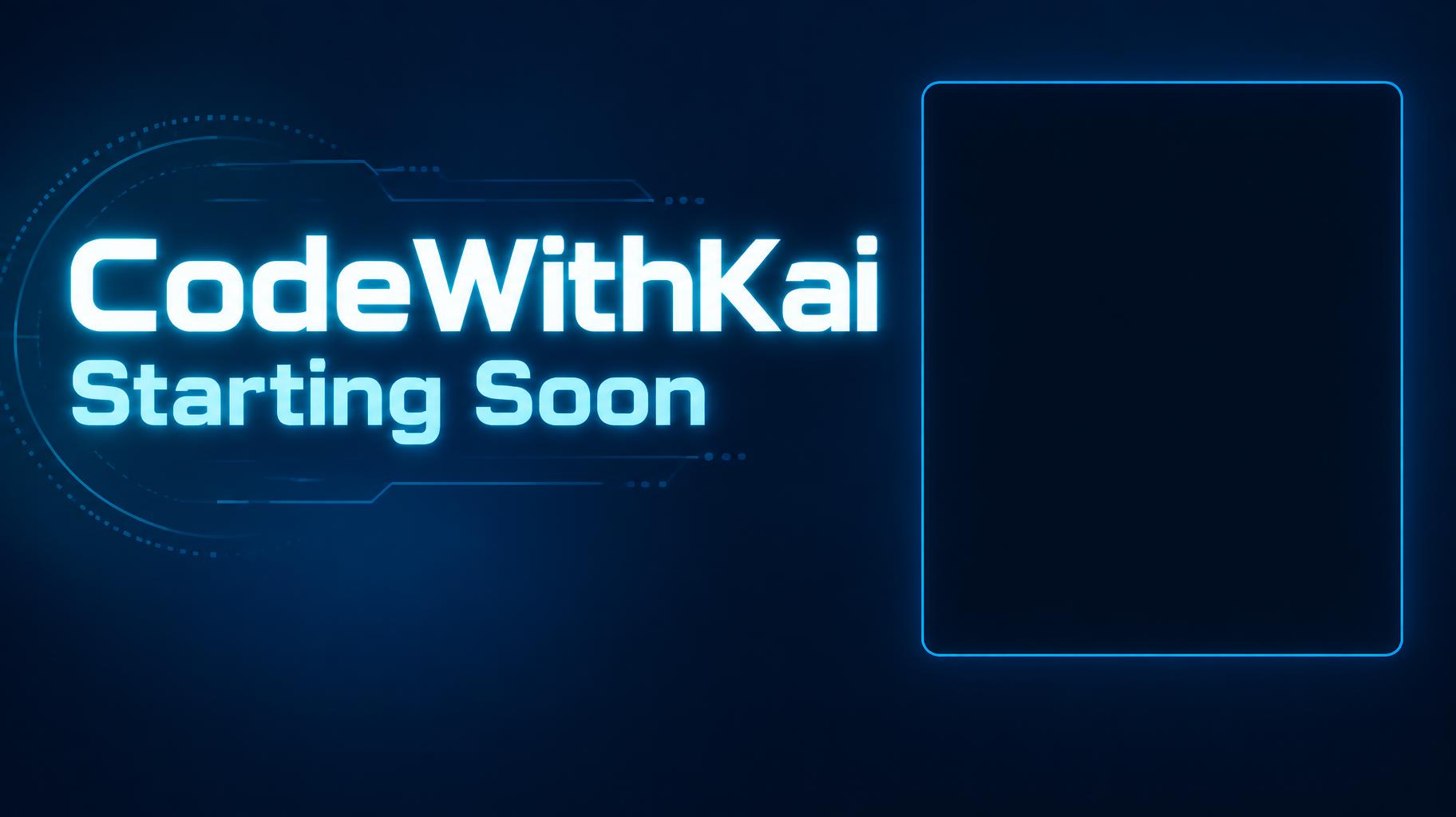
"CodeWithKai — Starting Soon" is a stream screen for a coding stream, in a clean neon tech style. Glowing cyan letters for the channel name and status sit on the left of a deep blue screen, with an empty rounded frame outlined in cyan on the right where the webcam goes. Remake it with your own name and status.

Creative prompt

Create a finished full-screen stream overlay for OBS or Streamlabs, 1824 × 1024 px, 16:9. Render exactly these two text strings, with no other text: “CodeWithKai” and “Starting Soon”. Make “CodeWithKai” the dominant channel wordmark, set large and bold in the upper-left area; place the equally phone-legible status line “Starting Soon” directly below it. Use custom geometric sans-serif lettering: extra-bold, broad, cleanly cut terminals, open counters, close but distinct spacing, bright neon cyan letter faces with a narrow white-cyan luminous core and a controlled cyan halo. Keep every letter crisp and highly legible at thumbnail size. Use a deep blue-to-navy background with restrained blue light falloff and a few faint, low-contrast technical line details confined to the left text area. On the right, reserve a large empty, plain dark rectangle for the webcam, approximately 34% of canvas width and 60% of canvas height, with only a fine subdued cyan perimeter rule; leave its interior completely clear and dark. Maintain a clear gap between text and webcam area. Keep all key elements within generous safe margins. No chat, timer, interface elements, extra copy, busy imagery, or details along the edges. High-contrast digital broadcast graphic, precise vector-like edges, subtle emissive glow, clean composition.

Tags

Use for
SceneChannel›Made asOverlay›OccasionEducational channel›
Visuals
LookFuturistic›Minimal›MoodDark›EffectNeon›Glow›LetteringSans-serif›LayoutStacked›ColorsBlue›Teal›Black›Text typeHeadline + details›LanguageEnglish›

Generated on October 6, 2026 · 1824 × 1024 · JPEG · OpenAI GPT-Image-2.5 Sunburst · Layout: Text Left Webcam Right · Shared by the creator · Free for commercial use (CC BY 4.0)
Where this design fits

Channel designs→
stream overlay screenstream overlay screen39 designs · 1824 × 1024 px, 16:9Channel
✦ Explore AI Text Effect Styles

Browse AI Text Effect Styles

View all styles →
Viking
Explore style →
Viking871 images
MetallicCarvedAggressiveRugged
Movie & Film
Explore style →
Movie & Film8.3K images
EpicDramaticCinematicGold
Cyberpunk
Explore style →
Cyberpunk750 images
NeonCyberpunkDarkGlitch
Netflix & Streaming
Explore style →
Netflix & Streaming1.7K images
ModernDarkCinematicGlow
Neon Glow
Explore style →
Neon Glow1.5K images
GlowDreamyNeonTubular
3D Bold
Explore style →
3D Bold1.3K images
3DStrikingHeavyChunky
Home›››CodeWithKai Starting Soon
CodeWithKai
Starting Soon - Cyan Stream Interface (DIY) text effect - create a finished full-screen stream overlay for obs or stre
Download JPEG
Channel›Overlay›

CodeWithKai Starting Soon - Cyan Stream Interface Text Effect

Created 2 days ago
F
@FontVibe
9072 public designs · All designs by this creator →
Style
Cyan Stream Interface (DIY)
AI font
Kai Display Sans
Layout
Text Left Webcam Right
Image Size
1824 × 1024
Made for
stream overlay screen
→
✦ Remake this design with your text

Uses OpenAI GPT-Image-2.5 Sunburst, the model behind this artwork · 15 credits

25/250
Transparent Effect
✦ Transparent Effect
Generates a PNG with the background removed — only the text and its visual effects remain. The AI automatically selects the optimal background color for clean removal based on your style.
Output is always PNG for lossless transparency.
About this artwork

"CodeWithKai — Starting Soon" is a stream screen for a coding stream, in a clean neon tech style. Glowing cyan letters for the channel name and status sit on the left of a deep blue screen, with an empty rounded frame outlined in cyan on the right where the webcam goes. Remake it with your own name and status.

Creative prompt

Create a finished full-screen stream overlay for OBS or Streamlabs, 1824 × 1024 px, 16:9. Render exactly these two text strings, with no other text: “CodeWithKai” and “Starting Soon”. Make “CodeWithKai” the dominant channel wordmark, set large and bold in the upper-left area; place the equally phone-legible status line “Starting Soon” directly below it. Use custom geometric sans-serif lettering: extra-bold, broad, cleanly cut terminals, open counters, close but distinct spacing, bright neon cyan letter faces with a narrow white-cyan luminous core and a controlled cyan halo. Keep every letter crisp and highly legible at thumbnail size. Use a deep blue-to-navy background with restrained blue light falloff and a few faint, low-contrast technical line details confined to the left text area. On the right, reserve a large empty, plain dark rectangle for the webcam, approximately 34% of canvas width and 60% of canvas height, with only a fine subdued cyan perimeter rule; leave its interior completely clear and dark. Maintain a clear gap between text and webcam area. Keep all key elements within generous safe margins. No chat, timer, interface elements, extra copy, busy imagery, or details along the edges. High-contrast digital broadcast graphic, precise vector-like edges, subtle emissive glow, clean composition.

Tags

Use for
SceneChannel›Made asOverlay›OccasionEducational channel›
Visuals
LookFuturistic›Minimal›MoodDark›EffectNeon›Glow›LetteringSans-serif›LayoutStacked›ColorsBlue›Teal›Black›Text typeHeadline + details›LanguageEnglish›

Generated on October 6, 2026 · 1824 × 1024 · JPEG · OpenAI GPT-Image-2.5 Sunburst · Layout: Text Left Webcam Right · Shared by the creator · Free for commercial use (CC BY 4.0)

Where this design fits

Channel designs→
stream overlay screenstream overlay screen39 designs · 1824 × 1024 px, 16:9Channel
✦ Explore AI Text Effect Styles

Browse AI Text Effect Styles

View all styles →
Viking
Explore style →
Viking871 images
MetallicCarvedAggressiveRugged
Movie & Film
Explore style →
Movie & Film8.3K images
EpicDramaticCinematicGold
Cyberpunk
Explore style →
Cyberpunk750 images
NeonCyberpunkDarkGlitch
Netflix & Streaming
Explore style →
Netflix & Streaming1.7K images
ModernDarkCinematicGlow
Neon Glow
Explore style →
Neon Glow1.5K images
GlowDreamyNeonTubular
3D Bold
Explore style →
3D Bold1.3K images
3DStrikingHeavyChunky

Want more text styles? Browse our free font generators — fancy, cursive, gothic & more.

Popular searches:
AI text effect generatortext effect generatorAI typography generatortext art makerfancy font generator