FontVibe
HomeGenerateStylesGalleryFontsPricingBlog
English▾
FontVibe
✦FontVibe
FontVibe

Free AI font generator — describe what you need or pick a style, and get finished text artwork. 134+ styles, instant PNG/JPG download.

Product

GenerateStylesGalleryPricing

Popular Scenes

Halloween designsChannel designsHalloween font

Resources

BlogAI Font LibraryTransparent Background MakerASCII Art GeneratorFont Tools

Legal

Terms of ServicePrivacy PolicyLegalContact
© 2026 FontVibe. All rights reserved.
Privacy Policy|Terms & Conditions|Legal|特定商取引法に基づく表記
FontVibe

Free AI font generator — describe what you need or pick a style, and get finished text artwork. 134+ styles, instant PNG/JPG download.

Product
GenerateStylesGalleryPricing
Popular Scenes
Halloween designsChannel designsHalloween font
Resources
BlogAI Font LibraryTransparent Background MakerASCII Art GeneratorFont Tools
Legal
TermsPrivacyLegalContact
© 2026 FontVibe. All rights reserved.
Privacy|Terms|Legal|特商法
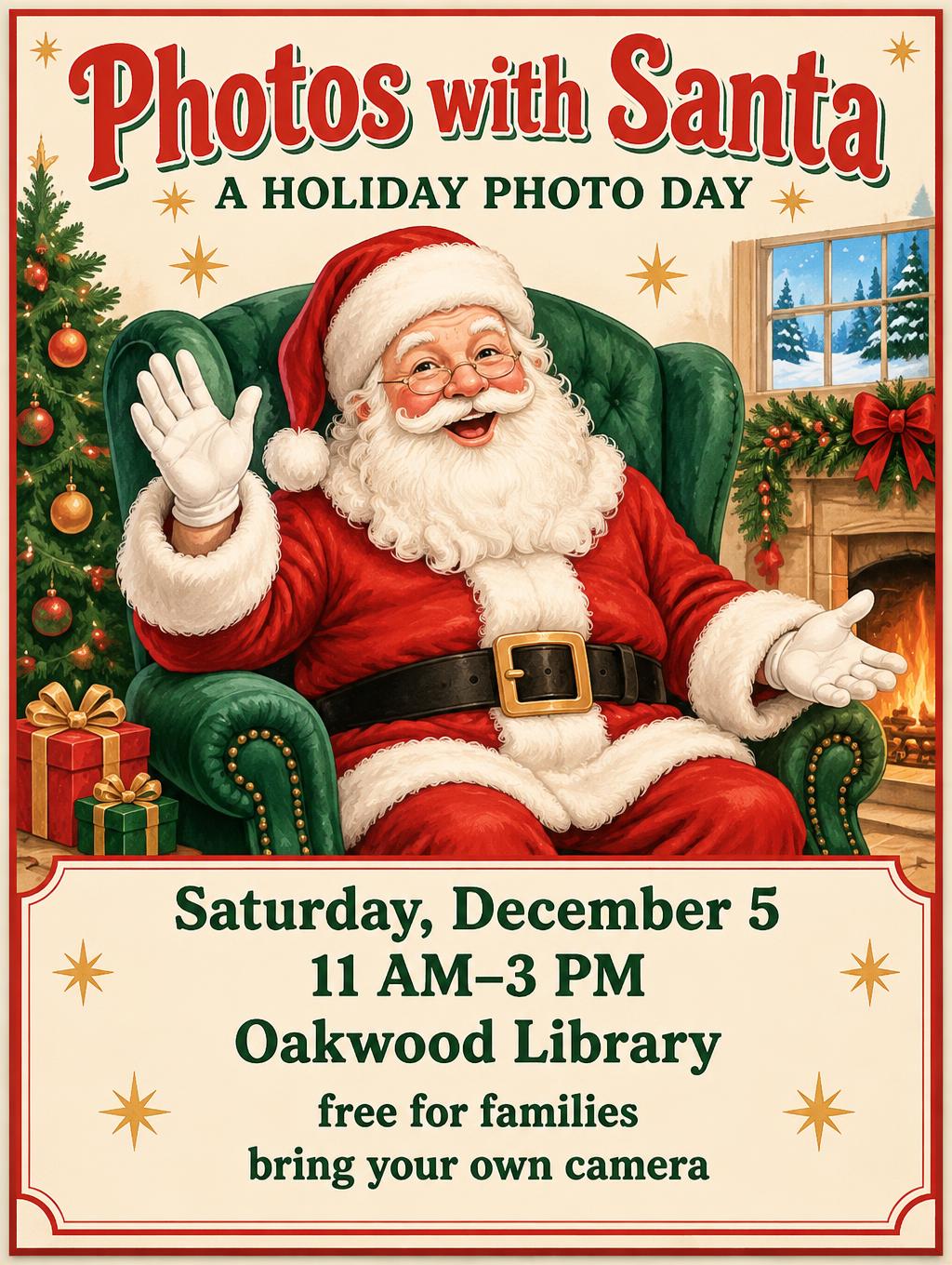
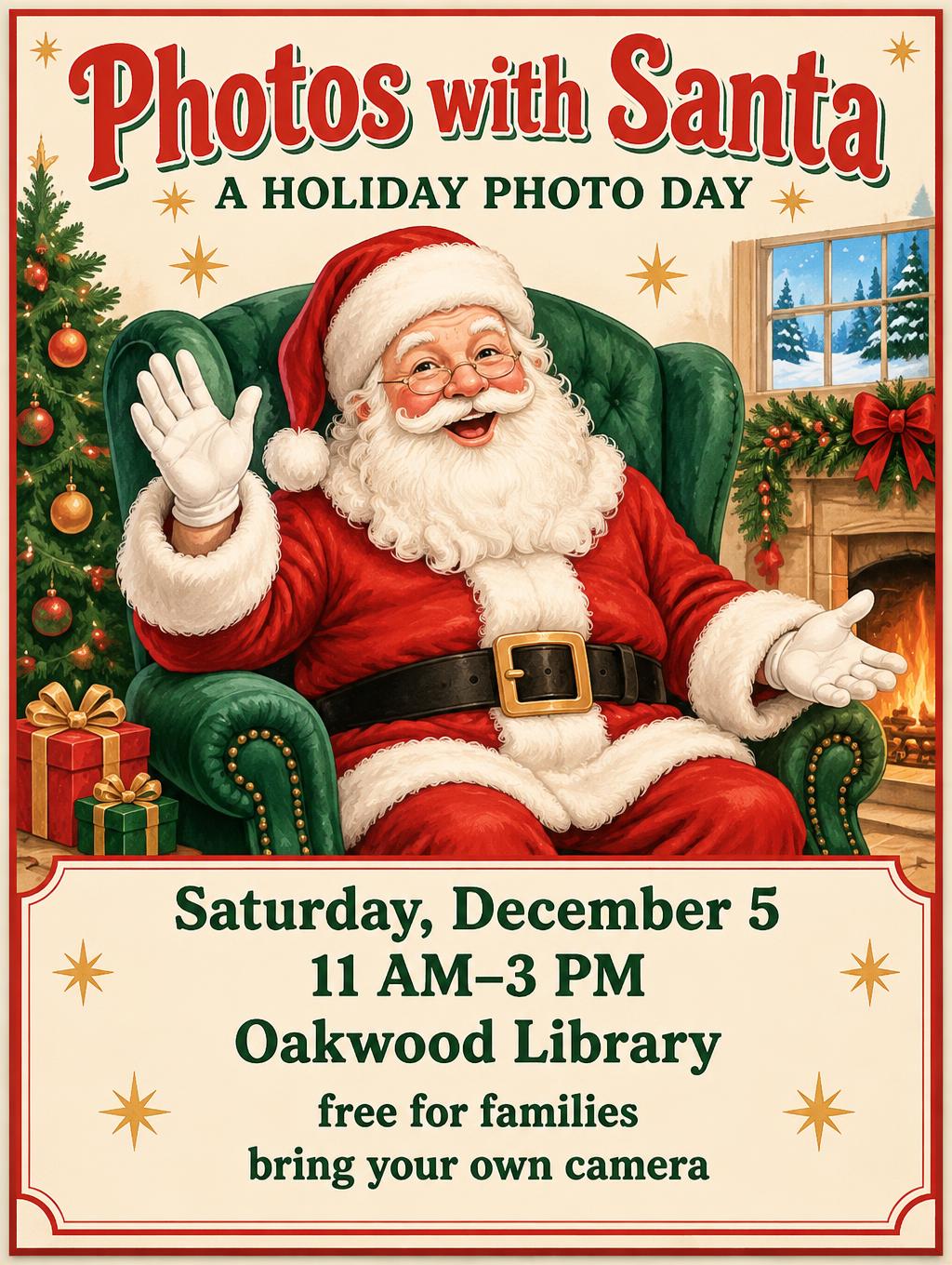
Home››Cheerful Holiday Pop (DIY)›Photos with Santa A HOLIDAY PHOTO DAY Saturday, December 5 11 AM–3 PM Oakwood Library free for families bring your own camera
Photos with Santa
A HOLIDAY PHOTO DAY
Saturday, December 5
11 AM–3 PM
Oakwood Library
free for families
bring your own camera - Cheerful Holiday Pop (DIY) text effect - create a finished, bright 3:4 printed christmas event flyer,
Christmas›Poster›

Photos with Santa A HOLIDAY PHOTO DAY Saturday, December 5 11 AM–3 PM Oakwood Library free for families bring your own camera - Cheerful Holiday Pop Text Effect

Created yesterday
F
@FontVibe
9660 public designs
›
Style
Cheerful Holiday Pop (DIY)
AI font
Jolly Display
Layout
Santa Flyer Stack
Image Size
1024 × 1360
Made for
Christmas poster
→
✦ Remake this design with your text

Uses OpenAI GPT-Image-2.5 Sunburst, the model behind this artwork · 15 credits

125/500
Transparent Effect
✦ Transparent Effect
Generates a PNG with the background removed — only the text and its visual effects remain. The AI automatically selects the optimal background color for clean removal based on your style.
Output is always PNG for lossless transparency.
About this artwork

"Photos with Santa" is a vintage-style holiday poster for a library photo day, drawn in a retro storybook illustration style. Red headline lettering sits above a waving Santa in a green armchair, with a Christmas tree and a fireplace beside him, and green event details fill a cream panel below. Swap the headline, date, time, venue and the two bottom notes to make your own holiday event poster.

Creative prompt

Create a finished, bright 3:4 printed Christmas event flyer, with a lively, welcoming storybook-pop illustration and crisp, readable lettering. Use a warm cream paper background with a subtle fine grain, framed by a simple deep-red border and a few small golden starbursts. Palette: cherry red, vivid evergreen, warm cream, golden yellow, and touches of sky blue. Keep every element well inside a generous print-safe margin. At the top, set the exact headline “Photos with Santa” in very large, friendly custom display lettering. Use sturdy, rounded-but-not-bubbly letterforms with open counters and clear spacing; rich cherry-red faces, cream keyline, and a small evergreen offset shadow for clean separation. Below it, set the smaller supporting line “A HOLIDAY PHOTO DAY” in neat uppercase evergreen lettering. Make the central image a large, unmistakably smiling Santa seated in a generous emerald-green upholstered armchair. Show his classic red suit, white fur trim, warm rosy cheeks, and welcoming open posture. Use clean, expressive illustrated shapes and gentle painted shading, bright soft light, and a few restrained golden sparkles. Include only a small wrapped gift or two near the chair; keep the artwork joyful without crowding the words. Across the lower portion, place a clear, centered cream information panel with a thin red rule. Set these exact lines, in this order, as crisp, dark-green text with generous line spacing: “Saturday, December 5” / “11 AM–3 PM” / “Oakwood Library” / “free for families” / “bring your own camera”. Make the date, time, and venue especially easy to read from a distance. Preserve the exact spelling, punctuation, capitalization, and wording of every quoted line. Render no other text, logos, dates, or made-up event details.

Tags

Use for
SceneChristmas›Made asPoster›
Visuals
LookVintage›Retro›MoodFestive›Warm›Cheerful›Friendly›EffectShadow›LayoutStacked›ColorsRed›Green›Cream›ElementsChristmas Tree›Fireplace›Gift Box›Holly›Ribbon›Santa Claus›Sparkle›Window›SettingLiving room›ForFamily›Kids›CultureAmerican›Text typeHeadline + details›LanguageEnglish›

Generated on October 19, 2026 · 1024 × 1360 · JPEG · OpenAI GPT-Image-2.5 Sunburst · Layout: Santa Flyer Stack · Shared by the creator · Free for commercial use (CC BY 4.0)
Where this design fits

Christmas designs→
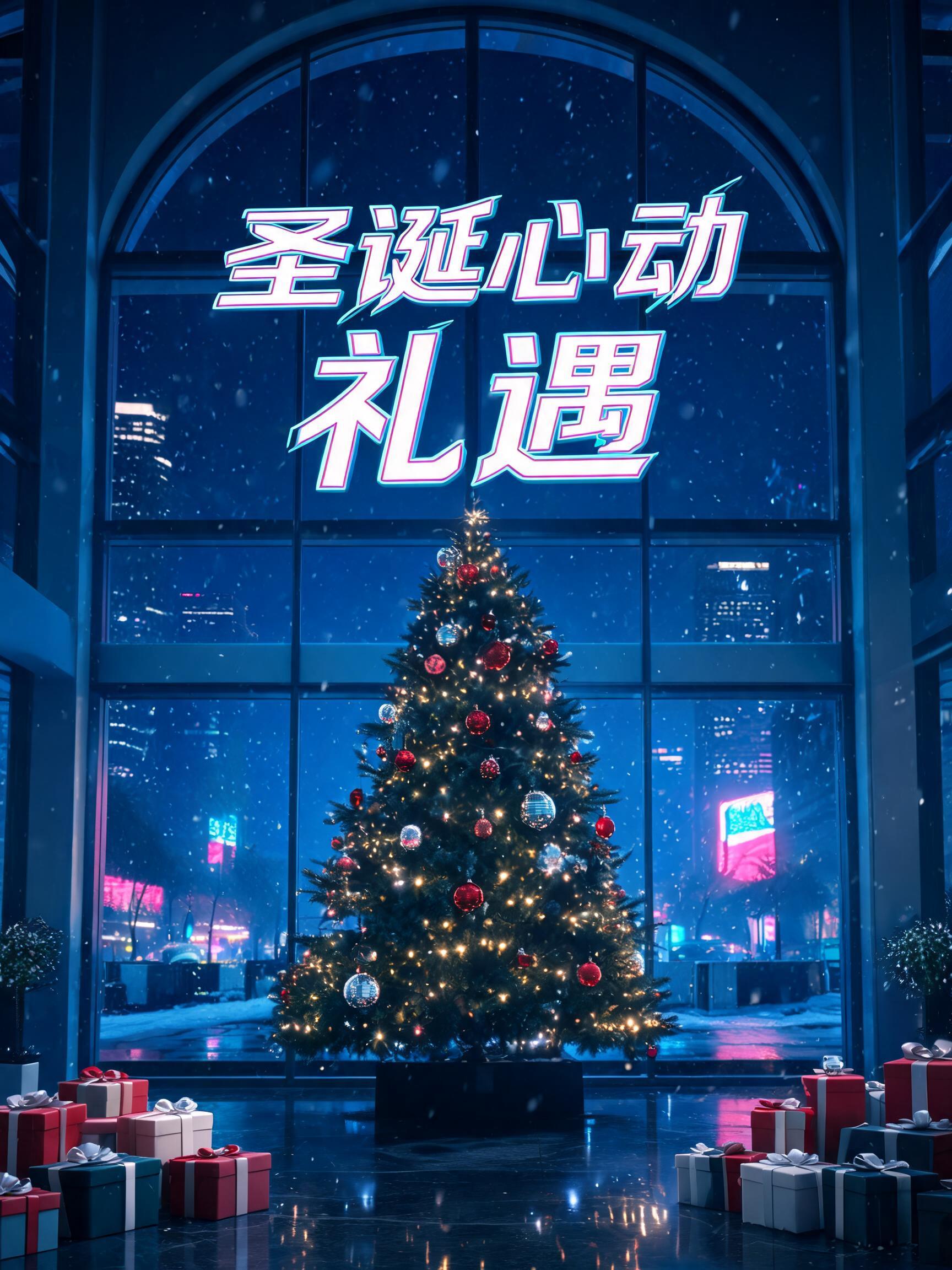
Christmas posterChristmas poster44 designs · Letter flyer or 18×24 in posterChristmas
✦ Explore AI Text Effect Styles

Browse AI Text Effect Styles

View all styles →
Viking
Viking923
Movie & Film
Movie & Film8.7K
Cyberpunk
Cyberpunk776
Netflix & Streaming
Netflix & Streaming1.8K
Neon Glow
Neon Glow1.6K
3D Bold
3D Bold1.4K
Home››Cheerful Holiday Pop (DIY)›Photos with Santa A HOLIDAY PHOTO DAY Saturday, December 5 11 AM–3 PM Oakwood Library free for families bring your own camera
Photos with Santa
A HOLIDAY PHOTO DAY
Saturday, December 5
11 AM–3 PM
Oakwood Library
free for families
bring your own camera - Cheerful Holiday Pop (DIY) text effect - create a finished, bright 3:4 printed christmas event flyer,
Download JPEG
Christmas›Poster›

Photos with Santa A HOLIDAY PHOTO DAY Saturday, December 5 11 AM–3 PM Oakwood Library free for families bring your own camera - Cheerful Holiday Pop Text Effect

Created yesterday
F
@FontVibe
9660 public designs · All designs by this creator →
Style
Cheerful Holiday Pop (DIY)
AI font
Jolly Display
Layout
Santa Flyer Stack
Image Size
1024 × 1360
Made for
Christmas poster
→
✦ Remake this design with your text

Uses OpenAI GPT-Image-2.5 Sunburst, the model behind this artwork · 15 credits

125/500
Transparent Effect
✦ Transparent Effect
Generates a PNG with the background removed — only the text and its visual effects remain. The AI automatically selects the optimal background color for clean removal based on your style.
Output is always PNG for lossless transparency.
About this artwork

"Photos with Santa" is a vintage-style holiday poster for a library photo day, drawn in a retro storybook illustration style. Red headline lettering sits above a waving Santa in a green armchair, with a Christmas tree and a fireplace beside him, and green event details fill a cream panel below. Swap the headline, date, time, venue and the two bottom notes to make your own holiday event poster.

Creative prompt

Create a finished, bright 3:4 printed Christmas event flyer, with a lively, welcoming storybook-pop illustration and crisp, readable lettering. Use a warm cream paper background with a subtle fine grain, framed by a simple deep-red border and a few small golden starbursts. Palette: cherry red, vivid evergreen, warm cream, golden yellow, and touches of sky blue. Keep every element well inside a generous print-safe margin. At the top, set the exact headline “Photos with Santa” in very large, friendly custom display lettering. Use sturdy, rounded-but-not-bubbly letterforms with open counters and clear spacing; rich cherry-red faces, cream keyline, and a small evergreen offset shadow for clean separation. Below it, set the smaller supporting line “A HOLIDAY PHOTO DAY” in neat uppercase evergreen lettering. Make the central image a large, unmistakably smiling Santa seated in a generous emerald-green upholstered armchair. Show his classic red suit, white fur trim, warm rosy cheeks, and welcoming open posture. Use clean, expressive illustrated shapes and gentle painted shading, bright soft light, and a few restrained golden sparkles. Include only a small wrapped gift or two near the chair; keep the artwork joyful without crowding the words. Across the lower portion, place a clear, centered cream information panel with a thin red rule. Set these exact lines, in this order, as crisp, dark-green text with generous line spacing: “Saturday, December 5” / “11 AM–3 PM” / “Oakwood Library” / “free for families” / “bring your own camera”. Make the date, time, and venue especially easy to read from a distance. Preserve the exact spelling, punctuation, capitalization, and wording of every quoted line. Render no other text, logos, dates, or made-up event details.

Tags

Use for
SceneChristmas›Made asPoster›
Visuals
LookVintage›Retro›MoodFestive›Warm›Cheerful›Friendly›EffectShadow›LayoutStacked›ColorsRed›Green›Cream›ElementsChristmas Tree›Fireplace›Gift Box›Holly›Ribbon›Santa Claus›Sparkle›Window›SettingLiving room›ForFamily›Kids›CultureAmerican›Text typeHeadline + details›LanguageEnglish›

Generated on October 19, 2026 · 1024 × 1360 · JPEG · OpenAI GPT-Image-2.5 Sunburst · Layout: Santa Flyer Stack · Shared by the creator · Free for commercial use (CC BY 4.0)

Where this design fits

Christmas designs→
Christmas posterChristmas poster44 designs · Letter flyer or 18×24 in posterChristmas
✦ Explore AI Text Effect Styles

Browse AI Text Effect Styles

View all styles →
Viking
Explore style →
Viking923 images
MetallicCarvedAggressiveRugged
Movie & Film
Explore style →
Movie & Film8.7K images
EpicDramaticCinematicGold
Cyberpunk
Explore style →
Cyberpunk776 images
NeonCyberpunkDarkGlitch
Netflix & Streaming
Explore style →
Netflix & Streaming1.8K images
ModernDarkCinematicGlow
Neon Glow
Explore style →
Neon Glow1.6K images
GlowDreamyNeonTubular
3D Bold
Explore style →
3D Bold1.4K images
3DStrikingHeavyChunky

Want more text styles? Browse our free font generators — fancy, cursive, gothic & more.

Popular searches:
AI text effect generatortext effect generatorAI typography generatortext art makerfancy font generator
Notifications
No notifications yet