FontVibe
HomeGenerateStylesGalleryFontsPricingBlog
English▾
FontVibe
✦FontVibe
FontVibe

Free AI font generator — describe what you need or pick a style, and get finished text artwork. 134+ styles, instant PNG/JPG download.

Product

GenerateStylesGalleryPricing

Popular Scenes

Halloween designsChannel designsHalloween font

Resources

BlogAI Font LibraryTransparent Background MakerASCII Art GeneratorFont Tools

Legal

Terms of ServicePrivacy PolicyLegalContact
© 2026 FontVibe. All rights reserved.
Privacy Policy|Terms & Conditions|Legal|特定商取引法に基づく表記
FontVibe

Free AI font generator — describe what you need or pick a style, and get finished text artwork. 134+ styles, instant PNG/JPG download.

Product
GenerateStylesGalleryPricing
Popular Scenes
Halloween designsChannel designsHalloween font
Resources
BlogAI Font LibraryTransparent Background MakerASCII Art GeneratorFont Tools
Legal
TermsPrivacyLegalContact
© 2026 FontVibe. All rights reserved.
Privacy|Terms|Legal|特商法
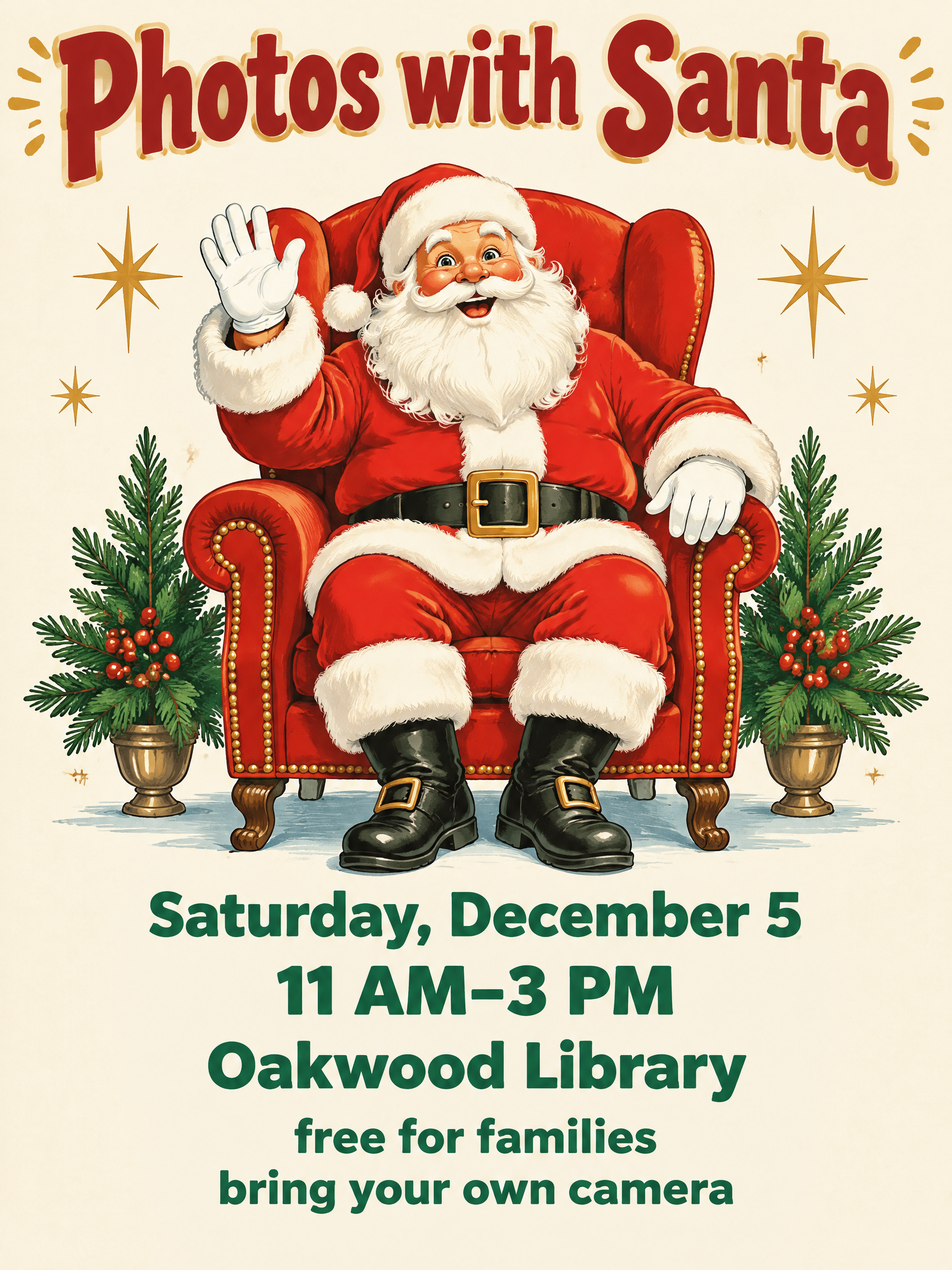
Home››Bright Storybook Christmas (DIY)›Photos with Santa Saturday, December 5 11 AM–3 PM Oakwood Library free for families bring your own camera
Photos with Santa
Saturday, December 5
11 AM–3 PM
Oakwood Library
free for families
bring your own camera - Bright Storybook Christmas (DIY) text effect - create a finished, print-ready 3:4 portrait christmas event
Christmas›Poster›

Photos with Santa Saturday, December 5 11 AM–3 PM Oakwood Library free for families bring your own camera - Bright Storybook Christmas Text Effect

Created 23 hours ago
J
@jack
582 public designs
›
Style
Bright Storybook Christmas (DIY)
AI font
Jolly Round Display
Layout
Santa Event Stack
Image Size
1728 × 2304
Made for
Christmas poster
→
✦ Remake this design with your text

Uses OpenAI GPT-Image-2.5 Sunburst, the model behind this artwork · 24 credits

105/500
Transparent Effect
✦ Transparent Effect
Generates a PNG with the background removed — only the text and its visual effects remain. The AI automatically selects the optimal background color for clean removal based on your style.
Output is always PNG for lossless transparency.
About this artwork

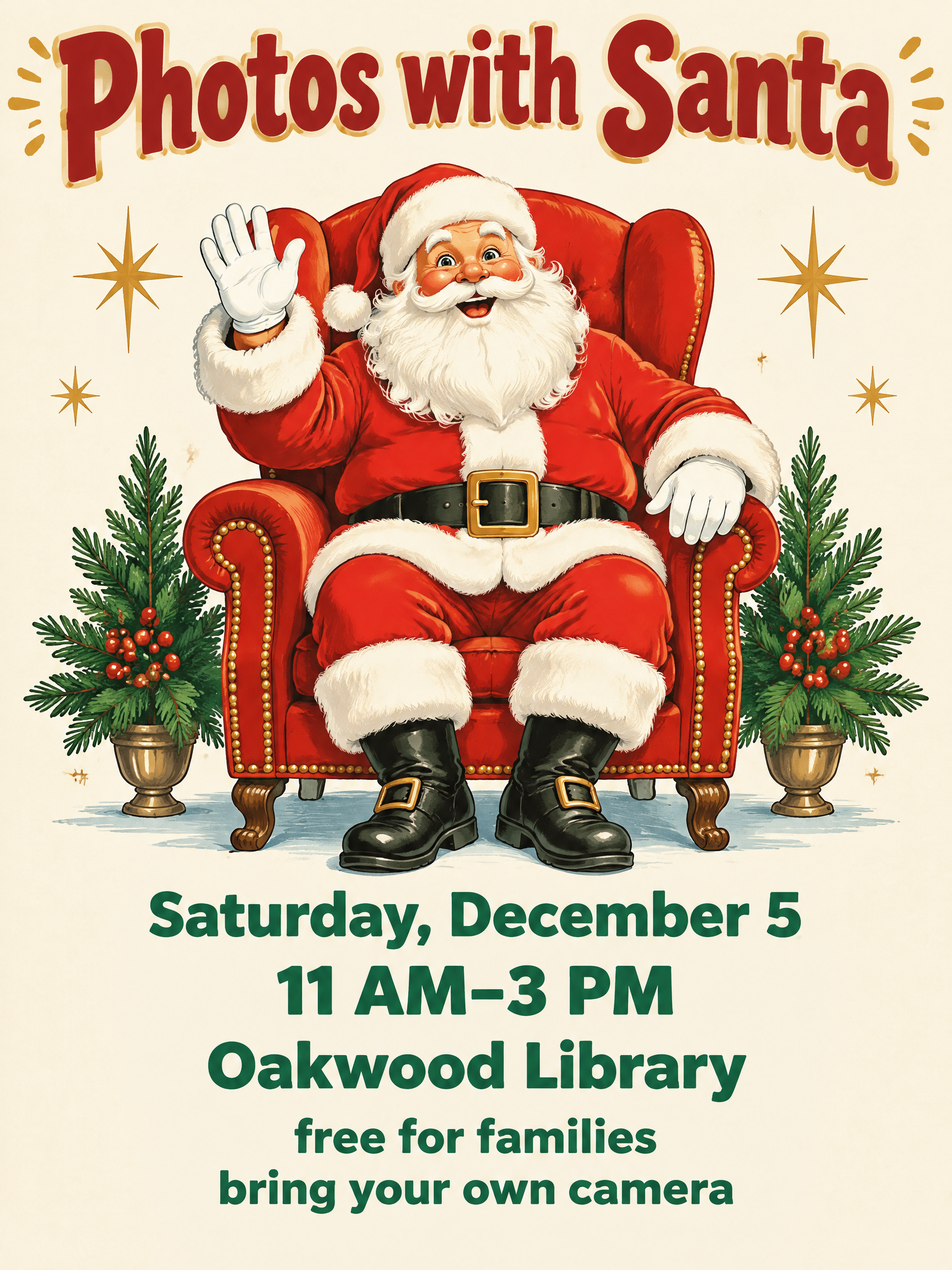
"Photos with Santa" is a vintage-style Christmas event poster for a library visit with Santa. Red outlined headline lettering sits above Santa waving from a red armchair between two potted evergreens, with gold stars and green date, time and place lines below. Swap the date, hours, venue name and the free-for-families note to make a poster for your own event.

Creative prompt

Create a finished, print-ready 3:4 portrait Christmas event flyer, with generous safe margins so every word remains legible when printed as a letter flyer or 18×24 poster. Use a fun, bright mid-century storybook illustration style: clean, hand-painted shapes with crisp ink-like outlines, subtle cream paper grain, and lively cherry-red, pine-green, warm-gold and sky-blue colors. No distressed text, no photographic realism, no religious imagery, and no extra words. At the top, make the exact headline “Photos with Santa” the largest text, highly readable from across a room. Set it in friendly, custom rounded display lettering: heavy, broad, upright forms, open counters, even strokes, softly rounded corners, and close but clear spacing. Use deep cherry-red letters with a warm cream keyline and a small golden highlight; keep every letter shape crisp and easy to read. Make the central illustration a large, smiling, jolly Santa seated in an oversized, ornate red armchair, facing the viewer with an inviting expression and one hand raised in greeting. Show his white beard, classic red suit with cream trim, and black boots. Frame him with only a few tasteful holiday details—two small stylized evergreen branches and a handful of golden starbursts—leaving clear negative space around the text. Bright, cheerful, flat printed-light illustration with gentle painted highlights; Santa and chair are the visual hero. Below the illustration, set the event information in a centered, orderly stack, clearly smaller than the headline but readable at poster distance. Keep each line distinct with ample spacing and exact wording and casing: “Saturday, December 5” then “11 AM–3 PM” then “Oakwood Library” then “free for families” then “bring your own camera”. Use a clean, bold rounded sans serif in deep pine green, with the time and venue slightly emphasized. Do not add a year, tagline, address, web address, price, badge text, or any other lettering. Maintain a warm cream background, balanced spacing, sharp legible text, and a polished, cheerful community-event finish.

Tags

Use for
SceneChristmas›Made asPoster›
Visuals
LookVintage›Retro›MoodFestive›Cheerful›Friendly›EffectOutline›LetterformsHeavy›ColorsRed›Cream›Green›ElementsHolly›Pine Tree›Santa Claus›Sparkle›Star›ForFamily›Kids›CultureAmerican›Text typeHeadline + details›LanguageEnglish›

Generated on October 19, 2026 · 1728 × 2304 · PNG · OpenAI GPT-Image-2.5 Sunburst · Layout: Santa Event Stack · Shared by the creator · Free for commercial use (CC BY 4.0)
Where this design fits

Christmas designs→
Christmas posterChristmas poster44 designs · Letter flyer or 18×24 in posterChristmas
✦ Explore AI Text Effect Styles

Browse AI Text Effect Styles

View all styles →
Viking
Viking923
Movie & Film
Movie & Film8.7K
Cyberpunk
Cyberpunk776
Netflix & Streaming
Netflix & Streaming1.8K
Neon Glow
Neon Glow1.6K
3D Bold
3D Bold1.4K
Home››Bright Storybook Christmas (DIY)›Photos with Santa Saturday, December 5 11 AM–3 PM Oakwood Library free for families bring your own camera
Photos with Santa
Saturday, December 5
11 AM–3 PM
Oakwood Library
free for families
bring your own camera - Bright Storybook Christmas (DIY) text effect - create a finished, print-ready 3:4 portrait christmas event
Download PNG
Christmas›Poster›

Photos with Santa Saturday, December 5 11 AM–3 PM Oakwood Library free for families bring your own camera - Bright Storybook Christmas Text Effect

Created 23 hours ago
J
@jack
582 public designs · All designs by this creator →
Style
Bright Storybook Christmas (DIY)
AI font
Jolly Round Display
Layout
Santa Event Stack
Image Size
1728 × 2304
Made for
Christmas poster
→
✦ Remake this design with your text

Uses OpenAI GPT-Image-2.5 Sunburst, the model behind this artwork · 24 credits

105/500
Transparent Effect
✦ Transparent Effect
Generates a PNG with the background removed — only the text and its visual effects remain. The AI automatically selects the optimal background color for clean removal based on your style.
Output is always PNG for lossless transparency.
About this artwork

"Photos with Santa" is a vintage-style Christmas event poster for a library visit with Santa. Red outlined headline lettering sits above Santa waving from a red armchair between two potted evergreens, with gold stars and green date, time and place lines below. Swap the date, hours, venue name and the free-for-families note to make a poster for your own event.

Creative prompt

Create a finished, print-ready 3:4 portrait Christmas event flyer, with generous safe margins so every word remains legible when printed as a letter flyer or 18×24 poster. Use a fun, bright mid-century storybook illustration style: clean, hand-painted shapes with crisp ink-like outlines, subtle cream paper grain, and lively cherry-red, pine-green, warm-gold and sky-blue colors. No distressed text, no photographic realism, no religious imagery, and no extra words. At the top, make the exact headline “Photos with Santa” the largest text, highly readable from across a room. Set it in friendly, custom rounded display lettering: heavy, broad, upright forms, open counters, even strokes, softly rounded corners, and close but clear spacing. Use deep cherry-red letters with a warm cream keyline and a small golden highlight; keep every letter shape crisp and easy to read. Make the central illustration a large, smiling, jolly Santa seated in an oversized, ornate red armchair, facing the viewer with an inviting expression and one hand raised in greeting. Show his white beard, classic red suit with cream trim, and black boots. Frame him with only a few tasteful holiday details—two small stylized evergreen branches and a handful of golden starbursts—leaving clear negative space around the text. Bright, cheerful, flat printed-light illustration with gentle painted highlights; Santa and chair are the visual hero. Below the illustration, set the event information in a centered, orderly stack, clearly smaller than the headline but readable at poster distance. Keep each line distinct with ample spacing and exact wording and casing: “Saturday, December 5” then “11 AM–3 PM” then “Oakwood Library” then “free for families” then “bring your own camera”. Use a clean, bold rounded sans serif in deep pine green, with the time and venue slightly emphasized. Do not add a year, tagline, address, web address, price, badge text, or any other lettering. Maintain a warm cream background, balanced spacing, sharp legible text, and a polished, cheerful community-event finish.

Tags

Use for
SceneChristmas›Made asPoster›
Visuals
LookVintage›Retro›MoodFestive›Cheerful›Friendly›EffectOutline›LetterformsHeavy›ColorsRed›Cream›Green›ElementsHolly›Pine Tree›Santa Claus›Sparkle›Star›ForFamily›Kids›CultureAmerican›Text typeHeadline + details›LanguageEnglish›

Generated on October 19, 2026 · 1728 × 2304 · PNG · OpenAI GPT-Image-2.5 Sunburst · Layout: Santa Event Stack · Shared by the creator · Free for commercial use (CC BY 4.0)

Where this design fits

Christmas designs→
Christmas posterChristmas poster44 designs · Letter flyer or 18×24 in posterChristmas
✦ Explore AI Text Effect Styles

Browse AI Text Effect Styles

View all styles →
Viking
Explore style →
Viking923 images
MetallicCarvedAggressiveRugged
Movie & Film
Explore style →
Movie & Film8.7K images
EpicDramaticCinematicGold
Cyberpunk
Explore style →
Cyberpunk776 images
NeonCyberpunkDarkGlitch
Netflix & Streaming
Explore style →
Netflix & Streaming1.8K images
ModernDarkCinematicGlow
Neon Glow
Explore style →
Neon Glow1.6K images
GlowDreamyNeonTubular
3D Bold
Explore style →
3D Bold1.4K images
3DStrikingHeavyChunky

Want more text styles? Browse our free font generators — fancy, cursive, gothic & more.

Popular searches:
AI text effect generatortext effect generatorAI typography generatortext art makerfancy font generator
Notifications
No notifications yet